
As you use Obsidian for a long time, there comes a moment when the vault feels like a ‘repository of unopened records’ rather than a ‘knowledge base.’ New notes keep being created, but checking if notes written six months ago are still usable tends to be put off.
The video ‘Why Can’t I Organize My Obsidian Notes? Note Organization Plugin That’s Done with One Click!’ from the Learning Master channel grasps this problem quite realistically. The key is not a technique to create more notes, but a routine to review and organize the notes that have already been created.
In this article, based on the Obsidian community plugin introduced in the video Note Sweepwe organized how to select, delete, store, and update old notes.

※ We captured the original YouTube video scene for review and explanation purposes.
Why it becomes harder to organize as the number of notes increases
When you first start using Obsidian, the increasing number of notes feels like productivity. However, as time passes, the problem changes. The more notes you have, the harder it is to distinguish between notes to re-read and notes to discard.
The host of the video, Kim Mun-jung, also talks about similar concerns. Even if nearly 10,000 notes are densely connected, if those notes are not actually re-used, the question remains as to whether they are ‘really my knowledge.’
At this point, the important criterion is simple.
- Has it been opened recently?
- Is it updated to match the current judgment and information?
- Is it connected to other notes and used for actual work?
- Is there a reason to keep it, or can it be deleted?
Note organization is not about creating a beautiful folder structure. It’s more about distinguishing between reusable knowledge and unnecessary records.
What kind of plugin is Note Sweep?
Note Sweep is an Obsidian community plugin that gathers long-abandoned notes and helps users review them one by one over a certain period of time. In the video, it sounds like ‘note import,’ but the core function is about reviewing and organizing old notes.
The installation flow is the same as that of a general community plugin.
- Open the community plugin browser in Obsidian settings.
- Search for `Note Sweep`.
- Install and activate the plugin.
- Run Note Sweep from the left ribbon or command palette.

※ I captured the original YouTube video scene for review and explanation purposes.
The key is not the installation itself, but the settings. If you try to open all notes at once, you will get tired soon. So, in the video, it is suggested to limit the target of organization and divide it into a manageable amount per day.
Recommended settings: 180 days, 20 minutes, 30 notes
The default values suggested in the video are quite practical.
- Days to leave: 180 days or more
- Session time: 20 minutes
- Number of notes to process per day: about 30
- Maximum number of notes per folder: about 5
- Excluded folders: folders that should be excluded from automatic organization or permanently stored
- Storage folder: the location to move notes that will not be deleted but stored separately
- Snooze: to review notes that are difficult to judge at the moment after a certain period
This setting focuses on “sustainable organization” rather than “perfect organization”. If you try to organize 10,000 notes at once, you are likely to fail. On the other hand, if you organize for 20 minutes a day, note management becomes a kind of habit.
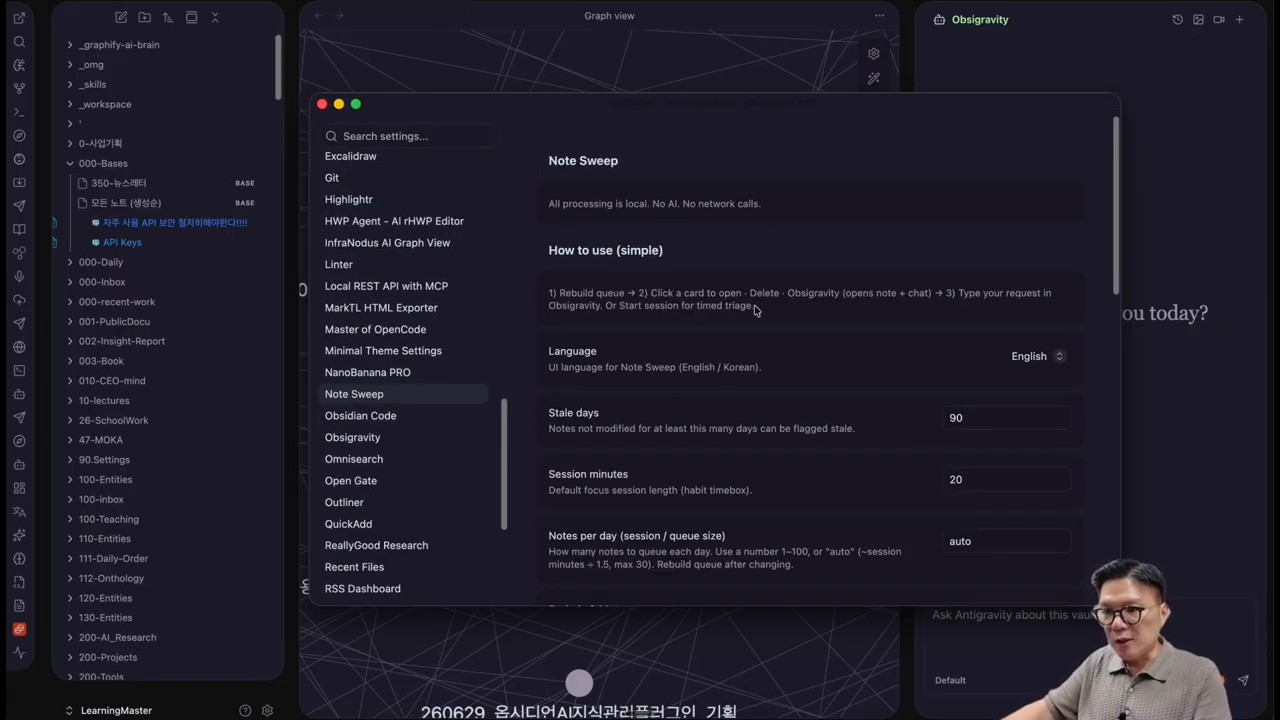
※ I captured the original YouTube video scene for review and description purposes.
In particular, the 180-day standard is also suitable for beginners. If you set it too short, even notes that are still in use will be included in the cleaning list. If you set it too long, the cleaning effect will appear late. Checking notes that have not been opened for about half a year is a realistic starting point.
Three judgment criteria: deletion, storage, and update
When you open an old note, there is one thing you must decide immediately. That is how to deal with this note in the future. Based on the video flow, there are three options for cleaning.
1. Notes to be deleted
Notes that are no longer meaningful or duplicated are subject to deletion. These include old tests, temporary memos, records that have already been absorbed into other notes, and data that are completely unrelated to current interests.
However, deletion should be done with caution. As mentioned in the video, there is a risk of accidentally deleting important notes while quickly cleaning. Therefore, it is okay to choose storage more often than deletion at first.
2. Notes to be stored
Notes that are not frequently used at the moment but may be referenced later can be safely moved to a storage folder. Storage means “I won’t delete it” but rather “I’ll lower its priority in the current workspace”.
3. Notes to be updated
The most important target is notes to be updated. Old notes that still have value can be revived by adding the latest information, new links, related notes, and one’s own interpretation.
In the video, AI-based workflows like OpsyGravity and Note Surgeon are also mentioned. This doesn’t mean assigning old notes directly to AI, but rather having humans review them and then using AI to supplement the necessary parts.
AI updates should be referred to as ‘review assistance’, not ‘auto-organization’.
When updating old notes with AI, the most important thing to be careful about is accountability. While AI can organize the content, it’s up to the user to decide if the note is still needed.
The recommended order of use is as follows:
- Use Note Sweep to select old notes.
- The user first determines whether to delete, store, or update them.
- Only request AI tools to summarize, update, and reinforce connections for notes that need to be updated.
- Do not paste the results as is, but modify them to fit your own expression and current context.
- Reconnect related notes and links.

※ I captured the original YouTube video scene for review and explanation purposes.
This method may be slower than simple automation. However, in knowledge management, speed is not the only thing that matters. The traces of me re-reading and judging must remain for the note to be actually used in the next task.
How to create a 20-minute daily organization routine
The advantage of Note Sweep is that it turns the abstract determination to ‘organize’ into a concrete session. Having a daily 20-minute limit reduces the burden.
The recommended routine is as follows.
- Open a 20-minute session before starting work or at the end of the day.
- In the first 5 minutes, quickly process notes to be deleted or stored.
- In the next 10 minutes, select 1-2 notes to update.
- In the last 5 minutes, organize connection links and tags.
- For notes that are difficult to judge, snooze them and move on to the next session.
This way, note organization becomes a small, repeatable habit, rather than a separate large project.
Managing Obsidian Vault like a data lake
The impressive expression in the video is to create a note repository close to a ‘first-class data lake’. A data lake is not complete just by collecting a lot of data. Quality, accessibility, and reusability must be managed together.
The same applies to Obsidian Vault. What’s more important than the fact that there are many notes is the following question.
- Can you find the necessary notes again?
- Are old notes updated based on current standards?
- Is duplicate and garbage data continuously accumulating?
- Are past notes used as actual materials when starting new tasks?
Note Sweep is a tool that regularly raises these questions. So, the value of this plugin lies in being a device that makes you review your notes, rather than just organizing them.

※ I captured the original YouTube video scene for review and explanation purposes.
Who would benefit from using this plugin?
Note Sweep is especially suitable for the following users.
- Those who have accumulated over a thousand Obsidian notes
- Those who create notes daily but have a low rate of reopening them
- Those whose vaults have become heavy with old memos and latest thoughts mixed together
- Those who want to update their notes with AI tools but find it difficult to choose the target
- Those who want to make note organization a daily routine, not a big project
On the other hand, if the number of notes is not yet large, or if all notes are managed in clear project units, it may not be an essential tool. In this case, it is more effective to check the folder structure and linking habits first.
Let’s read together
- Obsidian Deep Research Automation: How to Use NotebookLM and Tavily at Once
- Antigravity CLI and Obsidian Automation: Turning Notes Into an AI Work Hub
- In the AI era, what we need to learn before prompts is ‘our own language’
FAQ
Does Note Sweep automatically delete notes?
Based on the video, it is a tool that helps list and organize old notes, rather than automatically deleting them. The user must judge whether to delete them. For important notes, it is safer to store or snooze them instead of deleting them immediately.
Do I have to set the abandonment period to 180 days?
It’s not necessary. However, when starting out, around 180 days is a good starting point. If it’s set too short, there will be too many notes to organize, and if it’s set too long, the organizing effect will be delayed.
Can I update old notes directly with AI?
It’s possible, but the recommended order is for humans to first determine the necessity of the notes. It’s safer to ask AI to summarize, update, and reinforce connections only for notes that are worth updating.
Do Obsidian beginners need Note Sweep?
If you don’t have many notes, it’s not essential yet. Beginners should first establish note writing rules, linking habits, and folder structures. Note Sweep is more useful when you need a cleaning routine after accumulating many notes.
Reference
- Master of Learning YouTube video: Why can’t my Obsidian notes be organized? A note organization plugin that’s done with one click!
- Obsidian Community Plugins
※ The images in this article are captured from the original YouTube video for review and explanation purposes.
Original Korean article: https://www.thinknote.co.kr/obsidian-note-sweep-plugin-note-cleanup/