
This English version is a fuller translation and adaptation of the original Korean article, “바이브 코딩 입문자가 막히는 이유, 코딩보다 먼저 알아야 할 IT 지도,” for global readers. The article discusses the importance of understanding the basics of IT and coding before diving into vibe coding, a new way of coding that utilizes AI tools to generate code quickly. However, the article highlights that relying solely on AI tools can lead to confusion and frustration when dealing with errors and understanding the underlying structure of the code.
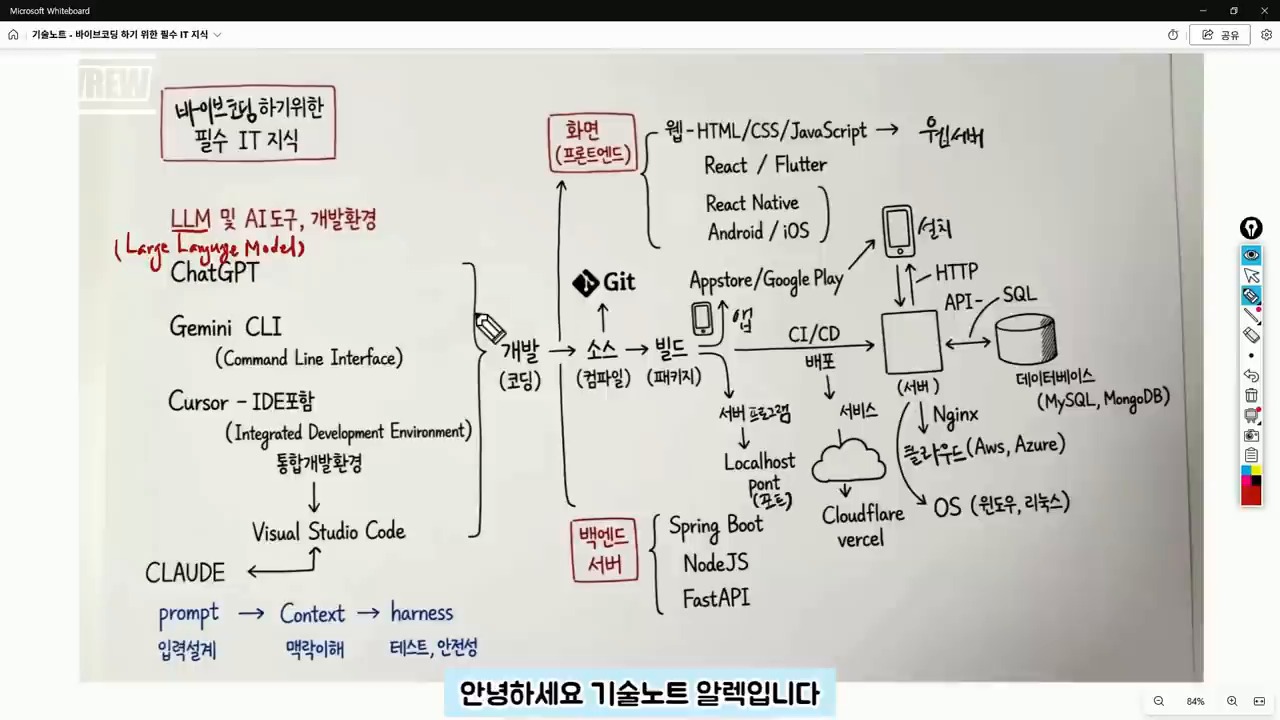
Original Korean article: 바이브 코딩 입문자가 막히는 이유, 코딩보다 먼저 알아야 할 IT 지도
Understanding the Structure is More Important than the Tool
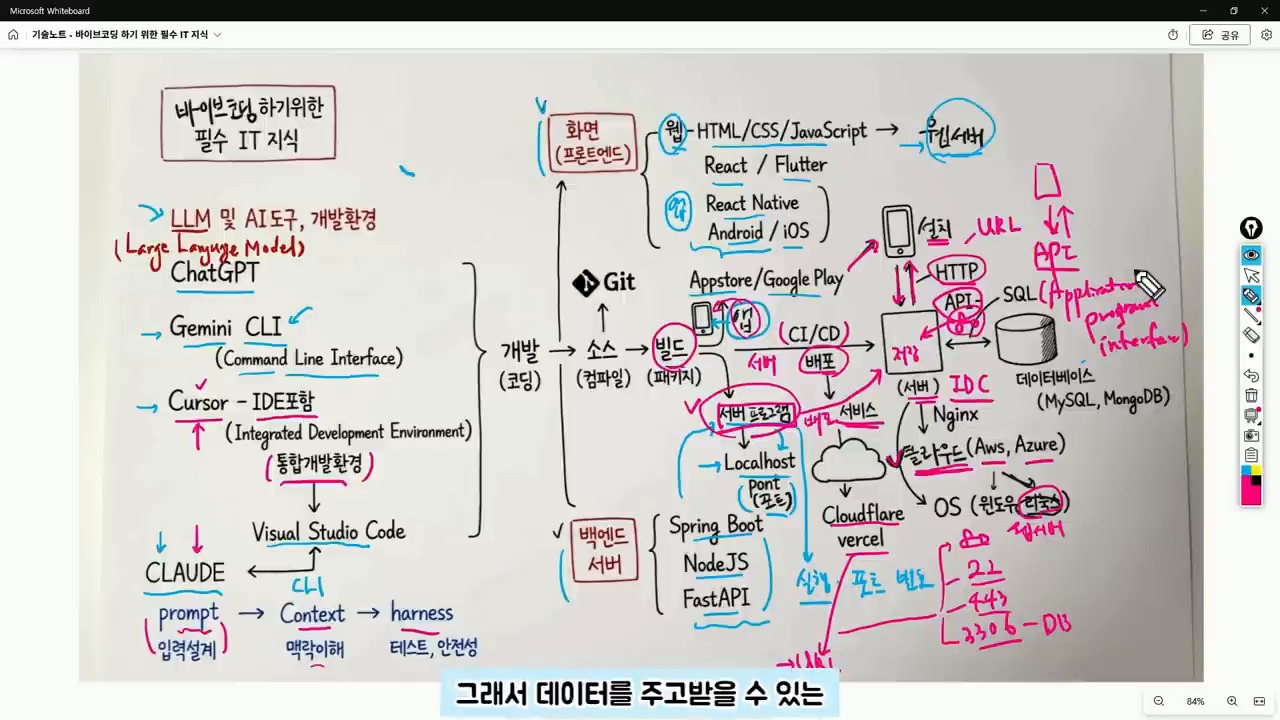
Even in an era where AI can write code for us, the fundamental structure of development remains the same. In fact, beginners need to have a broader understanding of the IT map to navigate and modify the code generated by AI tools. This includes understanding the difference between frontend and backend code, identifying errors, and knowing how to deploy the code to a server or cloud.
Judgment is Still a Human Responsibility
While AI can generate code quickly, it’s essential to remember that the user is still responsible for making judgments about the code. This includes answering questions such as: Is this code for the frontend or backend? Is the error due to an execution environment issue or a syntax problem? Will the result be deployed to the internet or only viewed on my local computer? What type of data storage will be used? By answering these questions, users can provide more specific instructions to the AI tool and get more accurate results.
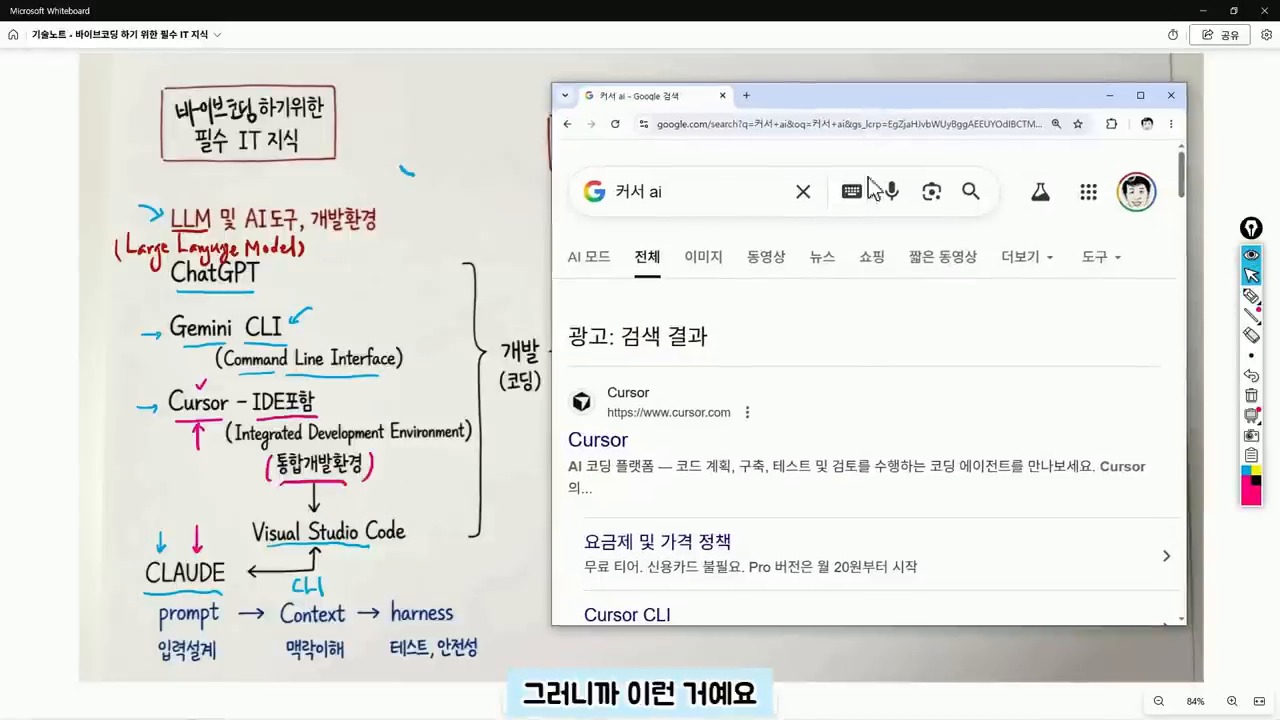
ChatGPT, Claude, and Cursor are Not the Same
ChatGPT and Gemini are conversational AI tools that can be used to ask questions and receive answers. On the other hand, Cursor is a code editor that combines AI and development environment, making it closer to an integrated development environment (IDE). Claude is also a development assistant tool that can be used in conjunction with code editors. Understanding the differences between these tools is essential to choose the right one for the task at hand.
IDE is a Workshop for Handling Code
An IDE is a workshop where code is written, managed, and executed. It’s a development environment that connects coding, file management, and execution. Visual Studio Code and Cursor are examples of IDEs. When starting with vibe coding, it’s essential to separate the task of choosing an AI tool from understanding the development environment. Regardless of the AI tool used, the code is still stored in files and modified within the development environment.
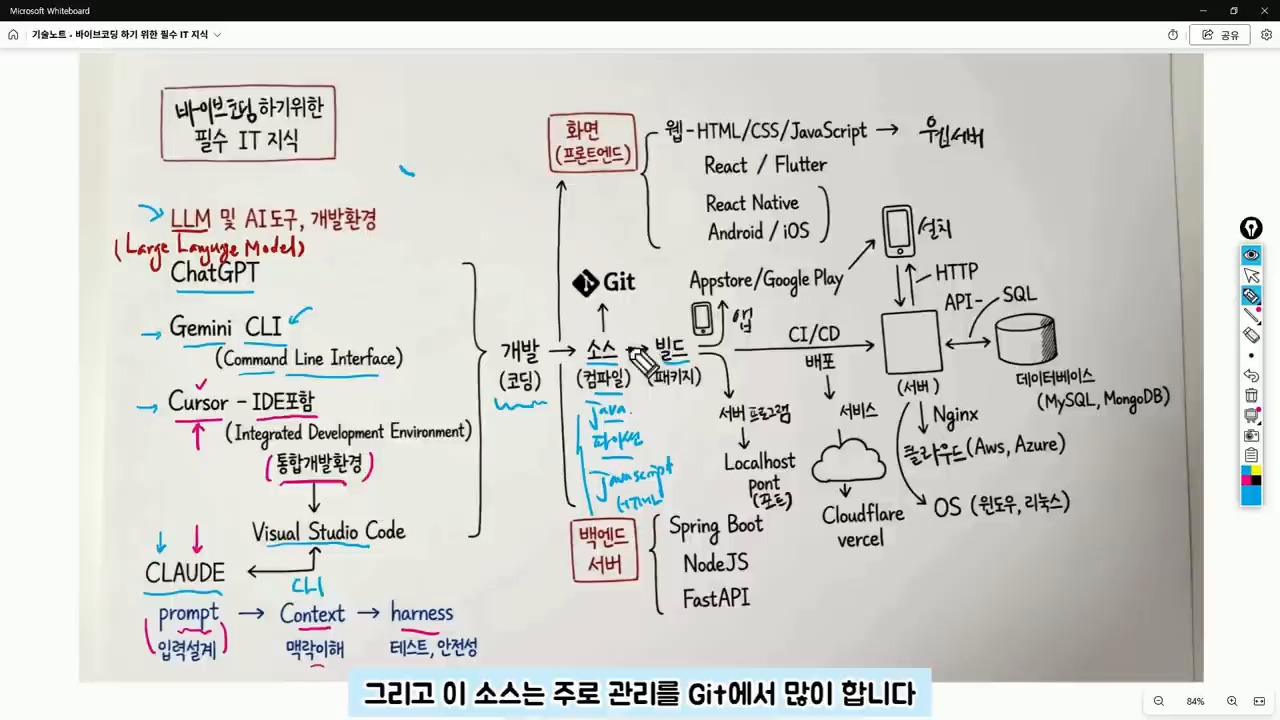
Context is More Important than Prompt
Initially, AI utilization focused on crafting the perfect prompt. However, now it’s more important to provide context to the AI tool. Context refers to the surrounding circumstances that the AI needs to make a judgment. By providing information such as project purpose, current file structure, error messages, and desired output format, the AI can provide more accurate answers. For example, instead of saying “create a login feature,” it’s better to say “I have a React frontend and a FastAPI backend, and I want to implement a login feature using JWT. I’m currently getting a 401 error.”
Source Code and GitHub are Essential
The result of AI-generated code is still source code, which is a file written in a programming language such as Java, Python, or JavaScript. It’s essential to manage these files and track changes using a version control system like Git. GitHub is a service that stores and manages code repositories, making it possible to collaborate with others and track changes.
Git is a Tool for Managing Change History
Git is a tool that manages the change history of code. GitHub is a service that stores and manages code repositories. While Git may seem challenging at first, understanding the basic concepts of repositories, commits, branches, and pushes is essential. In vibe coding, GitHub is crucial because it allows users to revert to previous versions of the code, work on the same project from different computers, and collaborate with others.
Build and Execution are the Processes of Turning Code into a Service
Source code is not the final product. Depending on the language and environment, the code may need to be compiled or built before it can be executed. In web projects, libraries and configuration files are bundled together to create a deployable result. When the AI tool reports a “build error,” it’s not just a syntax problem. The issue could be related to library versions, environment variables, execution commands, or folder locations. Therefore, vibe coding beginners need to develop the ability to read code and understand project structure.
Distinguishing Between Frontend and Backend Reduces Errors
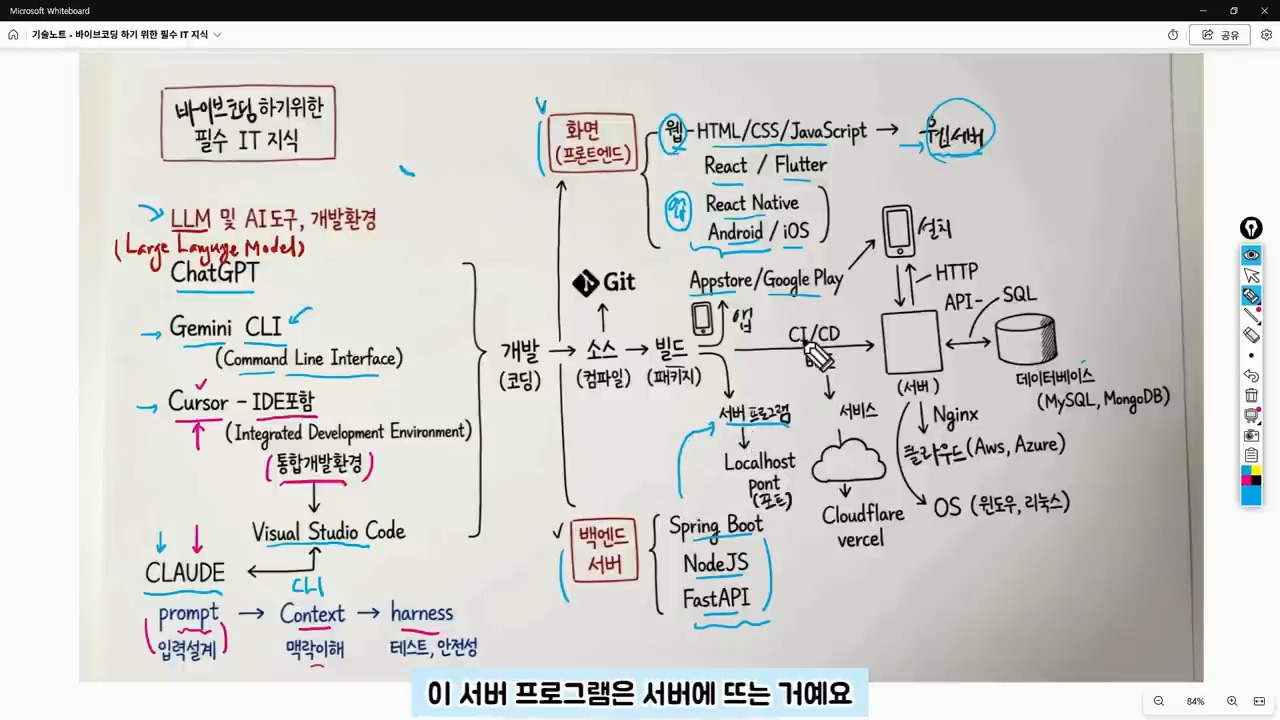
The frontend refers to the area responsible for creating the user interface, including web screens, app screens, buttons, input fields, lists, and designs. React, React Native, and Flutter are popular tools for frontend development. The backend, on the other hand, refers to the server-side program that handles data processing, login, posting, payment processing, and data retrieval. Spring Boot, Node.js, and FastAPI are popular frameworks for backend development.
Backend Handles Data Processing Behind the Scenes
When creating an app using vibe coding, if the screen is visible but data is not being saved, it’s not just a frontend issue. The backend API, server execution status, and database connection also need to be checked. Understanding the structure of the web and app, including the client-server relationship, makes it easier to identify and solve problems.
Server, Port, API, and Database are Essential Concepts After Deployment
A server program runs on a specific port. Web servers often run on ports 80 or 443. During development, ports 3000, 5000, or 8000 are commonly used. Understanding the concepts of URL, HTTP, and API is essential for deploying and managing web services. When encountering errors such as “CORS error,” “404,” “500,” or “connection refused,” it’s essential to understand the underlying causes, which often relate to address, port, server execution, API path, or permission issues.
API is the Channel for Client-Server Communication
An API is an agreement between the client and server for exchanging data. GET is used for retrieving data, POST for sending new data, PUT for modifying data, and DELETE for deleting data. JSON is a common format for API responses. A database is a space for storing actual data, and SQL is a language for querying or modifying data in the database.
A Suggested Order for Learning
It’s not necessary to learn all the technologies at once. Instead, following a suggested order can help reduce confusion and errors. By understanding the basics of IT and coding, including the concepts of frontend, backend, server, API, and database, users can ask more specific questions to the AI tool and get more accurate results.
Related Reading
Continue with these related Thinknote English articles in the Digital Transformation cluster.
- Thinknote English article
- Thinknote English article
- Thinknote English article
- Thinknote English article
- Thinknote English article
- Thinknote English article
FAQ
What is this article about?
This article explains a digital transformation, platform, market-structure, or technology-adoption topic with Korea-specific context and global implications.
How should I use this guide?
Use it to understand market signals and strategic patterns. Combine it with current market data before making business or investment decisions.
Where can I read the original Korean article?
The original Korean article is available here: Vibe Coding for Beginners: The IT Map You Need Before AI Writes Code.