[태그:] AI Workflow

  • What Is the OpenHuman AI Agent? The Promise and Limits of an Open-Source AI Assistant with Local Memory

    OpenHuman AI agent is attracting attention because it is not simply “one more chatbot.” It aims at something larger than a single conversation window. It tries to bring a person’s files, notes, apps, web research and automation flows together into one AI work environment.

    Its official GitHub repository says OpenHuman aims to be “a brain that builds local-first memory.” It also describes itself as an orchestrator running a fleet of agents and as a deep researcher. The phrasing is ambitious, but the direction is clear. It wants AI to stop asking from scratch every time. Instead, it imagines a work system that continuously remembers and acts within the user’s world.

    What Kind of Project Is OpenHuman?

    OpenHuman is an open-source AI agent platform published in the `tinyhumansai/openhuman` repository. According to the official repository, its primary language is Rust and its license is GPL-3.0. As of July 2026, the latest release is v0.61.8, and the README explicitly describes the project as Early Beta.

    There are three core ideas.

    1. A structure that remembers personal data with a local-first approach
    2. An orchestration structure for running multiple agents and workflows
    3. An execution environment that combines web, files, browser, voice and research tools

    So OpenHuman is less like a standalone model such as ChatGPT or Claude. It is closer to an “agent harness” that connects multiple models and tools to real workflows.

    First Difference: Local-First Memory

    The point OpenHuman emphasizes most strongly is memory. The README mentions Memory Tree together with Obsidian Wiki. It describes a system that organizes user data into SQLite and a Markdown tree. It then connects that data to an Obsidian vault that humans can open and inspect.

    This approach matters. Many AI tools say, “I remember.” But users often cannot tell where that memory is stored, how it is retrieved, or how to fix incorrect memories. At least in its direction, OpenHuman aims for an editable knowledge structure rather than black-box memory.

    Of course, the actual quality still has to be verified separately. Even if a memory structure looks good, automatically collected information can become a burden if it accumulates as duplicate or outdated content. For a personal knowledge system, “organizing well and making corrections easy” matters more than “saving a lot.”

    Second Difference: Agent Orchestration

    OpenHuman emphasizes agent orchestration more than a single assistant. It aims to create workflows, run them based on triggers and build automation with approval gates. The README also mentions related open-source subcomponents such as `tinyflows` and `tinyagents`.

    This direction fits well with the current AI agent trend. Work automation no longer ends with “how to write good prompts.” It is now more important to decide what should run when. Teams also need retry rules and clear points where user approval is required.

    That is also why OpenHuman is interesting. If a personal AI assistant is to enter real work, it needs an execution structure more than conversational ability. Calendar checks, meeting summaries, file investigation, research, code work and report drafting need to connect into a single flow.

    Third Difference: Combining Research and Execution Tools

    OpenHuman introduces features such as web search, scraping, browser use, coding tools, voice and meeting agents. Its official documentation also uses the concept of SuperContext. The direction is to scan local memory, files and the web first. That secures context before the user has even finished asking.

    If this structure works properly, the advantage is significant. You do not have to explain again from the beginning what the AI knows. It can answer after reviewing work context, file locations, recent conversations and related documents.

    However, permission design is the core issue for this kind of tool-based agent. Connecting accounts such as Gmail, Slack, Notion and GitHub is convenient, but it also expands access to sensitive information. If the tool has automatic execution features, even more caution is needed. You need to check what data remains local and what requests are sent to external model APIs.

    Who Might Want to Try OpenHuman?

    OpenHuman is not a tool everyone needs. It becomes more worth considering if you are close to the following conditions.

    • You already use Obsidian, Markdown or local-file-based knowledge management.
    • You want to connect an AI assistant to work automation rather than simple Q&A.
    • You want to handle context from multiple tools such as Gmail, Notion, GitHub and Slack in one place.
    • You are interested in extensibility structures such as AI agent workflows, MCP and Skills.
    • You can tolerate the instability of a beta tool and test it.

    On the other hand, you may expect a work tool that you can install and use reliably right away. In that case, it is better to wait a little. The official repository also states that it is Early Beta. The more data access a tool has, the more important it is to start with small tests during the beta stage.

    What to Check When Installing

    The official INSTALL document primarily recommends native installation by operating system. macOS can use a Homebrew tap. Ubuntu and Debian can use the `.deb` from GitHub Releases. Windows can use an MSI installer.

    There are also cautions. Script-based installation is convenient, but the official documentation also explains that separate signature verification is limited. For that reason, it is safer to use the operating system’s standard installation method or release files when possible.

    Another issue is the Linux environment. The INSTALL document notes that AppImage may crash because of Wayland or some system library issues. On Debian/Ubuntu, installing the `.deb` may be the more stable choice.

    Criteria for Evaluating OpenHuman

    An agent platform like OpenHuman should not be judged only by its feature list. The real evaluation criteria are a little different.

    1. Is the Memory Editable?

    Users should be able to see what the AI remembers. They should be able to correct wrong memories and delete outdated context.

    2. Are There Approval Points in Automation?

    A good agent does not execute everything on its own. Tasks such as sending email, modifying files, posting externally and making payments require clear approval steps.

    3. Does It Leave the Cause When It Fails?

    Agents will inevitably fail. What matters is not pretending they do not fail, but showing where they got stuck and what logs or retry paths are available.

    4. Is It Clear What Data Goes to External Models?

    The phrase local-first is not enough by itself. You need to check what data stays local and what data is sent to external APIs.

    5. Does It Conflict with My Existing Workflow?

    AI tools change how work is done. That can be a positive change, but it can also create confusion in existing file structures and collaboration methods. It is best to test first in a small project.

    Compared with Hermes Agent

    OpenHuman gives the impression of being close to a personal desktop AI operating system. It puts local memory, Obsidian wiki, various app integrations and background loops at the front.

    By contrast, Hermes Agent is strong in task execution, tool calls, skills, cron and workspace-based automation. It is closer to a method that continues from research and writing to uploading and verification. It works inside project folders and procedures the user has already defined.

    The two tools differ more in perspective than in direct competition. OpenHuman is oriented toward building a “whole personal AI environment.” Hermes is closer to an “agent runtime that executes tools all the way through real work.” This difference will become more important in the age of AI agents. That is because harnesses and memory structures, more than models alone, will determine real productivity.

    Conclusion: Worth Watching, but Start with Small Tests

    OpenHuman is an interesting project that shows where AI agents are heading. It is an attempt to move beyond conversational chatbots and combine local memory, workflows, research and execution tools into one system.

    But it is still Early Beta. Before connecting personal data and work tools, you need to check permissions, storage locations, the scope of external transmission, failure logs and the range of automatic execution. Rather than entrusting it with core work from the start, it is safer to begin with a separate test account and a small folder.

    Ultimately, the question is not “Is OpenHuman good?” The more precise question is this: Are you ready to let AI continuously remember and execute around your knowledge and workflow? OpenHuman is a tool that poses that question quite clearly.

    Further Reading

    FAQ

    Is OpenHuman an AI model like ChatGPT?

    No. OpenHuman is closer to an AI agent platform that connects multiple models, tools, memory and workflows than to a specific model.

    Is OpenHuman free?

    The official GitHub repository is an open-source project under the GPL-3.0 license. However, actual use may require external model APIs, connected services or subscription features, so you should check the cost structure separately after installation.

    What Is OpenHuman’s Biggest Strength?

    It aims to combine local-first memory with agent orchestration. Rather than being a simple conversational AI, it is structured to connect the user’s files, apps, goals and automation flows.

    Can I Use It for Real Work Right Now?

    Because the official repository says it is Early Beta, it is better to test it first with a test account and limited data instead of applying it immediately to core work.

    What Should I Be Most Careful About When Installing?

    Account integration permissions and the installation method. When possible, use the official release’s native package, and connect sensitive accounts such as Gmail, Slack and GitHub with minimum required permissions.

    References

    Original Korean Article

    This article is a full-fidelity English translation draft of the original Korean post: OpenHuman AI agent Korean article on Thinknote.

  • AI Web Design Workflow: How to Build a Landing Page with ChatGPT Mockups and Claude Design

    AI Web Design Workflow: How to Build a Landing Page with ChatGPT Mockups and Claude Design

    # AI Web Design Workflow: How to Build a Landing Page with ChatGPT Mockups and Claude Design

    AI web design is no longer just a story about “enter a prompt and a site comes out.” The more important change is a division-of-labor workflow: first visualize the design standard, then have another AI implement that standard.

    Darrel Wilson’s video shows this flow well. First, he creates website screenshots with ChatGPT Sol, then passes a preferred mockup to Claude Design and turns it into a responsive web page. For beginners, it is a fast experimentation tool. For practitioners, it is a way to reduce the gap between a brief and implementation.

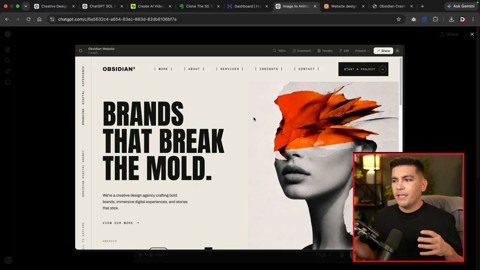
    Example of a website mockup created by ChatGPT
    AI first draws a finished-looking website mockup to create a visual reference point. Source: screenshot from Darrel Wilson YouTube video.

    The core is “creating a visual standard,” not “generating code”

    A common mistake when building a website with AI is to start with the prompt, “Create a cool landing page in HTML.” Even if the result looks plausible, the brand tone, image direction, section density, and typography can easily drift.

    The video’s approach is different. It first asks ChatGPT Sol to create screenshots that look like finished websites by providing the industry, mood, image style, and layout requirements. Those screenshots become a visual brief that can be given to another AI.

    Step 1: Create multiple design mockups with ChatGPT Sol

    The text prompt should not simply say, “Make a website.” It should include specific design conditions, such as the following.

    • Industry and site purpose
    • Desired mood and brand tone
    • Image direction for the hero section
    • Layout characteristics such as vertical or horizontal text
    • CTA buttons, menus, and section structure
    • Whether to use high-resolution images

    The purpose of this step is not to obtain code that can be deployed immediately. It is to compare several mockups quickly and choose the strongest direction.

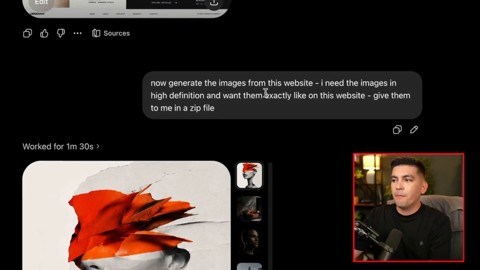
    Extracting image assets from a mockup
    Images inside the screenshot are separated into high-resolution assets and passed to the implementation stage. Source: screenshot from Darrel Wilson YouTube video.

    Step 2: Extract image assets separately and pass them to Claude

    Even if a strong mockup is produced, the final result weakens sharply if the images turn into placeholders during implementation. That is why the video extracts the images inside the screenshot as high-resolution files and downloads them as a ZIP file.

    The reason this process matters is simple. Claude Design can follow not only the layout, but also the image assets that created the mood of the original mockup.

    In real work, one more check is needed at this stage. You must review the commercial usability of AI-generated images, human depictions, brand similarity, and copyright risk.

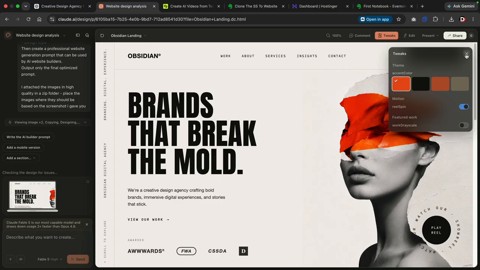
    Claude Design implementation screen
    The selected mockup is placed in Claude Design and translated into an actual web page structure. Source: screenshot from Darrel Wilson YouTube video.

    Step 3: Implement the mockup as a responsive web page with Claude Design

    The next step is to upload the selected screenshot and image ZIP to Claude Design. In the video, Wilson instructs Claude to follow the original mockup as closely as possible and, if necessary, turns off Claude’s default design system.

    The prompt can be short. What matters is not saying only “Make a similar website based on this image,” but giving the following standards as well.

    1. Preserve the original mockup’s layout first.
    2. Do not replace the image assets with placeholders.
    3. Consider both desktop and mobile responsiveness.
    4. Connect the menu, CTAs, and section order like a real site.
    5. Structure it so it can later expand into About, Services, and Contact pages.

    Step 4: Do not stop at the homepage; expand the site structure

    In the video, after creating the homepage, he generates additional pages such as About, Services, Insight, and Contact in the same design language. This part is important. Even if a single landing page looks beautiful, it is hard to use as a real website if the internal pages are empty.

    AI website production should not stop at “the first screen looks pretty.” At minimum, you need to check the following.

    • Do navigation links lead to actual pages?
    • Do the menu and CTA work naturally on mobile?
    • Do the contact form, buttons, and external links function correctly?
    • Is the copy not duplicated across pages?
    • Are SEO titles and meta descriptions separated by page?
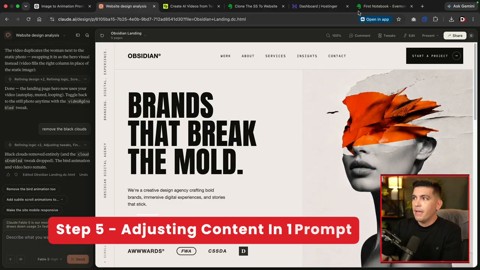
    Adjusting content with prompts
    Industry information and wording are entered again to customize page content. Source: screenshot from Darrel Wilson YouTube video.

    Step 5: Refine copy and animation separately afterward

    Claude’s first result is a starting point. In the video, industry information is entered again to customize all text, and animations such as birds, clouds, and human video elements are added.

    Animation, however, should be handled carefully. Background videos and moving objects can improve the first impression, but they can also reduce mobile speed and accessibility. On small screens in particular, text readability comes first.

    In practice, the following order is stable.

    1. Complete the structure and sections first.
    2. Have a human review the brand copy.
    3. Fix the mobile layout.
    4. Add animation in minimal units.
    5. Check speed, accessibility, and SEO last.
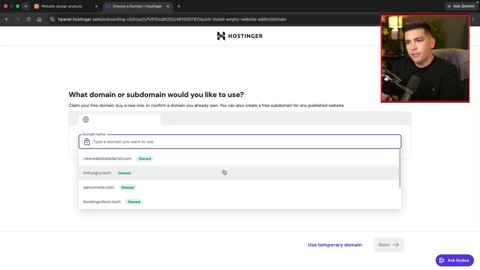
    Example of the deployment stage
    The completed HTML is connected to hosting and published on a real domain. Source: screenshot from Darrel Wilson YouTube video.

    What this method changes is the work sequence, not the tools

    The message of the video is not “designers and developers are no longer needed.” Rather, it means the human role is moving further toward the front end and the back end of the process.

    At the front end, people must create good visual briefs and judge which direction to choose among multiple mockups. At the back end, they must verify whether the result meets real service standards.

    As AI becomes faster, the standards humans need to check must also become clearer.

    StageWhat AI does wellWhat humans should check
    Mockup generationSuggesting varied layouts and image directionsBrand fit, differentiation, copyright
    ImplementationStructuring HTML/CSS and generating a responsive draftCode quality, accessibility, performance
    ContentDrafting industry-specific copyAccuracy, persuasion, legal wording
    DeploymentProducing publishable files quicklyHosting, domain connection, forms, security

    Checklist for trying it right away

    • Do not try to finish everything at once; separate mockup creation, implementation, revision, and deployment.
    • Give ChatGPT the “design direction” and Claude the “implementation standards.”
    • Pass image assets along with the screenshot.
    • Check the mobile screen with a separate prompt.
    • Before actual deployment, check links, forms, speed, accessibility, and SEO.

    Recommended reading

    FAQ

    Q1. Can ChatGPT Sol complete a website by itself?

    The core of the video is not to finish with Sol alone. ChatGPT Sol creates design mockups and image assets, while Claude Design implements those mockups as actual web pages. It is closer to a division of labor.

    Q2. Why create a screenshot first instead of asking Claude to build it directly?

    A screenshot is a visual brief that communicates layout, images, typography, and mood all at once. Compared with text alone, it gives the AI a much more concrete standard to follow.

    Q3. Does this method replace Figma?

    For simple mockups and landing page experiments, it can reduce some work before Figma. However, it is hard to say that it fully replaces team collaboration, component management, design systems, and detailed UX validation.

    Q4. Can I use an AI-generated website commercially right away?

    It is safer to use it after review rather than immediately. Image rights, responsive quality, accessibility, performance, personal-data handling in forms, and search optimization all need to be checked separately.

    Q5. Is this workflow useful for beginners?

    Yes. It is especially useful for beginners who lack design confidence because they can view multiple mockups first and choose a direction. However, they should not trust the final result as-is, but verify it step by step with a checklist.

    References

    Original Korean article

    Read the original Korean article

  • Claude Skills for Small Business: From Chatbot to Workflow Automation

    Claude Skills for Small Business: From Chatbot to Workflow Automation

    This fuller English adaptation follows the Korean source on Claude Skills for small businesses. The key claim is that a Skill is not just a smarter chatbot prompt. It can package repeatable work, connect data, and help small teams automate routines that normally consume the owner’s morning and attention.

    Claude Skills for small business
    Claude Skills for small business.

    Original Korean article: Claude 소상공인 Skill, 챗봇을 넘어 업무 자동화 도구가 되다

    Why Claude Skills for Small Business Matter

    Small businesses often do not have dedicated operations teams. The owner or manager checks sales, messages, invoices, appointments, hiring, inventory, and customer issues personally. A general chatbot can answer questions, but it does not automatically know the business context or the repeated format of work.

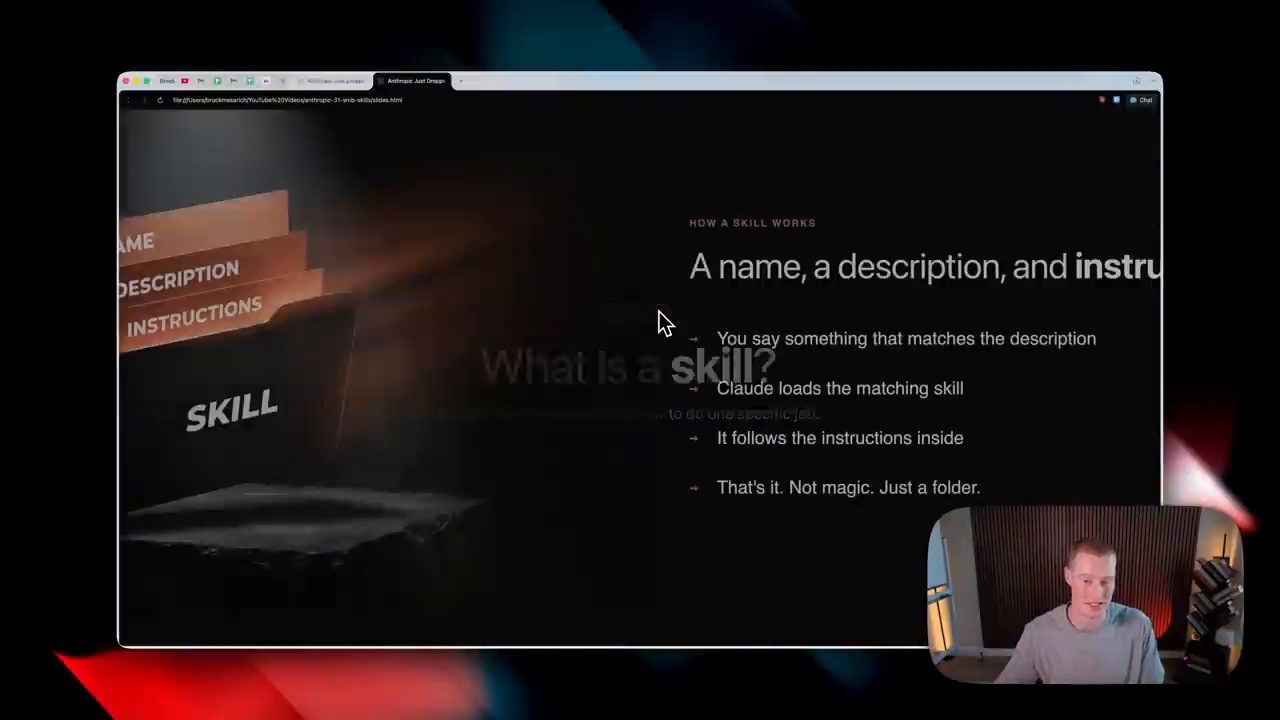
    A Claude Skill can bundle instructions, templates, files, and workflow logic so that the AI performs a specific job more consistently. That is why the source article describes the shift from chatbot to workflow automation.

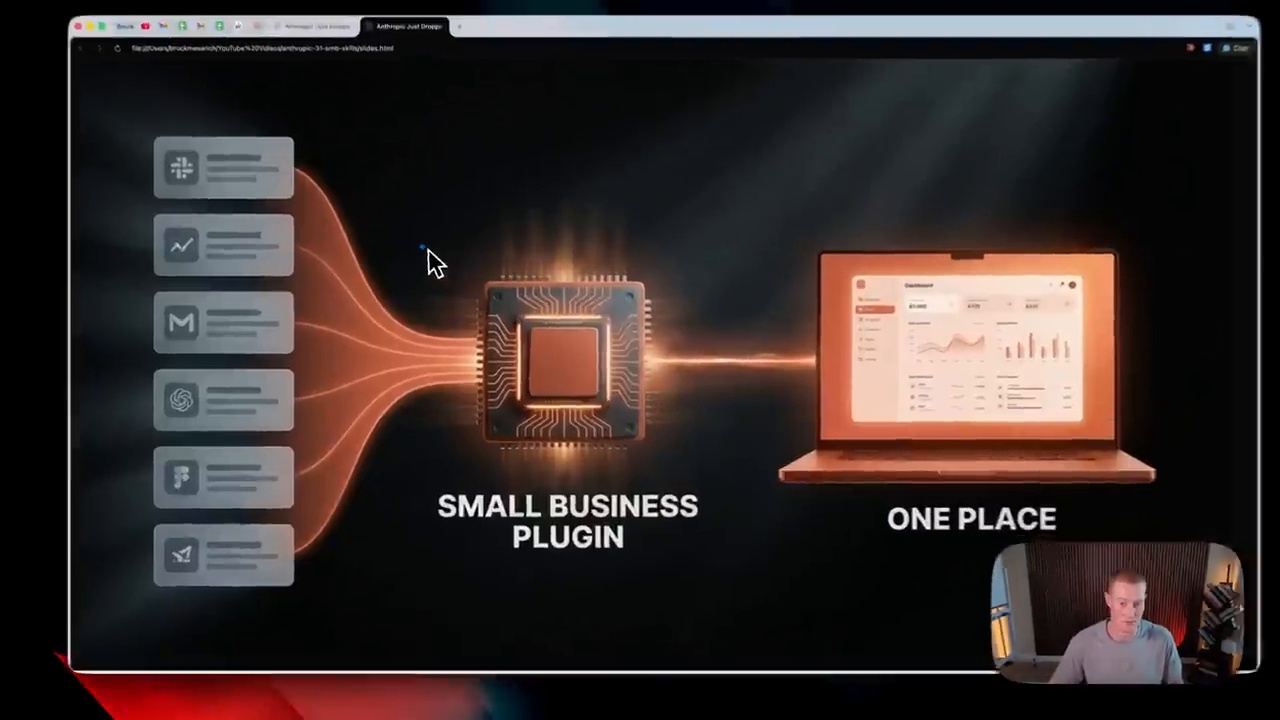
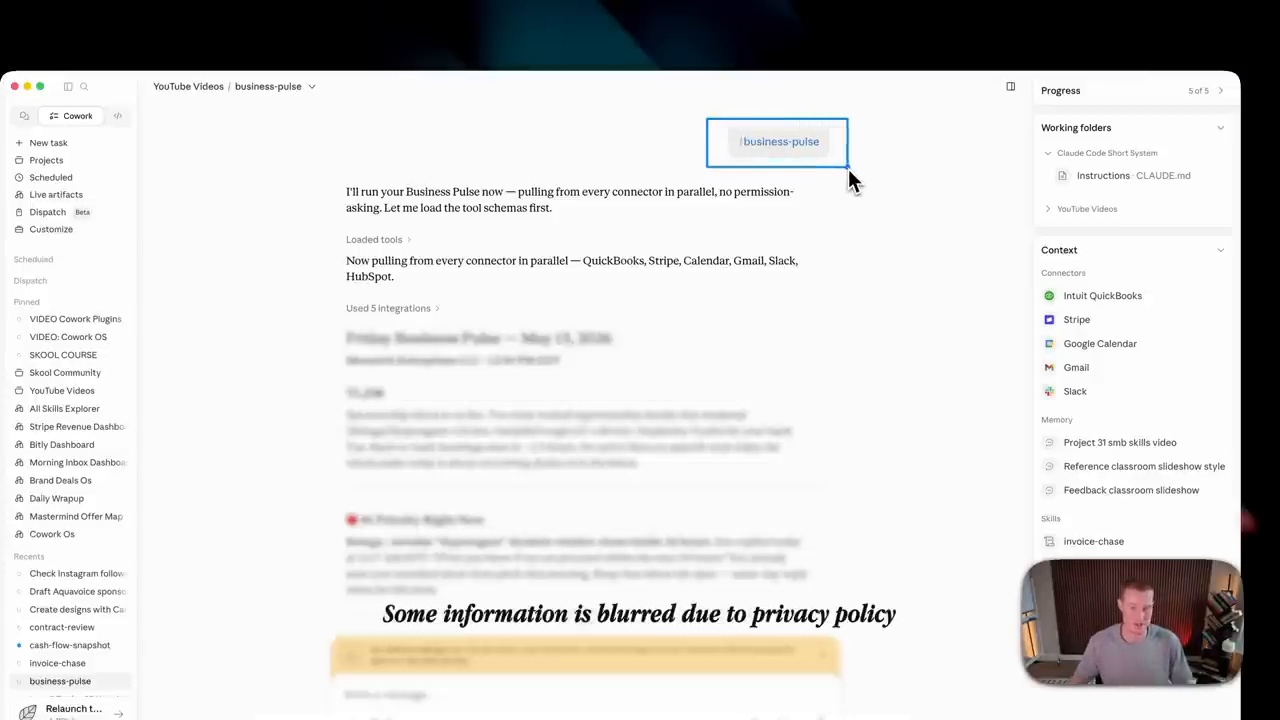
    Business Pulse: Turning the Day Into One Briefing

    Reducing the morning check burden

    Business Pulse represents a daily briefing workflow. Instead of opening multiple apps to check orders, calendar items, reviews, messages, and urgent tasks, the owner receives a summarized snapshot. The value is not only speed; it is attention management. A clear briefing helps the owner decide what must be handled first.

    For a small shop, salon, restaurant, agency, or local service business, this can reduce the feeling of being scattered across tools. The Skill becomes a morning operations packet that organizes signals into actions.

    Invoice Chase: Where Receivables Management Becomes Automated

    Data connection matters more than automatic email

    Invoice Chase shows why connected data matters. Sending a reminder email is easy; knowing which invoice is overdue, who has already replied, what tone is appropriate, and whether the customer is important requires context. A Skill can combine invoice data, customer history, and approved message templates.

    The Korean source highlights that automation should not mean careless pressure. Human review may remain important for sensitive customers, disputes, or large balances. But routine follow-ups can be standardized so that cash flow does not depend on memory.

    Job Post Builder: Hiring Work Becomes a Packet

    small business daily briefing automation
    small business daily briefing automation.

    Improving consistency in hiring documents

    Small businesses hire part-time staff, service workers, assistants, or specialists without a formal HR department. Job Post Builder can turn a role description into a consistent posting with responsibilities, requirements, schedule, compensation details, and evaluation criteria.

    This helps avoid vague hiring posts. It also lets the business reuse successful templates. Over time, the hiring process becomes a packet: job definition, posting, screening questions, interview guide, and follow-up message.

    App Connectors and MCP Create Executable AI

    The article connects Claude Skills with app connectors and MCP because execution requires access to real systems. A Skill becomes more useful when it can read approved documents, calendars, invoices, or CRM data. MCP-style connections can make that access more structured and permissioned.

    The practical lesson is that workflow automation needs both intelligence and connection. Without data, the AI guesses. With uncontrolled data, the AI becomes risky. The correct middle is permissioned access to the minimum information needed for the task.

    Security and Permissions Before Adoption

    invoice and email workflow automation
    invoice and email workflow automation.

    Tasks where human review must remain

    Small businesses should not automate everything blindly. Payments, legal messages, hiring decisions, customer refunds, medical or financial advice, and public posts should keep human review. Credentials should never be pasted into chats. Access should be limited, logged, and revoked when no longer needed.

    Practical Benefits for Small Business Owners

    The benefits are concrete: fewer repetitive checks, faster document creation, more consistent customer communication, better receivables follow-up, and less dependence on the owner’s memory. The deeper benefit is that small businesses can operate with a level of process discipline that previously required larger teams.

    A useful way to start is to choose one daily pain point rather than automate the whole business at once. If the owner spends thirty minutes every morning checking messages and unpaid invoices, that is a good first workflow. If hiring posts are inconsistent, Job Post Builder is a better starting point. Small wins build trust and reveal where data connections are still weak.

    Related Reading

    Continue with these related Thinknote English articles in the Digital Transformation cluster.

    FAQ

    What is this article about?

    This article explains a digital transformation, platform, market-structure, or technology-adoption topic with Korea-specific context and global implications.

    How should I use this guide?

    Use it to understand market signals and strategic patterns. Combine it with current market data before making business or investment decisions.

    Where can I read the original Korean article?

    The original Korean article is available here: Claude Skills for Small Business: From Chatbot to Workflow Automation.

  • Antigravity CLI and Obsidian Automation: Turning Notes Into an AI Work Hub

    Antigravity CLI and Obsidian Automation: Turning Notes Into an AI Work Hub

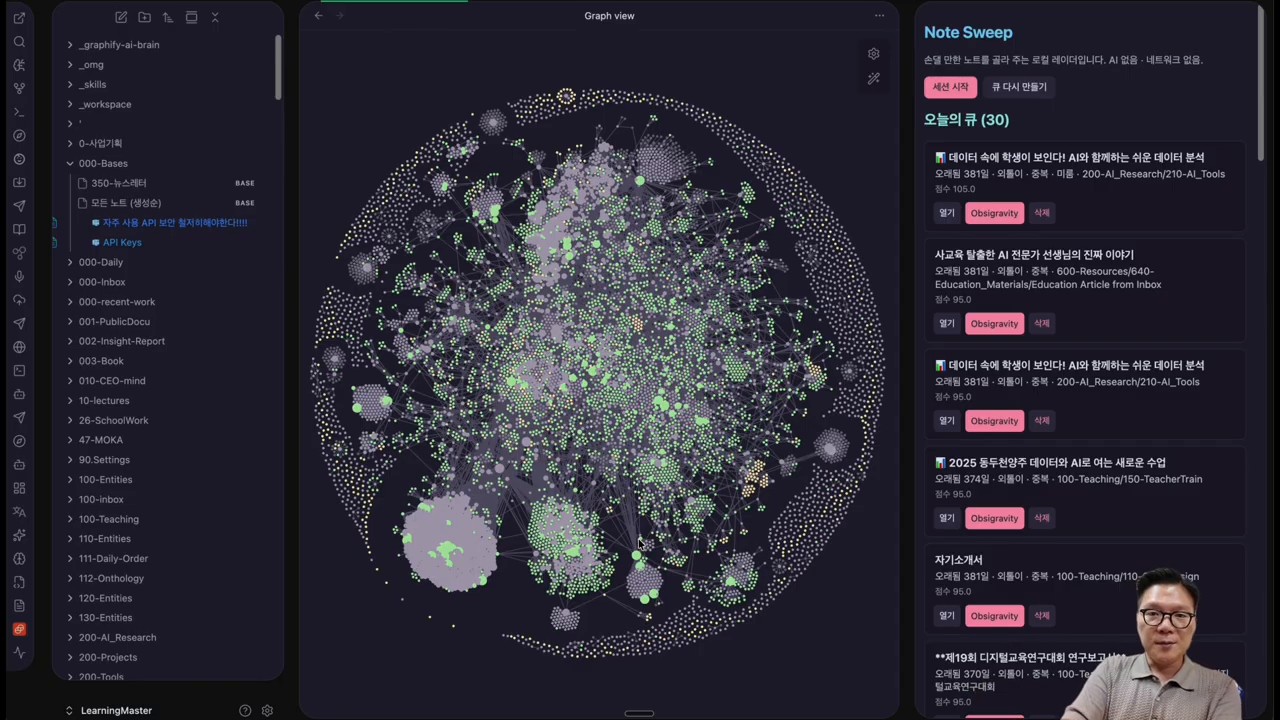
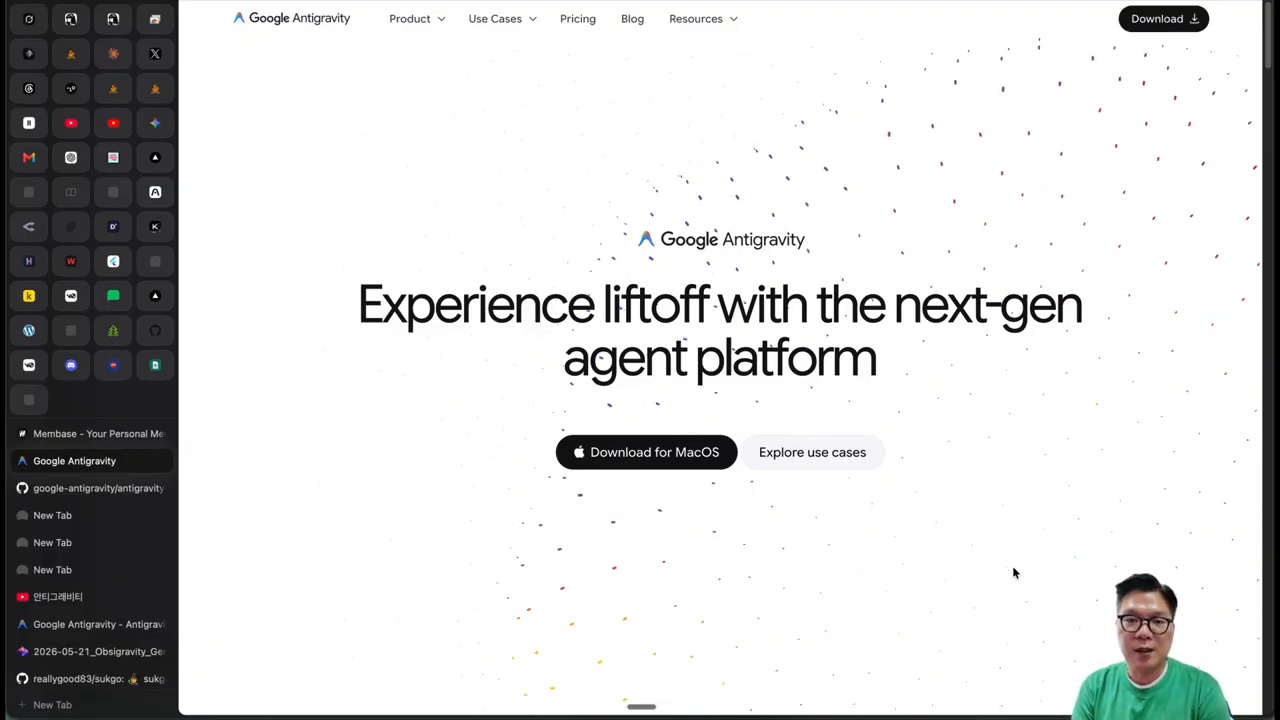
    This fuller English adaptation follows the Korean source on Antigravity CLI, Obsidian, and OpsiGravity. The important point is that the combination should not be seen as “just another note app setup.” It points to a workflow where notes, images, search, and external AI tools become one operational knowledge hub.

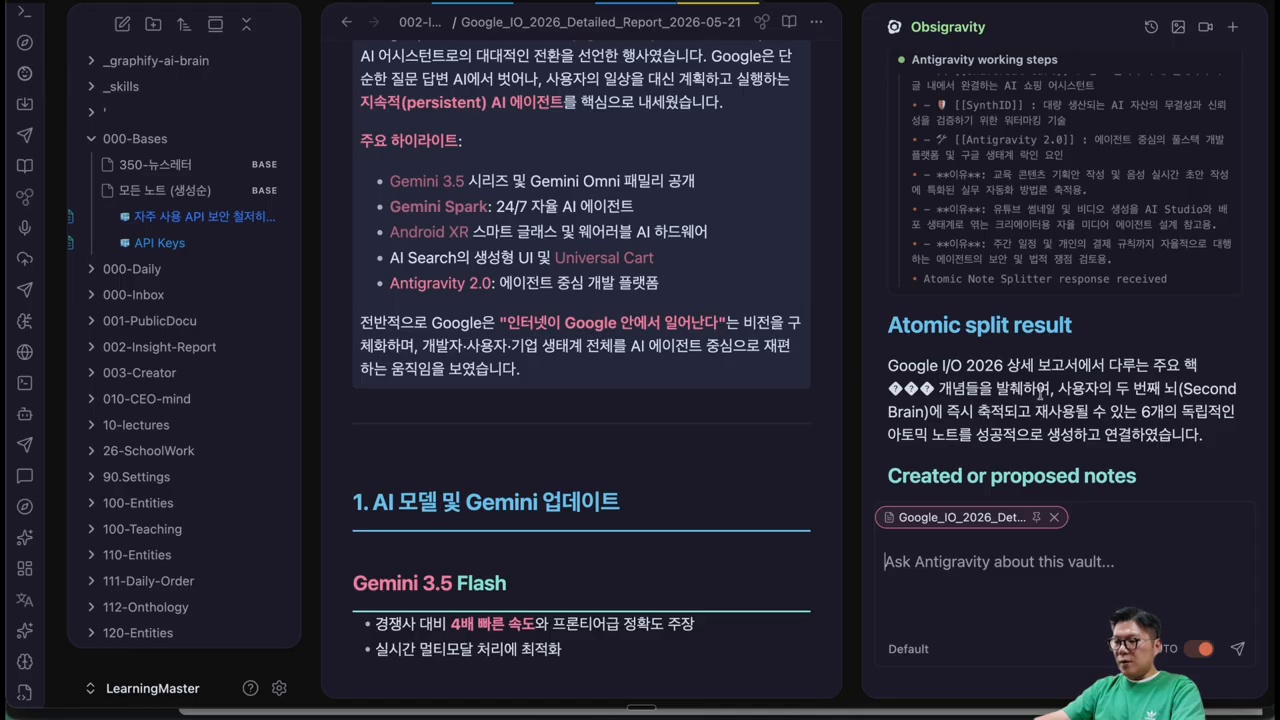
    Antigravity CLI and Obsidian automation workflow
    Antigravity CLI and Obsidian automation workflow.

    Original Korean article: Antigravity CLI Obsidian 자동화: OpsiGravity로 노트·이미지·검색을 한 번에 연결하는 방법

    Why the Antigravity CLI and Obsidian Combination Matters

    Look first at the work hub, not the note app

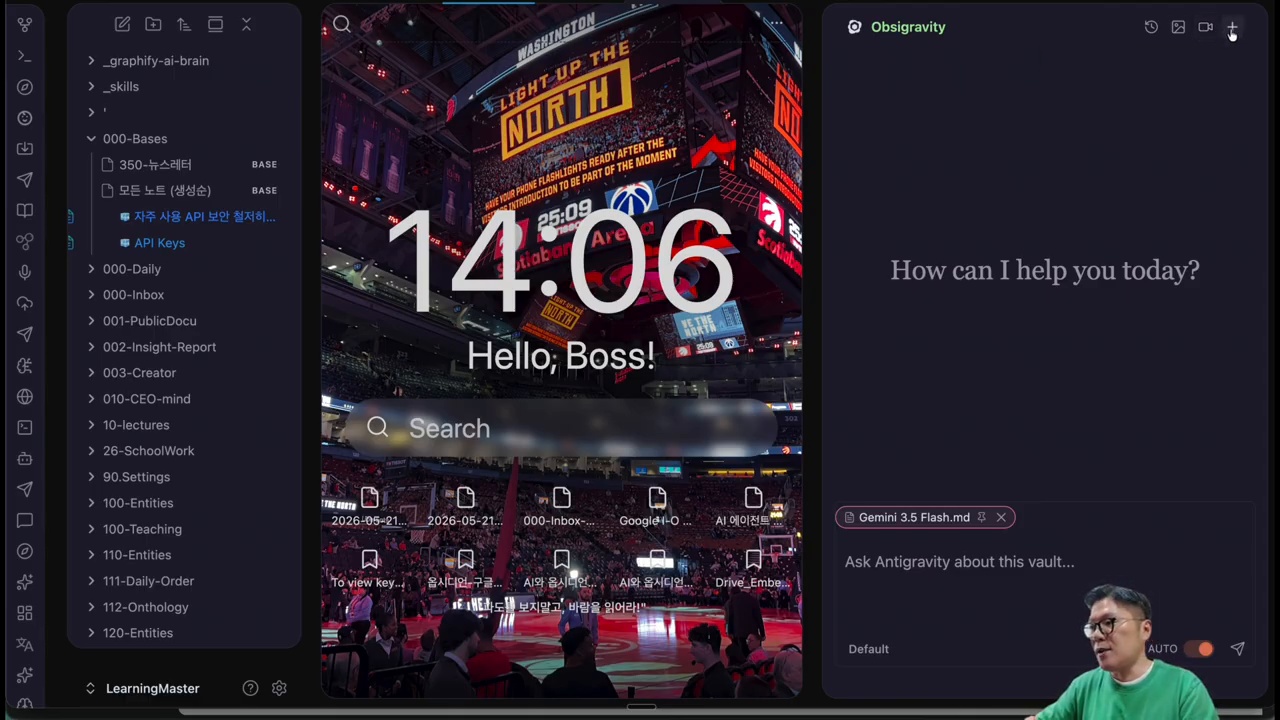
    Obsidian is powerful because it stores knowledge in local Markdown files and lets users build links between ideas. Antigravity CLI adds a command-line AI layer. OpsiGravity connects these into a workflow where notes can become prompts, image inputs, research seeds, and reusable knowledge units.

    The Korean source argues that the key is not the novelty of a plugin. It is the change in work structure. A note is no longer a passive archive. It becomes an input that can trigger generation, search, rewriting, splitting, and connection.

    What Is OpsiGravity?

    Main features shown in OpsiGravity

    OpsiGravity is presented as an automation layer that links Obsidian notes with Antigravity CLI and related tools. It can use the content of a note as context, support image generation flows, help restructure long documents, and connect to external search or build tools. For knowledge workers, this means the same note can support writing, research, visual ideation, and task execution.

    The source is careful not to treat it as magic. The quality of output depends on the quality of notes, prompts, files, and review. But when the workflow is organized, the user can reduce context switching between note app, browser, AI chat, image tool, and terminal.

    Creating Note-Based Images With Antigravity CLI

    Advantages and limits of image generation

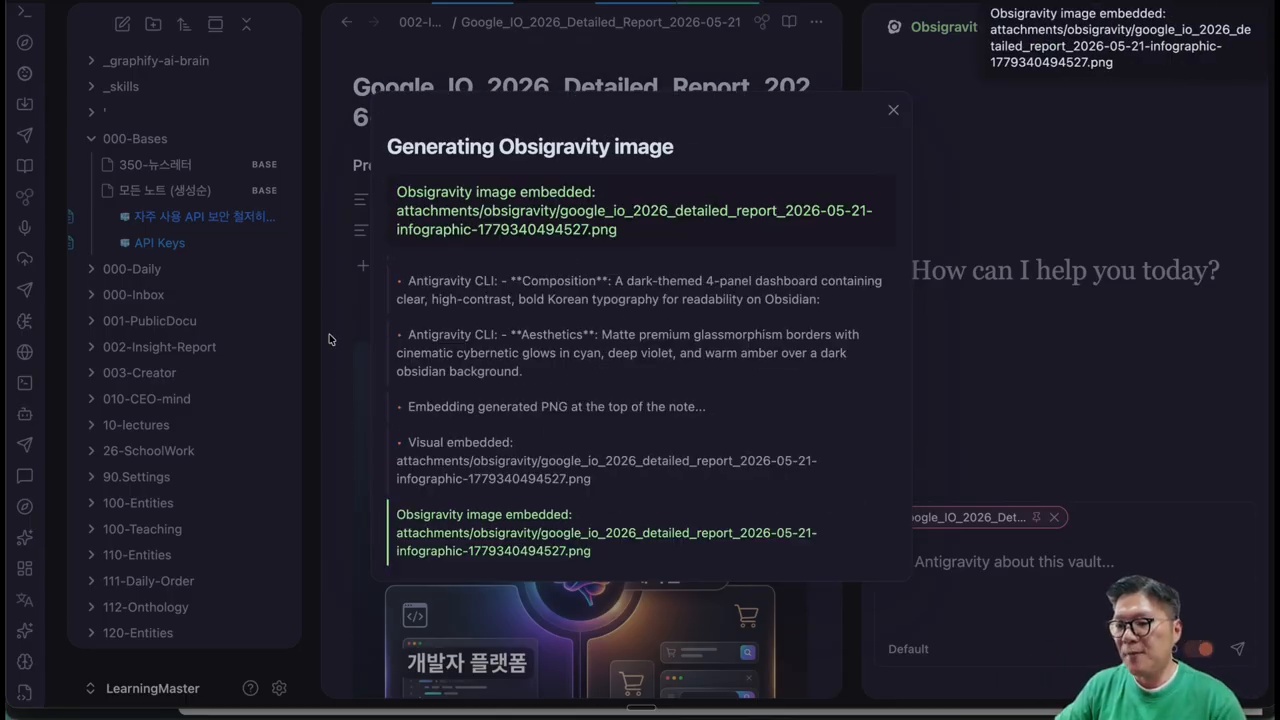
    One practical flow is turning a note into an image prompt. A user may write a concept, brand direction, scene description, or article outline in Obsidian, then ask the CLI workflow to generate an image based on that note. This is useful for blog thumbnails, presentation visuals, mood boards, and ideation.

    However, image generation still needs human taste. The model may misunderstand tone, produce visual artifacts, or miss brand consistency. The source article’s practical view is that AI images are helpful drafts, not automatic final assets. Users should keep prompts, outputs, and revisions together so the process improves over time.

    Note Surgeon and Atomic Split for Knowledge Management

    Obsidian as an AI work hub with OpsiGravity
    Obsidian as an AI work hub with OpsiGravity.

    Turning long reports into reusable notes

    Long documents are difficult to reuse. Note Surgeon and Atomic Split represent the idea of cutting a long report into smaller, linked notes. Each atomic note can contain one claim, one concept, one example, or one action item. This makes future writing and research easier.

    The value is not only tidiness. Atomic notes give AI cleaner context. Instead of feeding an entire messy document into a model, the user can provide focused notes with clear titles and links. This improves retrieval, summarization, and recombination.

    Why Connect Grok Build and X-Search?

    The meaning of external CLI connectors

    The source article discusses connecting external tools such as Grok Build and X-search because knowledge work often requires fresh information and executable steps. Notes contain internal knowledge; search brings outside signals; CLI tools turn ideas into actions. A connected workflow lets the user move from “I wrote this down” to “I researched, generated, revised, and executed it.”

    This kind of connector also raises responsibility. Search results may be noisy, APIs may change, and generated outputs require review. The workflow should store sources, dates, and decisions so the user can audit what happened later.

    Installation and Basic Setup

    AI image generation from Obsidian notes
    AI image generation from Obsidian notes.

    Setup checklist

    • Confirm that Obsidian vault files are backed up before automation.
    • Install and test the required CLI tools in a controlled folder.
    • Create a small sample vault before running workflows on important notes.
    • Define folders for prompts, generated images, research notes, and outputs.
    • Keep API keys and credentials outside notes and never commit them to a public repository.

    Questions to Check Before Adoption

    Before using this workflow seriously, ask what data will be sent to external models, whether private notes are included, how outputs are stored, and whether the process can be reproduced. The source article’s practical warning is that automation should increase control, not create hidden risk.

    A safe vault structure matters

    A practical setup separates private journals, credentials, published materials, research notes, and generated outputs. This prevents an automation command from accidentally sending sensitive personal information into an external model or overwriting important notes.

    One-line summary

    The workflow is valuable when it helps a user move from captured knowledge to reviewed output without losing sources, context, or control.

    Conclusion: Notes Become an AI Work Hub

    Note Surgeon and Atomic Split for knowledge management
    Note Surgeon and Atomic Split for knowledge management.

    The one-line summary is that Antigravity CLI plus Obsidian turns notes into a work hub. The best use case is not random experimentation, but a repeatable system where ideas, sources, images, search, and execution remain connected.

    Related Reading

    Continue with these related Thinknote English articles in the Digital Transformation cluster.

    FAQ

    What is this article about?

    This article explains a digital transformation, platform, market-structure, or technology-adoption topic with Korea-specific context and global implications.

    How should I use this guide?

    Use it to understand market signals and strategic patterns. Combine it with current market data before making business or investment decisions.

    Where can I read the original Korean article?

    The original Korean article is available here: Antigravity CLI and Obsidian Automation: Turning Notes Into an AI Work Hub.