[태그:] Vibe Coding

  • 15 Frontend Basics Every Vibe-Coding Beginner Should Know

    15 Frontend Basics Every Vibe-Coding Beginner Should Know

    # 15 Frontend Basics Every Vibe-Coding Beginner Should Know

    Once you start vibe coding, unfamiliar terms arrive quickly: React, Next.js, API, CSR, SSR, NPM, build, bundling. At first, it feels like you must memorize everything.

    But the important part is not memorizing terms. It is understanding why each technology appeared. Then you can see where AI-generated code runs and what to ask it to fix.

    This article summarizes beginner-friendly frontend concepts based on a Vibe Coding University video for non-developer vibe coders.

    Vibe-coding lecture screen with the keyword React
    When you start vibe coding, you often meet words like React. The point is flow, not memorization.
    ## 1. The internet and the web are different

    The internet is the global communication network connecting computers. The web is a service on top of that network for exchanging documents and moving through links. A browser is the app used to view the web.

    • Internet: the road connecting computers
    • Web: documents and screens exchanged on that road
    • Browser: the app used to view the web
    ## 2. The web began with documents and links

    The early web created by Tim Berners-Lee connected research documents through hyperlinks. Three foundations remain important today: HTML for structure, URL for addresses, and HTTP for the agreement between browser and server.

    ## 3. HTML is the skeleton, CSS is the clothing, JavaScript is the behavior

    HTML decides what exists on screen: headings, paragraphs, images, buttons, inputs. CSS controls appearance: color, size, position, spacing, fonts. JavaScript creates behavior: menus open, input is checked, cart quantities change.

    ## 4. The browser turns code into pictures

    Frontend code is material for the browser. The browser reads HTML and CSS, builds structure, calculates size and position, and paints pixels on screen. This is rendering. Recalculating layout is reflow; repainting pixels is repaint.

    Knowing this lets you ask AI more precisely: “change the button color” differs from “fix the layout shift when the button is clicked.”

    ## 5. jQuery and React solved different problems
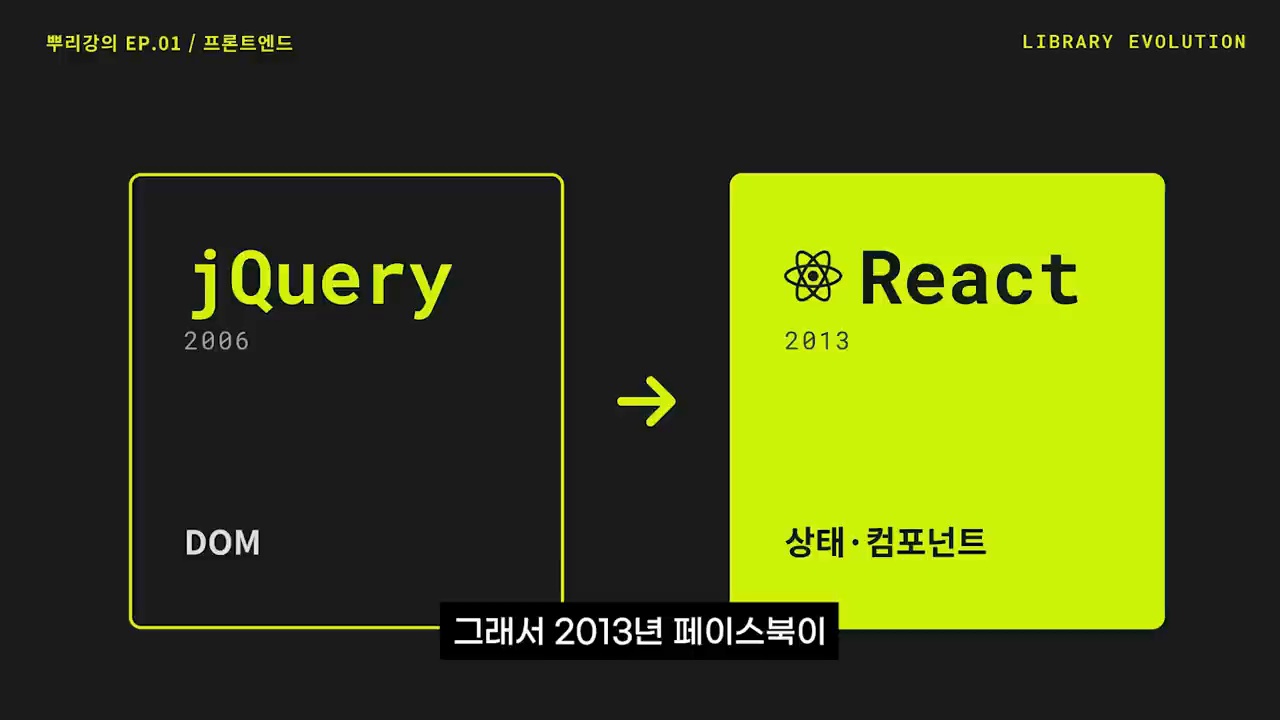
    Lecture screen explaining the shift from jQuery to React
    Frontend thinking moved from DOM manipulation to state and components.

    jQuery made DOM manipulation easier and more consistent across browsers. Later, web apps became more complex: login state, shopping carts, notifications, and real-time data. React handles complexity through state and components. When state changes, the screen is redrawn to match it; reusable UI pieces become components.

    ## 6. Node.js and NPM turned frontend into an ecosystem

    JavaScript originally ran only in browsers. Node.js allowed it to run on servers and in development tools. NPM installs and manages JavaScript packages.

    • Node.js: an environment for running JavaScript outside the browser
    • NPM: a warehouse for installing code packages
    • package.json: the list of packages the project depends on

    ## 7. Build means preparing development code for deployment
    Lecture screen explaining build, transpiling, and bundling
    Build prepares developer-friendly code in a form users can load quickly.

    Modern frontend projects contain many JavaScript, TypeScript, CSS, image, font, and library files. Build processes organize that work into code users can load quickly.

    • Transpiling: converting newer syntax for broader browser support
    • Bundling: grouping many files appropriately
    • Tree shaking: removing unused code
    • Optimization: reducing file size and improving load speed

    ## 8. MPA and SPA change pages differently
    Frontend lecture screen explaining SPA
    SPA is a major pattern that makes websites feel like apps.

    Traditional sites fetch new HTML from the server whenever pages change. This is an MPA, or Multi Page Application. An SPA first loads an app shell and then changes screens by exchanging only necessary data.

    • MPA: simpler structure and easier for search engines
    • SPA: smoother experience, but initial loading and SEO can be harder
    ## 9. CSR, SSR, and hydration are about who draws first

    CSR means the browser receives JavaScript and draws the screen. SSR means the server creates HTML first and sends it to the browser. Hydration attaches JavaScript behavior to HTML the server already rendered.
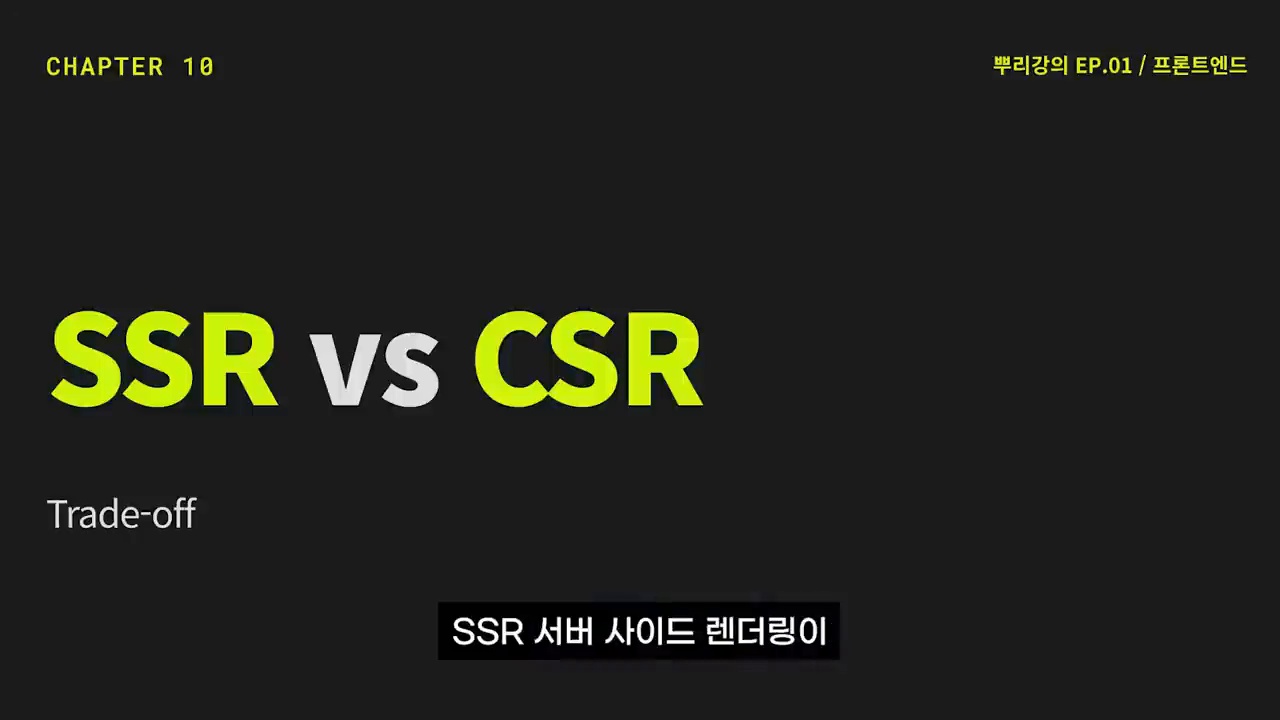
    Lecture screen comparing SSR and CSR rendering
    CSR and SSR differ in where the screen is first rendered.

    Frameworks such as Next.js are useful because they mix CSR, SSR, and static generation depending on the page.

    ## 10. An API is the agreement between frontend and backend

    The frontend handles what users see. The backend handles data storage, authentication, payment, and permissions. An API is the agreement for exchanging data between them: which address, which format, which response.

    ## Core checklist for vibe-coding beginners
    • Does this technology handle structure, design, behavior, or data?
    • Is the problem in the browser or server?
    • Is the issue slow screen rendering, missing data, or tangled state?
    • Do you need feature work, build-error fixing, or deployment optimization?
    • Did you tell the AI the problem location and expected result?

    With these distinctions, “it doesn’t work” becomes “React state changes but the screen does not update; please find the cause.”

    ## Related reading ## FAQ ### Do I have to learn frontend to vibe code? You do not need to memorize every syntax detail, but basic concepts such as HTML, CSS, JavaScript, APIs, and rendering help you ask AI better questions. ### Are React and Next.js the same? No. React is a UI library; Next.js is a broader framework built on React with routing, rendering, and deployment structure. ### Why do CSR and SSR matter? They affect initial loading speed, search visibility, and user experience. ### What should I check first when a build error occurs? Separate package installation, syntax conversion, type checking, and bundling issues. Give the AI the error message and command you ran. ### Which frontend concepts should beginners learn first? Roles of HTML/CSS/JavaScript, browser rendering, state, APIs, build, and the difference between CSR and SSR. ## References

    Frontend can look like a field full of terms to memorize, but it is really the history of the web solving problems: documents gained design, then interaction, then app-like behavior, and later concerns about search and speed.

    Vibe-coding beginners need this flow. Once you see it, you can read AI-generated code better, ask more specific questions, and modify projects more safely.

    Original Korean article

    Image source: Captured images used in this article are stills from the original YouTube video. They are used for review, commentary, and educational explanation, and copyright remains with the original rights holders and the channel.
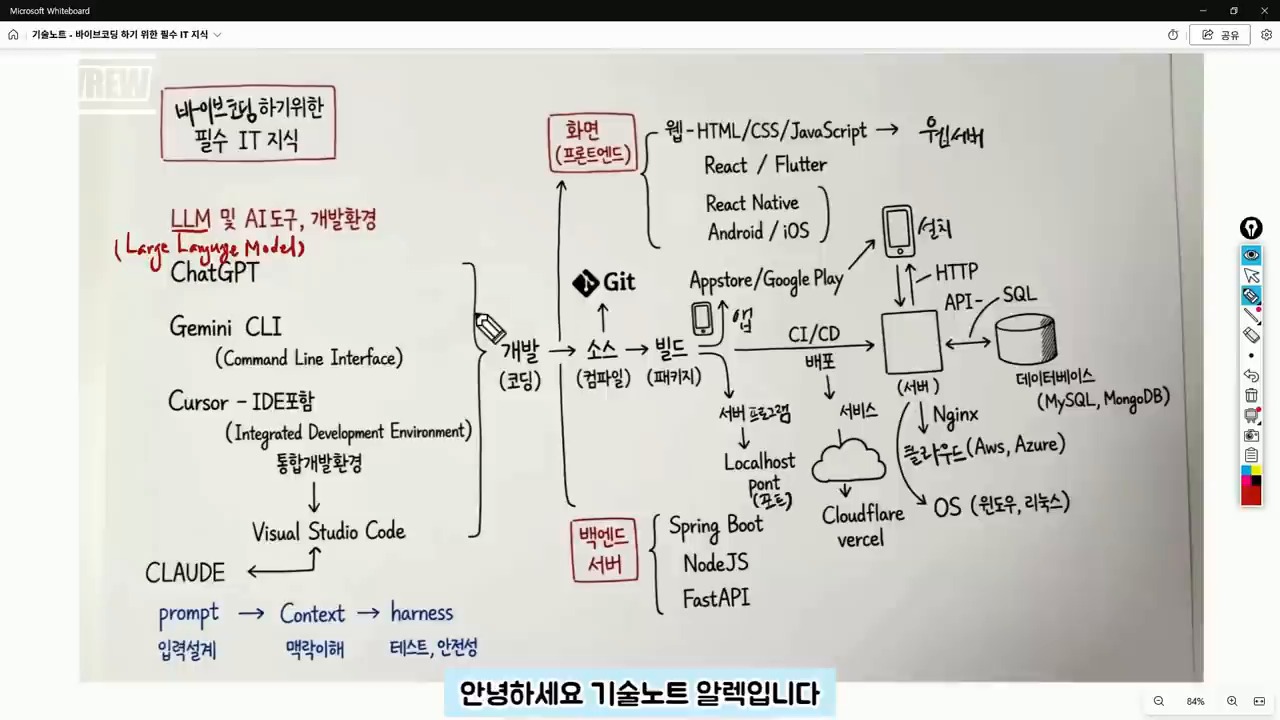
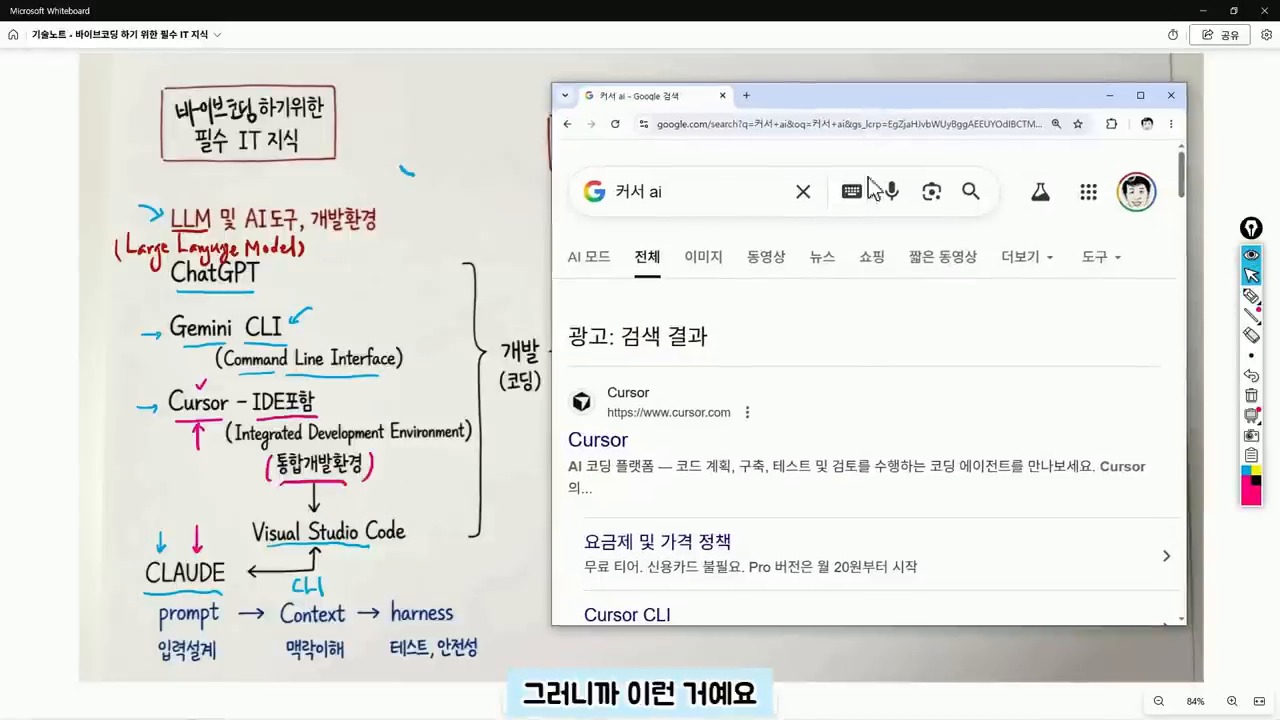
  • Vibe Coding for Beginners: The IT Map You Need Before AI Writes Code

    Vibe Coding for Beginners: The IT Map You Need Before AI Writes Code

    This English version is a fuller translation and adaptation of the original Korean article, “바이브 코딩 입문자가 막히는 이유, 코딩보다 먼저 알아야 할 IT 지도,” for global readers. The article discusses the importance of understanding the basics of IT and coding before diving into vibe coding, a new way of coding that utilizes AI tools to generate code quickly. However, the article highlights that relying solely on AI tools can lead to confusion and frustration when dealing with errors and understanding the underlying structure of the code.

    vibe coding for beginners IT map
    vibe coding for beginners IT map.

    Original Korean article: 바이브 코딩 입문자가 막히는 이유, 코딩보다 먼저 알아야 할 IT 지도

    Understanding the Structure is More Important than the Tool

    Even in an era where AI can write code for us, the fundamental structure of development remains the same. In fact, beginners need to have a broader understanding of the IT map to navigate and modify the code generated by AI tools. This includes understanding the difference between frontend and backend code, identifying errors, and knowing how to deploy the code to a server or cloud.

    Judgment is Still a Human Responsibility

    While AI can generate code quickly, it’s essential to remember that the user is still responsible for making judgments about the code. This includes answering questions such as: Is this code for the frontend or backend? Is the error due to an execution environment issue or a syntax problem? Will the result be deployed to the internet or only viewed on my local computer? What type of data storage will be used? By answering these questions, users can provide more specific instructions to the AI tool and get more accurate results.

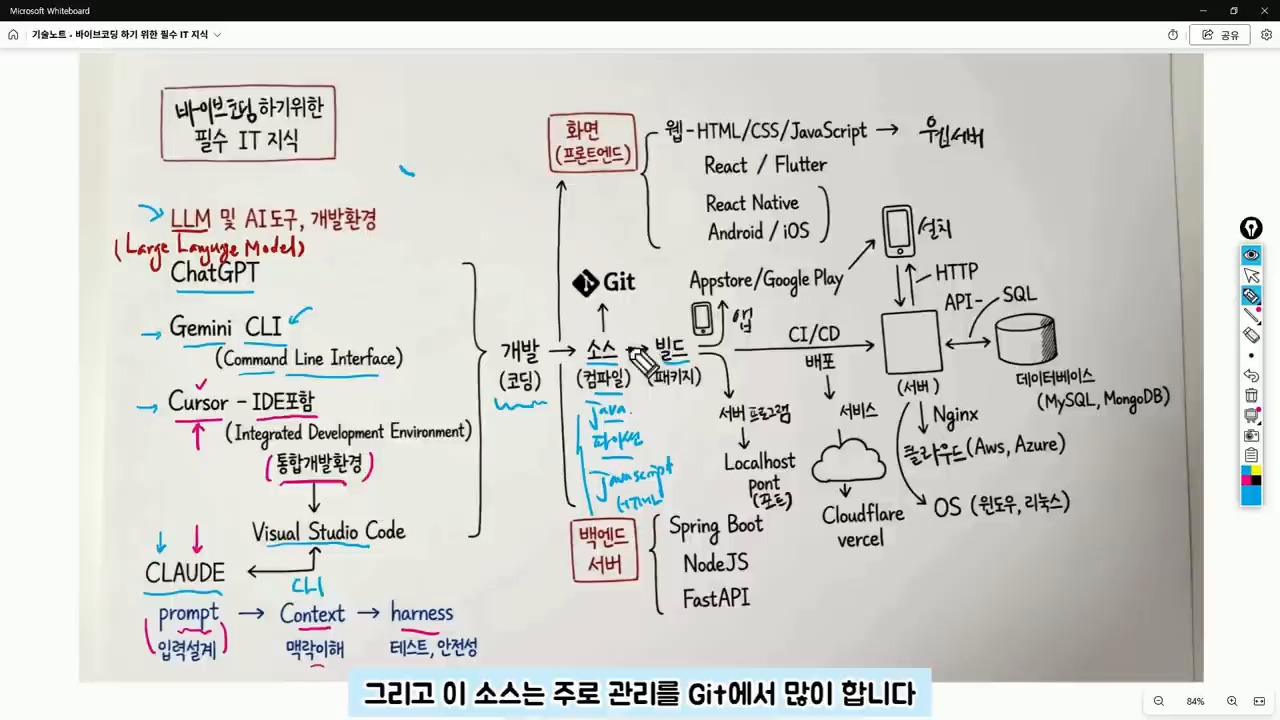
    AI coding tools and IDE basics
    AI coding tools and IDE basics.

    ChatGPT, Claude, and Cursor are Not the Same

    ChatGPT and Gemini are conversational AI tools that can be used to ask questions and receive answers. On the other hand, Cursor is a code editor that combines AI and development environment, making it closer to an integrated development environment (IDE). Claude is also a development assistant tool that can be used in conjunction with code editors. Understanding the differences between these tools is essential to choose the right one for the task at hand.

    IDE is a Workshop for Handling Code

    An IDE is a workshop where code is written, managed, and executed. It’s a development environment that connects coding, file management, and execution. Visual Studio Code and Cursor are examples of IDEs. When starting with vibe coding, it’s essential to separate the task of choosing an AI tool from understanding the development environment. Regardless of the AI tool used, the code is still stored in files and modified within the development environment.

    Git and GitHub for beginners
    Git and GitHub for beginners.

    Context is More Important than Prompt

    Initially, AI utilization focused on crafting the perfect prompt. However, now it’s more important to provide context to the AI tool. Context refers to the surrounding circumstances that the AI needs to make a judgment. By providing information such as project purpose, current file structure, error messages, and desired output format, the AI can provide more accurate answers. For example, instead of saying “create a login feature,” it’s better to say “I have a React frontend and a FastAPI backend, and I want to implement a login feature using JWT. I’m currently getting a 401 error.”

    Source Code and GitHub are Essential

    The result of AI-generated code is still source code, which is a file written in a programming language such as Java, Python, or JavaScript. It’s essential to manage these files and track changes using a version control system like Git. GitHub is a service that stores and manages code repositories, making it possible to collaborate with others and track changes.

    frontend backend API and server basics
    frontend backend API and server basics.

    Git is a Tool for Managing Change History

    Git is a tool that manages the change history of code. GitHub is a service that stores and manages code repositories. While Git may seem challenging at first, understanding the basic concepts of repositories, commits, branches, and pushes is essential. In vibe coding, GitHub is crucial because it allows users to revert to previous versions of the code, work on the same project from different computers, and collaborate with others.

    Build and Execution are the Processes of Turning Code into a Service

    Source code is not the final product. Depending on the language and environment, the code may need to be compiled or built before it can be executed. In web projects, libraries and configuration files are bundled together to create a deployable result. When the AI tool reports a “build error,” it’s not just a syntax problem. The issue could be related to library versions, environment variables, execution commands, or folder locations. Therefore, vibe coding beginners need to develop the ability to read code and understand project structure.

    deployment and database concepts for AI coding
    deployment and database concepts for AI coding.

    Distinguishing Between Frontend and Backend Reduces Errors

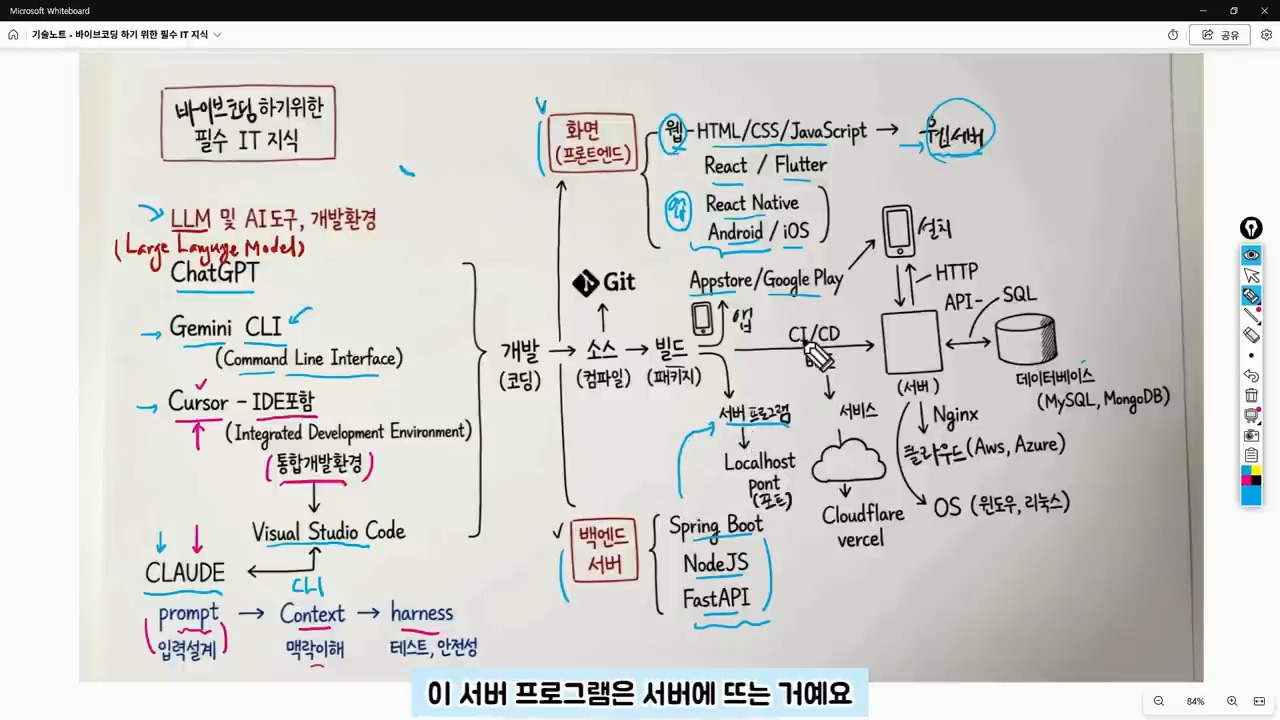
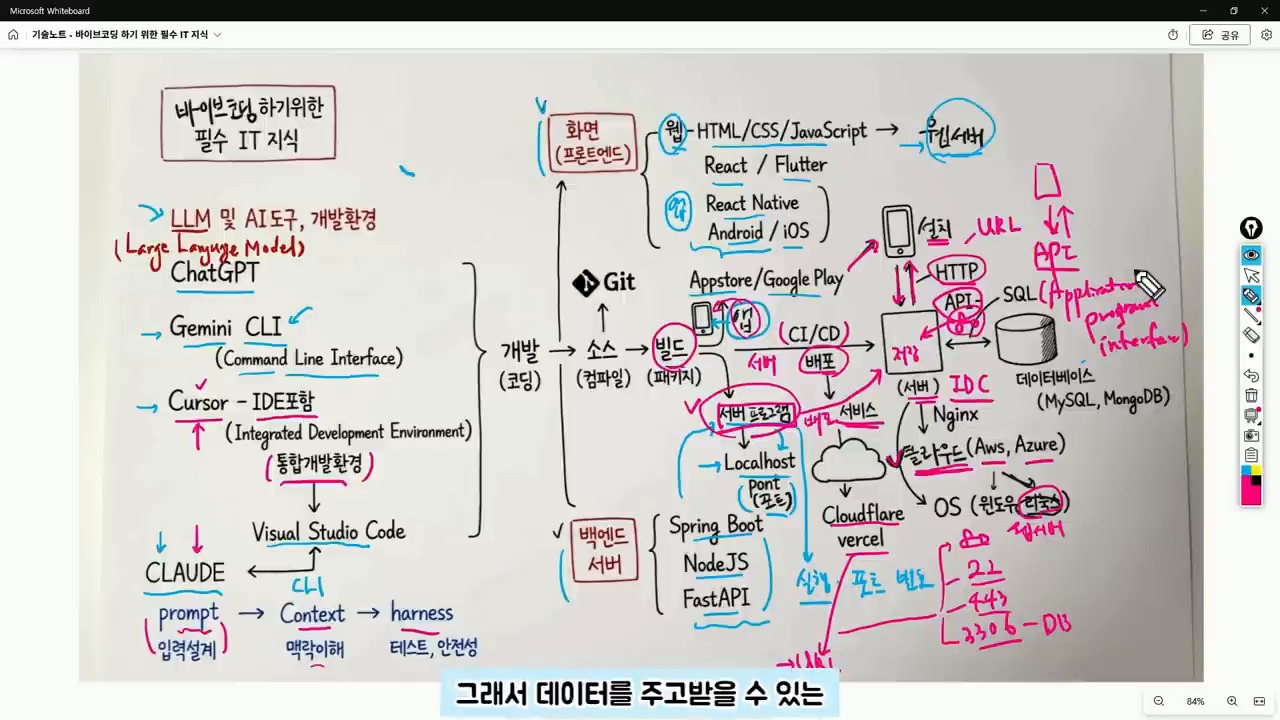
    The frontend refers to the area responsible for creating the user interface, including web screens, app screens, buttons, input fields, lists, and designs. React, React Native, and Flutter are popular tools for frontend development. The backend, on the other hand, refers to the server-side program that handles data processing, login, posting, payment processing, and data retrieval. Spring Boot, Node.js, and FastAPI are popular frameworks for backend development.

    Backend Handles Data Processing Behind the Scenes

    When creating an app using vibe coding, if the screen is visible but data is not being saved, it’s not just a frontend issue. The backend API, server execution status, and database connection also need to be checked. Understanding the structure of the web and app, including the client-server relationship, makes it easier to identify and solve problems.

    Server, Port, API, and Database are Essential Concepts After Deployment

    A server program runs on a specific port. Web servers often run on ports 80 or 443. During development, ports 3000, 5000, or 8000 are commonly used. Understanding the concepts of URL, HTTP, and API is essential for deploying and managing web services. When encountering errors such as “CORS error,” “404,” “500,” or “connection refused,” it’s essential to understand the underlying causes, which often relate to address, port, server execution, API path, or permission issues.

    API is the Channel for Client-Server Communication

    An API is an agreement between the client and server for exchanging data. GET is used for retrieving data, POST for sending new data, PUT for modifying data, and DELETE for deleting data. JSON is a common format for API responses. A database is a space for storing actual data, and SQL is a language for querying or modifying data in the database.

    A Suggested Order for Learning

    It’s not necessary to learn all the technologies at once. Instead, following a suggested order can help reduce confusion and errors. By understanding the basics of IT and coding, including the concepts of frontend, backend, server, API, and database, users can ask more specific questions to the AI tool and get more accurate results.

    Related Reading

    Continue with these related Thinknote English articles in the Digital Transformation cluster.

    FAQ

    What is this article about?

    This article explains a digital transformation, platform, market-structure, or technology-adoption topic with Korea-specific context and global implications.

    How should I use this guide?

    Use it to understand market signals and strategic patterns. Combine it with current market data before making business or investment decisions.

    Where can I read the original Korean article?

    The original Korean article is available here: Vibe Coding for Beginners: The IT Map You Need Before AI Writes Code.

  • Agentic Engineering: What Comes After Vibe Coding?

    Agentic Engineering: What Comes After Vibe Coding?

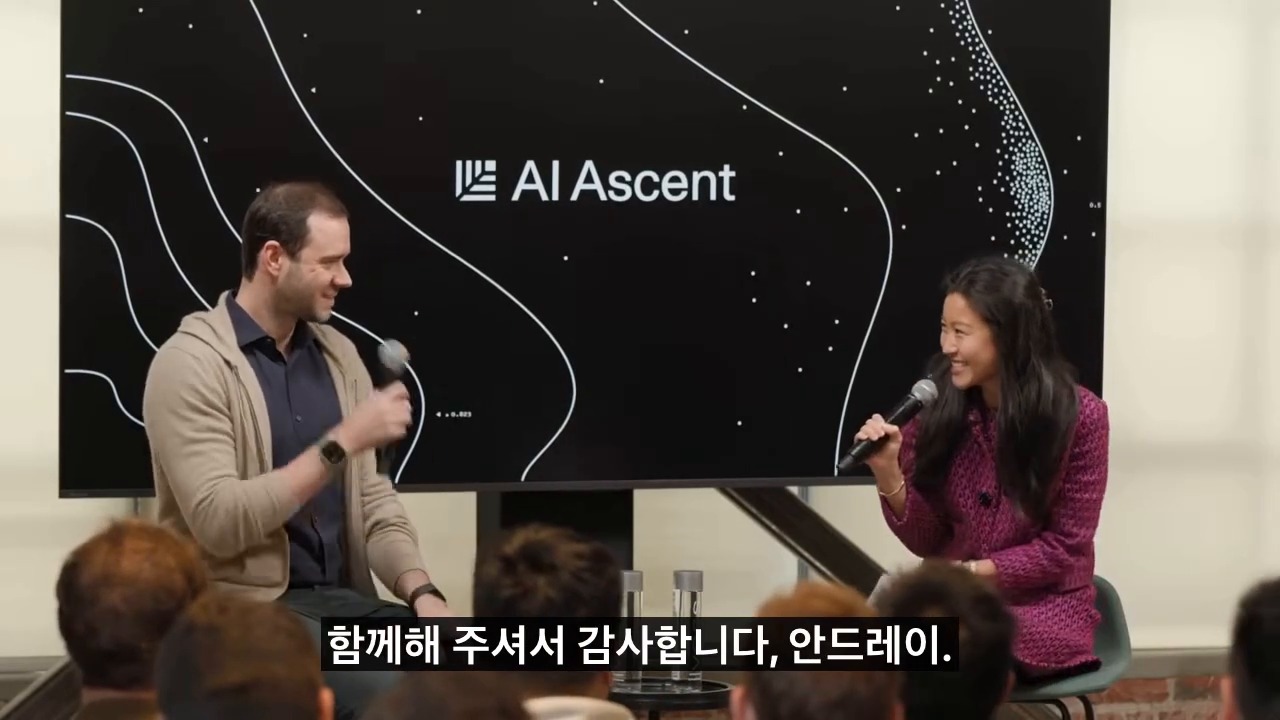
    This is a fuller English adaptation of the Korean article on agentic engineering after vibe coding. The source uses Andrej Karpathy’s discussion as a starting point, but its main focus is practical: when anyone can generate code with AI, real engineering shifts toward specification, verification, environment design, and responsibility.

    agentic engineering after vibe coding
    Agentic engineering moves developers from typing code to directing and verifying AI agents.

    Original Korean article: 에이전틱 엔지니어링: 안드레이 카파시가 말한 바이브 코딩 이후의 개발 방식

    Why Agentic Engineering Has Become Important

    A turning point after late 2025

    The article argues that AI coding entered a new phase as models became capable of longer, tool-using work. Vibe coding showed that natural language can produce working prototypes. But when prototypes move into production, teams need more than vibes. They need a way to assign tasks to agents, constrain them, test outputs, and recover from mistakes.

    Agentic engineering names this emerging discipline. It is not just writing prompts. It is designing the full loop in which an AI agent receives a goal, uses tools, modifies artifacts, checks results, and reports its reasoning for human review.

    What Software 3.0 Means

    Code is not only in files

    Software 1.0 was explicit code written by humans. Software 2.0 often referred to learned weights and data-driven behavior. Software 3.0, as discussed in the source, includes prompts, tool interfaces, workflows, evaluations, context, and agents as part of the software system. The product is no longer only a repository of files.

    This changes what engineers must version, review, and test. A prompt template, an evaluation dataset, an agent routine, or an MCP tool schema can be as important as a function in a codebase. If these pieces are invisible, the system cannot be operated reliably.

    Vibe Coding Lets Anyone Build, but Real Work Is Different

    What the MenuGen example shows

    The Korean article mentions the kind of example where a non-specialist can create an app or interface quickly with AI. This is the promise of vibe coding: describe the feeling, iterate visually, and get a working result. It expands who can make software.

    However, production work still involves edge cases, data integrity, security, accessibility, performance, maintenance, and user support. Vibe coding is excellent for exploration, but the moment a product affects customers or business operations, engineering discipline returns.

    What humans still must own

    Humans remain responsible for goals, ethics, tradeoffs, and accountability. An agent can implement a feature, but it does not own the consequences of a privacy breach, a bad medical recommendation, or a financial error. The source article emphasizes that the human role rises toward judgment rather than disappearing.

    Agentic Engineering Is the Skill of Specification and Verification

    Software 3.0 and AI coding tools
    Software 3.0 uses prompts, context, and LLMs as a new programming layer.

    The core practice is writing specifications that agents can execute and humans can verify. A good specification includes context, expected behavior, constraints, examples, non-goals, test commands, and acceptance criteria. It should also define what the agent must not change.

    Verification is equally important. Teams need unit tests, integration tests, golden examples, simulations, benchmark tasks, human review gates, and rollback plans. The question is not whether the AI produced something impressive. The question is whether the team can prove the result is correct enough for the intended use.

    Verifiable Environments Are the Core Product Opportunity

    What founders should watch

    The article identifies a business opportunity: environments where AI agents can safely perform work and be evaluated. In coding, this may mean sandboxes with tests. In design, it may mean versioned assets and approval flows. In enterprise operations, it may mean permissioned data connectors and audit logs.

    Founders should look for workflows where the output can be checked. If a task has clear evaluation signals, agents can improve quickly. If the task is vague, subjective, or legally sensitive, human review must remain central.

    Where AI-Native Developer Differences Come From

    vibe coding and production software gap
    Vibe coding makes creation easier, but production work still needs structure.

    Productivity is not typing speed

    The difference between developers will not be who types fastest. It will be who decomposes problems better, gives agents the right tools, reads output critically, and builds reusable workflows. A strong AI-native developer can run several streams of work while maintaining quality gates.

    Agent-First Infrastructure Is Needed

    Human UI and agent interfaces are different

    Many current tools are designed for human clicks. Agents need structured APIs, logs, machine-readable state, reversible actions, and narrow permissions. Agent-first infrastructure does not mean removing humans; it means making work legible to both humans and machines.

    Conclusion: Developers Do Not Disappear; Their Role Moves Up

    AI agent verification workflow for developers
    Agentic engineering depends on specifications, tests, and verification.

    The source article’s conclusion is optimistic but disciplined. AI expands who can create software, but reliable software still requires engineering. Agentic engineering is the next layer: designing environments where AI agents can work productively while humans retain responsibility for direction and verification.

    Related Reading

    Continue with these related Thinknote English articles in the Digital Transformation cluster.

    FAQ

    What is this article about?

    This article explains a digital transformation, platform, market-structure, or technology-adoption topic with Korea-specific context and global implications.

    How should I use this guide?

    Use it to understand market signals and strategic patterns. Combine it with current market data before making business or investment decisions.

    Where can I read the original Korean article?

    The original Korean article is available here: Agentic Engineering: What Comes After Vibe Coding?.