[태그:] Statistics

  • How to use the R pipe operator %>%: An easy way to read data analysis flows

    How to use the R pipe operator %>%: An easy way to read data analysis flows

    The pipe operator (%>%) in R allows you to increase both the readability and efficiency of your R programming code at the same time.

    Original Korean article: How to use the R pipe operator %>%: An easy way to read data analysis flows

    The R pipe operator is a grammar that helps you read the multi-step data processing process from top to bottom. The more nested functions you have, the more complex your code becomes, but pipes allow you to organize your analysis flow into a natural order. This article explains the basic structure of %>%, how to read it, and frequently used patterns in data analysis.

    In this article, we will take a detailed look at what these pipe operators are, why they are needed, and how they can be used.

    1. What is the pipe operator %>%?

    The %>% operator, or pipe operator, is mainly used in the dplyr and tidyverse packages. The main purpose of this operator is to clearly pass data or results to the next function.

    This makes your code more modular and makes it clear what's happening at each step.

    # example example
    result <- data %>%
      filter(age > 30) %>%
      select(name, age)

    2. Why should we use the pipe operator %>%?

    1) Improved code readability

    It makes complex data processing processes easier to understand at a glance. Typically, when multiple functions and operations are listed on a single line in R code, reading that code requires considerable effort.

    However, by using the pipe operator, you can clearly distinguish each step and understand the code more intuitively.

    2) Increased maintainability

    Code written using the pipe operator is easy to modify and extend. If you need to add or delete a new operation in a specific step, you only need to modify that part. This makes code easier to maintain.

    3) Intuitive data processing

    Pipe operators represent the flow of data vertically. This helps you understand more intuitively how your data is transformed.

    3. Example of pipe operator usage

    The %>% operator is also called the pipe operator and is mainly used in R, especially in the dplyr package and tidyverse package. The basic role of this operator is to connect the input and output of a function in a clear and readable way.

    The pipe operator receives data, processes it, and passes the result as the first argument to the next function. This makes the code much more readable and provides a clearer view of the data processing flow.

    For example, the following two pieces of code, using dplyr 's filter() and select() functions, accomplish the same thing:

    If you don't use the pipe operator:

    filtered_data <- filter(data, age > 30)
    result <- select(filtered_data, name, age)

    When using the pipe operator:

    result <- data %>%
      filter(age > 30) %>%
      select(name, age)

    In the second example using pipes, you can see at a glance the code starting from data ( data ) and what transformations ( filter , select ) it goes through. In this way, the pipe operator improves the readability of your code and helps you express your logic more clearly.

    1) Pipe operator basic data processing

    First, let's load the dplyr package and do simple data filtering, selection, and sorting.

    # dplyr example example
    library(dplyr)
    
    # example example
    filtered_data <- mtcars %>%
      filter(mpg > 20)
    
    # example example example example
    sorted_data <- mtcars %>%
      select(mpg, cyl) %>%
      arrange(desc(mpg))

    2) Pipe operator complex data processing scenarios

    Even complex data processing can be expressed concisely through the pipe operator.

    The example below shows the process of filtering, grouping, summarizing, and sorting mtcars data all at once.

    result <- mtcars %>%
      filter(mpg > 20) %>%
      group_by(cyl) %>%
      summarise(avg_mpg = mean(mpg)) %>%
      arrange(desc(avg_mpg))

    4. Conclusion

    The pipe operator %>% is a powerful tool for effectively processing data in R programming. You can increase the readability of your code, improve maintainability, and clearly express the logic of data processing.

    So, the use of this operator is almost essential when performing data analysis or data science work in R. Enjoy a more efficient data analysis experience with the %>% operator.

    To download the R program, you can click the download link on the R program's official website (https://www.r-project.org/).

    View all R programs

    Good article to read together

    • Text replacement str_replace, str_replace_all functions
    • str_squish function to remove unnecessary spaces
    • Understanding Tibble and the as_tibble() function
    • unnest_tokens() function
    • Execute PHP and R code in conjunction

    Key Checklist

    • Can the analysis sequence be read from top to bottom?
    • Is piped code clearer than nested functions?
    • Have you confirmed what the input and output data are for each step?
    • Are you creating pipe chains that are longer than necessary?

    Good R statistics articles to read together

    • How to use unnest_tokens function: How to split by words in R text mining
    • Variables and Measurement R Statistics: Understanding independent variables, dependent variables and measurement levels
    • What is research: Summary of research concepts for introduction to R statistics
    • Validity/Reliability R Statistics: Criteria for judging a good measurement tool

    FAQ

    Why do we use the R pipe operator %>%?

    If you overlap multiple functions, the code reads from the inside out, making it difficult for beginners to understand. Using pipe operators allows you to read the data processing order from top to bottom, making the analysis flow clearer.

    How are pipe operators different from basic R functions?

    There is no conflict of roles with the underlying R functions. A pipe is a connection method that passes the result of a function execution as the input of the next function, and is a tool for grouping existing functions into a more readable order.

    What's the most important order for a beginner to read pipe code?

    First, check what the starting data is and see what transformation occurs in each line in turn. Keeping track of intermediate results mentally makes it easier to understand the overall analysis flow.

    Related Reading

    FAQ

    What is this article about?

    This article is an English translation and global-reader adaptation of the Korean post “How to use the R pipe operator %>%: An easy way to read data analysis flows.” It preserves the original article’s main explanation, examples, and practical context.

    Why is it translated into English?

    The English version helps global readers access Thinknote articles through English search keywords while keeping the Korean source available as the original reference.

    Where can I read the original Korean version?

    You can read the original Korean article here: https://www.thinknote.co.kr/r-pipe-operator-guide/

  • str_squish function to remove unnecessary spaces

    str_squish function to remove unnecessary spaces

    To remove unnecessary spaces, use the str_squish function. The str_squish function is included in the stringr package of the R programming language and performs the function of removing leading, trailing, and intervening whitespace from a string. To remove unnecessary spaces, let's check the concept and main uses of the str_squish function.

    Original Korean article: str_squish function to remove unnecessary spaces

    1. The concept of str_squish

    str_squish() removes unnecessary spaces at the beginning and end of the target string, and reduces consecutive spaces within the string to a single space. For example, if you have a string called “Hello World”, applying the str_squish() function will convert it to “Hello World”.

    # stringr example example
    library(stringr)
    
    # example
    str_squish("   Hello   World  ")
    # example: "Hello World"

    2. Main usage

    Basic usage

    • str_squish(string)

    string: target string

    1) Apply to vector

    The str_squish function can also be applied to string vectors. In this case, the function is applied to each string element.

    # example
    str_squish(c("   Hello  ", "  World  "))
    # example: "Hello" "World"

    2) Apply to data frame

    The str_squish function with the dplyr package allows you to apply a function to specific columns in a data frame.

    # dplyr example example
    library(dplyr)
    
    # example example example
    df <- data.frame(name = c("  Alice  ", "  Bob  ", "  Carol  "),
                     age = c(30, 40, 50))
    
    # str_squish example
    df <- df %>%
      mutate(name = str_squish(name))
    
    # example example
    print(df)

    3. Conclusion

    The str_squish() function is a very useful tool when squeezing text data. This function simplifies complex string processing tasks. It is often used in data analysis or text mining tasks, so it is a good idea to learn how to use this function.

    To download the R program, you can click the download link on the R program's official website (https://www.r-project.org/).

    View all R programs

    Good article to read together

    • 1. What is research? [R Statistics]
    • Text replacement str_replace, str_replace_all functions
    • Understanding Tibble and the as_tibble() function
    • unnest_tokens() function
    • Execute PHP and R code in conjunction

    Practical Use Cases for str_squish()

    In real text analysis projects, unnecessary spaces often appear when data is copied from web pages, spreadsheets, survey answers, PDF extractions, or manually typed forms. A string may look clean on the screen, but it can contain repeated spaces, tabs, or line-break-like spacing that makes grouping, joining, filtering, or tokenizing less reliable.

    The value of str_squish() is that it solves two problems at once. First, it removes leading and trailing whitespace. Second, it compresses repeated internal whitespace into a single normal space. This makes the function especially useful before comparing labels, cleaning names, standardizing categories, or preparing text for tokenization.

    When to Use It in an R Workflow

    • Before using text as a key for joins or matching.
    • Before counting unique values in a survey or category column.
    • Before tokenizing Korean or English text for text mining.
    • Before exporting cleaned data to a report or dashboard.

    A practical rule is simple: if a text column came from outside your own controlled data pipeline, normalize whitespace early. That small cleaning step can prevent confusing duplicate categories and unexpected mismatches later in the analysis.

    Related Reading

    FAQ

    What is this article about?

    This article is an English translation and global-reader adaptation of the Korean post “str_squish function to remove unnecessary spaces.” It preserves the original article’s main explanation, examples, and practical context.

    Why is it translated into English?

    The English version helps global readers access Thinknote articles through English search keywords while keeping the Korean source available as the original reference.

    Where can I read the original Korean version?

    You can read the original Korean article here: https://www.thinknote.co.kr/r-str-squish-remove-spaces/

  • Text replacement str_replace, str_replace_all functions

    Text replacement str_replace, str_replace_all functions

    The text replacement (str_replace, str_replace_all) function is a very useful tool in string processing. The text replacement function is included in the stringr package and replaces one string with another.

    Original Korean article: Text replacement str_replace, str_replace_all functions

    1. Concept of text replacement (str_replace, str_replace_all) function

    1) str_replace()

    The str_replace() function replaces the first occurrence of a specific pattern within a string with another string.

    # stringr example example
    library(stringr)
    
    # example
    str_replace("apple orange apple", "apple", "banana")
    # example: "banana orange apple"

    In the example above, “apple” was replaced with “banana” only on its first occurrence.

    2) str_replace_all()

    On the other hand, the str_replace_all() function replaces every specific pattern within a string with another string.

    # example
    str_replace_all("apple orange apple", "apple", "banana")
    # example: "banana orange banana"

    In the example above, all “apple” words have been replaced with “banana”.

    2. Main usage of str_replace, str_replace_all functions

    Basic usage

    • str_replace(string, pattern, replacement)
    • str_replace_all(string, pattern, replacement)

    string: target string pattern: pattern to find replacement: string to replace

    1) Pattern matching using regular expressions

    You can use regular expressions in the pattern parameter. For example, if you want to remove all numbers, you can do this:

    # str_replace() example example
    str_replace("apple1 orange2", "[0-9]", "")
    # example: "apple orange2"
    
    # str_replace_all() example example
    str_replace_all("apple1 orange2", "[0-9]", "")
    # example: "apple orange"

    2) Replace multiple patterns at once

    The str_replace_all() function can replace multiple patterns at once. In this case, we pass pattern and replacement as named vectors.

    # example example example example
    str_replace_all("apple orange pear", c("apple" = "banana", "orange" = "grape"))
    # example: "banana grape pear"

    3) Replace all characters except Korean, English, and numbers with empty data

    You can use the str_replace_all function to replace all characters except Korean, English, and numbers with empty data. Let's apply this using regular expressions.

    Below is an example using the stringr package.

    # stringr example example
    library(stringr)
    
    # example example
    example_str <- "example! Hello, 1234!!@@"
    
    # example, example, example example example example example example example
    cleaned_str <- str_replace_all(example_str, "[^example-examplea-zA-Z0-9]", "")
    
    # example example
    print(cleaned_str)
    #exampleHello1234

    In the above code, "[^ga-hia-zA-Z0-9]" means all characters except Korean (ga-hi), English (a-zA-Z), and numbers (0-9). You can replace these with an empty string and get the result:

    3. Concluding how to use the text replacement function

    The text replacement (str_replace, str_replace_all) function is a very useful tool when processing text data. Using these functions, you can easily solve complex string processing tasks.

    In particular, when used with regular expressions, you can achieve more powerful string processing capabilities.

    To download the R program, you can click the download link on the R program's official website (https://www.r-project.org/).

    View all R programs

    Good article to read together

    • Install PHP 8 (ubuntu)
    • Setting up Nginx + Php8
    • Install memory caching APCu, Redis, Memcached
    • Install Centos 8
    • Linux user management useradd usermod userdel

    Related Reading

    FAQ

    What is this article about?

    This article is an English translation and global-reader adaptation of the Korean post “Text replacement str_replace, str_replace_all functions.” It preserves the original article’s main explanation, examples, and practical context.

    Why is it translated into English?

    The English version helps global readers access Thinknote articles through English search keywords while keeping the Korean source available as the original reference.

    Where can I read the original Korean version?

    You can read the original Korean article here: https://www.thinknote.co.kr/r-str-replace-functions/

  • Understanding Tibble and the as_tibble() function

    Understanding Tibble and the as_tibble() function

    1. What is Tibble?

    Tibble is one of the data structures for handling data in R and can be seen as a more useful extension of R's data frame (data.frame).

    Original Korean article: Understanding Tibble and the as_tibble() function

    Tibble is provided as part of the tidyverse package and is compatible with data frames. Tibble has nice-looking data output, is useful when processing partially large data, and is simpler when dealing with variable types or variable names.

    1) Main features

    • Output: Tibble is highly readable when output to the console. First, you may want to show only 10 rows and not all columns.
    • Column data types: Tibble maintains column data types better. For example, character data remains character type.
    • Partial selection of columns and rows: Tibble is also more reliable when using [[]] or $. For example, requesting a column name that does not exist will return an error.

    2) Creating Tibble

    There are several ways to create a Tibble.

    • Create your own using the tibble() function:
    library(tibble) my_tibble <- tibble(x = 1:5, y = 1, z = x ^ 2 + y)
    • Convert an existing data frame to the as_tibble() function:
    my_data_frame <- data.frame(x = 1:5, y = 1, z = x ^ 2 + y) my_tibble <- as_tibble(my_data_frame)
    • Create it directly using the tibble() function: library(tibble) my_tibble <- tibble(x = 1:5, y = 1, z = x ^ 2 + y)
    • Convert an existing data frame to the as_tibble() function: my_data_frame <- data.frame(x = 1:5, y = 1, z = x ^ 2 + y) my_tibble <- as_tibble(my_data_frame)

    3) Using Tibble

    Tibble works much like a data frame, so it is compatible with most data frame functions.

    # example example
    my_tibble$x
    # example example
    my_tibble[1:2,]
    # dplyr example
    library(dplyr)
    my_tibble %>% filter(x > 2)

    4) Tibble add-on

    Tibble also offers some additional features and options. For example, you can force data types and add metadata for rows and columns.

    Tibble is easier to handle, more readable, and can effectively handle large data sets than traditional data frames.

    tibble is a subclass of data frame (data.frame) used when handling data in R. tibble is part of the tidyverse, making data processing simpler and more efficient in a variety of ways. The as_tibble() function converts a given data object into a tibble object.

    3) Check Tibble data type

    To check the tibble data type, you must install the tibble package.

    install.packages("tibble")

    You can check tibble data with is_tibble. The output value of class(ti_iris) [1] “tbl_df” “tbl” “data.frame” indicates that the ti_iris object has multiple classes. In R, an object can have multiple classes, which reflects the object's inheritance structure.

    1. “tbl_df”: This indicates that ti_iris is a data frame in tibble format. tbl_df is a class defined in the tibble package.
    2. “tbl”: This class is the superclass of tbl_df and represents the basic characteristics of a tbl object. This usually appears together with tbl_df and is defined in the tibble package.
    3. “data.frame”: This indicates that ti_iris is also a regular R data frame by default. data.frame is one of the base classes in R.
    is_tibble(ti_iris)
    TRUE
    class(ti_iris)
    [1] "tbl_df"     "tbl"        "data.frame"

    2. Understanding as_tibble() function

    The as_tibble() function converts various data objects (e.g. data.frame, matrix, etc.) into tibble form. A tibble is similar to a data frame, but has some important differences. For example, tibble allows for cleaner data output and more flexibility in handling variable types.

    The as_tibble() function is used to convert data into tibble format and supports various options. Below is a detailed description of the options:

    1) x

    The first argument x is the data you want to convert. This can take many forms: vectors, lists, data frames, matrices, etc.

    as_tibble(data.frame(x = 1:3, y = 4:6))

    2) .rows

    The .rows option specifies the number or range of rows to load. This allows you to select only some rows from a large dataset.

    as_tibble(iris, .rows = 1:5)

    3) .name_repair

    The .name_repair option specifies how to handle column names. This option can have the following values:

    • “minimal”: No modifications are made.
    • “unique”: Makes column names unique.
    • “universal”: Converts to a valid column name.
    • “check_unique”: Checks if column names are unique, otherwise raises an error.
    as_tibble(data.frame(x = 1, x = 2), .name_repair = "unique")

    4) .col_names (deprecated)

    This option was used to specify column names in previous versions, but is now deprecated. Use .name_repair instead.

    5) … (deprecated)

    This is an option to accept additional arguments and is currently deprecated.

    Example:

    # .name_repairexample example example example example
    as_tibble(data.frame(` ` = 1:3, x = c('a', 'b', 'c')), .name_repair = "universal")
    # .rowsexample example example example example
    as_tibble(mtcars, .rows = 1:5)

    Combining these options allows you to perform a wide variety of data transformation tasks.

    3. Main usage of as_tibble() function

    1) Basic usage

    • as_tibble(x, …)

    x : target data object … : additional optional arguments

    2) Convert data frame to tibble

    # tibble example example
    library(tibble)
    # example example example
    df <- data.frame(name = c("Alice", "Bob", "Carol"),
                     age = c(30, 40, 50))
    # as_tibbleexample example
    df_tibble <- as_tibble(df)
    # example example
    print(df_tibble)

    3) Convert matrix to tibble

    # example example
    mat <- matrix(1:6, nrow = 2)
    # as_tibbleexample example
    mat_tibble <- as_tibble(mat)
    # example example
    print(mat_tibble)

    4) Convert list to tibble

    For lists, each list element becomes a column of tibble.

    # example example
    lst <- list(name = c("Alice", "Bob"), age = c(30, 40))
    # as_tibbleexample example
    lst_tibble <- as_tibble(lst)
    # example example
    print(lst_tibble)

    4. as_tibble() complex example

    1) Overlapping data

    The as_tibble function can also handle nested data structures, such as lists of lists.

    # example example
    nested_list <- list(
      meta = list(name = "sample", version = "1.0"),
      data = list(
        id = 1:3,
        value = c("a", "b", "c")
      )
    )
    # example example tibbleexample example
    nested_tibble <- as_tibble(nested_list)
    print(nested_tibble)

    Here, nested_tibble has two columns, meta and data, and each column is again made up of a list.

    2) Combination of data frame and list

    The as_tibble function is also useful when some columns of the data frame are made up of lists.

    # example example example example
    df_with_list <- data.frame(
      id = 1:3,
      meta = I(list(
        list(name = "Alice", age = 30),
        list(name = "Bob", age = 40),
        list(name = "Carol", age = 50)
      ))
    )
    # as_tibbleexample example
    tibble_with_list <- as_tibble(df_with_list)
    print(tibble_with_list)

    In this way, the as_tibble function can flexibly handle complex data structures along with various options. You can obtain more efficient results by utilizing the various features of this function in complex data analysis or preprocessing tasks.

    To download the R program, you can click the download link on the R program's official website (https://www.r-project.org/).

    Good article to read together

    • Text replacement str_replace, str_replace_all functions
    • str_squish function to remove unnecessary spaces
    • unnest_tokens() function
    • Execute PHP and R code in conjunction
    • Importance and usage of pipe operator %>%

    Related Reading

    FAQ

    What is this article about?

    This article is an English translation and global-reader adaptation of the Korean post “Understanding Tibble and the as_tibble() function.” It preserves the original article’s main explanation, examples, and practical context.

    Why is it translated into English?

    The English version helps global readers access Thinknote articles through English search keywords while keeping the Korean source available as the original reference.

    Where can I read the original Korean version?

    You can read the original Korean article here: https://www.thinknote.co.kr/r-tibble-as-tibble-guide/

  • How to connect PHP to R: How to call an R script on the web and receive the result

    How to connect PHP to R: How to call an R script on the web and receive the result

    1. Execute PHP and R code in conjunction

    Linking PHP and R code: Running PHP and R code in conjunction combines the advantages of both programming languages ​​to handle complex web applications and data analysis together. However, since there are many pros and cons, you must consider your development goals and scenarios to decide whether to link PHP and R code.

    Original Korean article: How to connect PHP to R: How to call an R script on the web and receive the result

    1) Advantages of linking PHP and R code

    1. Leverage language expertise: PHP is strong in web development, and R is strong in data analysis. You can take advantage of the strengths of both languages.
    2. Code reuse: Data analysis code or models already written in R can be easily reused in web applications.
    3. Create dynamic web content: By running R code in PHP, you can dynamically display real-time data analysis results on your website.
    4. Capable of complex analysis: R provides a wide variety of data analysis functions, including statistical analysis, machine learning, and graph creation.
    5. System resource efficiency: Make efficient use of system resources by executing R code only when needed.

    2) Disadvantages of linking PHP and R code

    1. Performance Issues: Running R code in PHP can be slow in general, and performance can be especially problematic when dealing with large amounts of data or complex analysis.
    2. Security Vulnerability: Using functions like exec or shell_exec puts your server at risk of vulnerability. Be careful when using these functions.
    3. Environment setup and management: Running R and PHP together requires both environments to be well set up and maintained, which can increase complexity.
    4. Error handling: Error handling can become complicated when linking two languages. Any errors that may occur in both PHP and R must be caught and managed.
    5. Memory usage: R is a fairly memory-intensive language. If PHP and R processes run simultaneously, memory usage can increase significantly.
    6. Version compatibility: Over time, R libraries or PHP packages are updated, which can cause compatibility issues.

    2. Execute R code in PHP using the exec function

    Executing R code using PHP's exec() function is a simple way to run external programs in PHP. This method generally requires R to be installed on the server running PHP, and make sure the exec() function is not disabled in the server settings.

    1) Concept

    The exec() function is used to run external programs in PHP. To run an R script using this function, simply pass as an argument the command to run the R script on the command line. Typically this command is Rscript.

    exec("Rscript [R example example]", $output);

    2) Example 1

    Example 1 is a very simple example of executing the R script simple_example.R using PHP's exec() function.

    R script ( simple_example.R ):

    result <- 1 + 1
    cat(result)

    PHP code:

    <?php
    exec("Rscript simple_example.R", $output);
    echo "R output: " . implode("\n", $output);
    ?>

    2) Example 2

    Example 2 shows the process of running an R script in PHP to fit a linear model, summarizing the results, and saving them to a text file. The PHP code then reads this text file and outputs it.

    R script ( linear_model.R ):

    x <- c(1, 2, 3, 4, 5)
    y <- c(2, 4, 1, 8, 7)
    fit <- lm(y ~ x)
    summary_str <- capture.output(summary(fit))
    write(summary_str, "summary.txt")

    PHP code:

    <?php
    exec("Rscript linear_model.R");
    
    // Rexample example summary.txt example example
    $summary = file_get_contents("summary.txt");
    echo "R Summary:\n$summary";
    ?>

    3) Example 3

    Example 3 demonstrates how an R script and PHP interact by reading and writing a CSV file. This example specifically demonstrates how an R script can take command line arguments and process them dynamically.

    R script ( data_processing.R ):

    args <- commandArgs(trailingOnly = TRUE)
    input_file <- args[1]
    output_file <- args[2]
    
    data <- read.csv(input_file)
    data$sum <- rowSums(data[, c("col1", "col2")])
    
    write.csv(data, output_file)

    PHP code:

    <?php
    $input_file = "input.csv";
    $output_file = "output.csv";
    
    exec("Rscript data_processing.R $input_file $output_file");
    
    // Rexample example output.csv example example
    $output_data = file_get_contents("output.csv");
    echo "R Output Data:\n$output_data";
    ?>

    caution

    • Make sure the exec() function is not disabled on the server.
    • Security issue: Be careful with the exec() function as it can cause server security issues if used incorrectly.
    • Error handling: The exec() function does not output a PHP warning on failure by default, so you may need to implement separate error handling logic.

    3. Run R code in PHP using the Rserve package

    1) Rserve concept

    Rserve is one of the packages provided by R that allows R to operate as a server. Typically R is used as a tool for interactive statistical calculations, but Rserve allows you to operate R as a server and run R code from other applications (e.g. PHP, Java, Python, etc.). This is accomplished using the TCP/IP protocol.

    • TCP/IP protocol support: Easy to communicate with other languages ​​or frameworks.
    • Multi-session support: Multiple users can use R’s services at the same time.
    • Platform independence: Can be used on a variety of operating systems and languages.
    • Low barrier to entry: Users familiar with R can use Rserve with relative ease.

    2) Rhythm

    1. Integration between languages: R's special data analysis libraries and functions can be easily used in other languages.
    2. Performance optimization: R tasks are processed on a separate server, reducing the load on the web server.
    3. Code reusability: The same R code can be reused in multiple applications.
    4. Concurrency: Multiple users can perform R analysis simultaneously.

    3) Disadvantages

    1. Setup complexity: There can be complexity in setting up interfaces between R, Rserve, and other programming languages.
    2. Debugging Difficulty: Interoperability between R and other languages ​​can complicate debugging.
    3. Security vulnerabilities: Because they communicate over TCP/IP, misconfiguration can lead to security vulnerabilities.

    4) Basic use

    1. Install Rserve in R: install.packages("Rserve")
    2. Start Rserve in R: library(Rserve) Rserve()
    3. Install the PHP Rserve client. Create a composer.json file and add the content below. { "require": { "cturbelin/rserve-php": "^2.1" } }
    4. When you run composer instll in the terminal, a vendor folder will be created and contain related files.
    5. Call an R function from your PHP code: <?php require './vendor/autoload.php'; define('RSERVE_HOST', 'localhost'); use Sentiweb\Rserve\Connection; use Sentiweb\Rserve\Parser\NativeArray; $cnx = new Connection(RSERVE_HOST); $r = $cnx->evalString('2+2' ); echo $r; ?>
    6. If an error occurs when running, check whether php-mbstring is installed correctly.

    5) Use multiple lines

    You can run multiple lines of R code inside $r->evalString(). You can write your R code as a string over multiple lines.

    <?php
    require './vendor/autoload.php';
    define('RSERVE_HOST', 'localhost');
    use Sentiweb\Rserve\Connection;
    use Sentiweb\Rserve\Parser\NativeArray;
    $cnx = new Connection(RSERVE_HOST);
    
    // example example R example
    $script = <<<RSCRIPT
    x <- c(1, 2, 3, 4, 5)
    y <- c(2, 4, 1, 8, 7)
    fit <- lm(y ~ x)
    summary_fit <- summary(fit)
    RSCRIPT;
    
    $r->evalString($script);
    
    $summary = $cnx->evalString('capture.output(summary_fit)');
    foreach($summary as $line) {
        echo $line . "\n";
    }
    ?>

    In this example, we included multiple lines of R code by writing it in the format HereDoc ( <<<RSCRIPT … RSCRIPT; ). After that, I am executing these multiple lines of code at once by calling the evalString() method.

    This allows even complex R scripts to run in PHP.

    3. Run R code in PHP using the Rserve package

    Rserve can be useful when web servers or other applications require complex statistical analysis or data processing. However, you should carefully consider the pros and cons mentioned above before using it.

    To download the R program, you can click the download link on the R program's official website (https://www.r-project.org/).

    Good article to read together

    • Install PHP 8 (ubuntu)
    • Setting up Nginx + Php8
    • Install memory caching APCu, Redis, Memcached
    • Install Centos 8
    • Linux user management useradd usermod userdel

    Related Reading

    FAQ

    What is this article about?

    This article is an English translation and global-reader adaptation of the Korean post “How to connect PHP to R: How to call an R script on the web and receive the result.” It preserves the original article’s main explanation, examples, and practical context.

    Why is it translated into English?

    The English version helps global readers access Thinknote articles through English search keywords while keeping the Korean source available as the original reference.

    Where can I read the original Korean version?

    You can read the original Korean article here: https://www.thinknote.co.kr/php-r-code-integration/

  • How to use unnest_tokens function: How to split by words in R text mining

    How to use unnest_tokens function: How to split by words in R text mining

    The unnest_tokens () function is a function included in the tidytext package of the R programming language, and separates text data into tokens. This function processes text appropriately for the ‘tidy data’ format, making it useful for text mining and natural language processing. This function creates a new row for each token, leaving columns other than those containing the text intact.

    Original Korean article: How to use unnest_tokens function: How to split by words in R text mining

    The unnest_tokens function is a key tool in R text mining to divide sentences or documents into words. To analyze text data, you must first break sentences into tokens and connect them to the next step, such as word frequency or sentiment analysis. This article summarizes the tidytext-based tokenization flow and usage of the unnest_tokens function.

    1. unnest_tokens() concept

    The unnest_tokens() function is included in R's tidytext package and is used to tokenize text data. Tokenization is the process of breaking down long text strings into smaller units, such as words or sentences.

    This function is useful for converting text data into a form that is easy to process and analyze. For example, you can separate words that make up a single document or sentence.

    1) Installation and library loading

    install.packages("tidytext")
    library(tidytext)

    2) basic usage of unnest_tokens

    The basic function form can be seen like this.

    unnest_tokens(data, output_column, input_column, token = "words", ...)
    • data: The data frame to tokenize.
    • output_column: The name of the new column in which to store the token.
    • input_column: Name of the column containing the text to tokenize.
    • token: Type of token (default is “words”).

    example

    library(dplyr)
    library(tibble)
    
    # example example
    data <- tibble(id = c(1, 2), text = c("I love R", "Data science is awesome"))
    
    # example example
    tokenized_data <- data %>%
      unnest_tokens(word, text)
    
    # example example
    print(tokenized_data)

    In this example, we used a tibble dataframe with an id column and a text column. We applied the unnest_tokens() function to tokenize the text in the text column into words, and stored the results in a new word column.

    Additional options

    • drop : If set to FALSE, include the input column in the results.
    • to_lower: If set to FALSE, it is case sensitive.
    • strip_numeric , strip_punct , strip_mark , collapse etc: Additional text cleaning options.

    This function is very flexible and can be applied to a variety of text data. It can be used with several tokenization options and other tidytext functions to perform more complex text analysis tasks.

    • Token: This is the basic unit when analyzing text, and can usually be a word, phrase, or sentence.
    • Tidy Text: This refers to a text data format in which each word (token) forms one line and is stored together with a document or other identifier.

    2. unnest_tokens parameter

    The unnest_tokens() function has several options that allow you to fine-tune the process of tokenizing text. I'll explain some of the main options below.

    1) Basic parameters:

    1. data: The data frame to tokenize.
    2. output_column: The name of the new column in which to store the token.
    3. input_column: Name of the column containing the text to tokenize.
    4. token: Type of token (e.g. “words”, “characters”, etc.)

    2) Additional options:

    1. drop: logical type. Whether to remove the input column from the results. The default is TRUE.
    2. to_lower: logical type. Whether to convert all characters to lowercase. The default is TRUE.
    3. strip_numeric: logical type. Whether to remove numbers. The default is FALSE.
    4. strip_punct: logical type. Whether to remove punctuation. The default is FALSE.
    5. collapse: string. Whether to concatenate tokens with this string. The default is NULL.
    library(dplyr)
    library(tidytext)
    
    # example example
    data <- tibble(id = c(1, 2), text = c("I love R", "Data science is awesome"))
    
    # example example, example example example, example example
    tokenized_data <- data %>%
      unnest_tokens(word, text, drop = FALSE, to_lower = FALSE)
    
    # example example
    print(tokenized_data)

    3) Remarks

    • If you set drop = FALSE, the original input_column will be retained in the result even after tokenization.
    • If you set to_lower = FALSE, case will be preserved.
    • If you set strip_numeric = TRUE, numbers will be removed.
    • If you set strip_punct = TRUE, punctuation will be removed.

    By combining these options, you can increase the precision of tokenization or simplify the preprocessing process.

    • input: The name of the column containing the text to tokenize.
    • output: The name of the new column in which to store the tokenized results.
    • token: This is an option that determines what unit to tokenize in. These include ‘words’, ‘characters’, ‘ngrams’, ‘sentences’, ‘lines’, ‘paragraphs’, and ‘regex’.

    4) Omitted

    You can omit the input and output parameters in the unnest_tokens() function, but in that case the function will use the default settings of the first column of the data frame as input and word as the output column name. So you can also use it in the following form:

    text %>%
      unnest_tokens(token = "sentences")

    However, if you do this, it can be difficult to clearly understand from code alone which columns are being tokenized and in which columns the tokens are stored. For code readability and maintainability, it is recommended to specify input and output explicitly.

    Explicitly specifying column names is recommended because it makes it easier for readers of your code or when modifying your code later to know what the column means.

    To download the R program, you can click the download link on the R program's official website (https://www.r-project.org/).

    Good article to read together

    • Text replacement str_replace, str_replace_all functions
    • str_squish function to remove unnecessary spaces
    • Understanding Tibble and the as_tibble() function
    • Execute PHP and R code in conjunction
    • Importance and usage of pipe operator %>%

    Key Checklist

    • Is the text column to be analyzed clear?
    • Have you decided which unit to divide into: sentences, words, or n-grams?
    • Is there a plan to remove stop words and analyze frequencies after tokenization?
    • Have you confirmed whether morpheme analysis is necessary in processing Korean text?

    Good R statistics articles to read together

    • How to use the R pipe operator %>%: An easy way to read data analysis flows
    • Research Method Introduction to R Statistics: Understanding research design and analysis methods at a glance
    • Variables and Measurement R Statistics: Understanding independent variables, dependent variables and measurement levels
    • What is research: Summary of research concepts for introduction to R statistics

    FAQ

    What does the unnest_tokens function do?

    The unnest_tokens function breaks long text into smaller, parsable chunks. The results separated into sentences, words, n-grams, etc. can be created in the form of a data frame and used for frequency analysis or visualization.

    Why is tokenization needed in R text mining?

    It is difficult for a computer to analyze an entire document directly into semantic units. Tokenization is a preprocessing step that divides text into analysis units, such as words, so that frequencies, co-occurrences, and sentiment scores can be calculated.

    How do unnest_tokens results relate to word frequency analysis?

    The tokenization result is usually one word per line. Afterwards, you can use dplyr functions such as count, group_by, and arrange to create a word frequency table or top keyword list.

    Related Reading

    FAQ

    What is this article about?

    This article is an English translation and global-reader adaptation of the Korean post “How to use unnest_tokens function: How to split by words in R text mining.” It preserves the original article’s main explanation, examples, and practical context.

    Why is it translated into English?

    The English version helps global readers access Thinknote articles through English search keywords while keeping the Korean source available as the original reference.

    Where can I read the original Korean version?

    You can read the original Korean article here: https://www.thinknote.co.kr/r-unnest-tokens-function/

  • What is research: Summary of research concepts for introduction to R statistics

    We ask the question, “Why?” This is because we are curious. Because we are curious. And various studies are conducted to obtain answers to interesting questions. To conduct research, you need data to create and test theories. There are quantitative and qualitative methods for verification. To use quantitative research methods, you must know numbers.

    Original Korean article: What is research: Summary of research concepts for introduction to R statistics

    If you first understand what research is, the direction of R statistical learning becomes much clearer. Before you memorize statistical functions or analysis procedures, you need to know the overall flow of developing a research question, collecting data, and interpreting the results. This article summarizes the meaning and basic structure of research that beginners in R statistics must know.

    Research Methods
    Research Methods

    I. Research methods

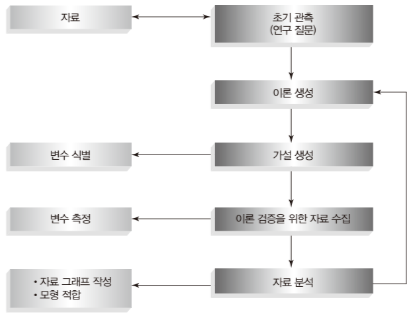
    To answer an interesting question, you need to take the following steps:

    1. Observation: The first step begins with observation. Observations can be stories that can be captured between actual events or people in everyday life.
    2. Theory: Initially create a theory that explains the observations.
    3. Hypothesis: Create a hypothesis to make a guess or inference from a theory. At this time, variables are defined and relationships between variables are established.
    4. Data collection: Collect relevant data to logically verify the theory. The form of data may vary depending on the type of information that matches the variable.
    5. Data analysis: Analyze collected data to verify or revise the theory.
    Article image 2
    Article image 2

    Ⅱ. What is a meaningful hypothesis?

    A good theory should be able to make statements (propositions) about the state of the world. In this case, the statement means something good. We make sense of the world through statements and make decisions that affect our future. Some statements can be verified through scientific activities, while others cannot be scientifically verified. Scientific statements can be confirmed or disproved by experiments. ‘IU is a popular singer’ – unscientific statement ‘IU is the singer with the highest album sales in Korea. ‘ – Scientific statement So, a meaningful hypothesis is one that creates a hypothesis that corresponds to a scientific statement with a good theory.

    Ⅲ. Verification and disproof

    In scientific research, verification and falsification play a key role in the process of evaluating the validity of scientific theories and accumulating scientific knowledge. Both verification and falsification are important in scientific research, but their roles are different.

    • Verification: The process of finding data that supports a hypothesis or theory and thereby increasing reliability.
    • Counterevidence: The process of proving a hypothesis or theory wrong due to a single counterexample.

    Ⅱ – 1. Verification

    Verification is the process of confirming whether a particular theory or hypothesis is actually correct. If the data obtained through verification supports a hypothesis or theory, the reliability of that theory is strengthened. However, verification alone cannot prove that the theory is absolutely true, because other possible explanations may exist.

    [Example] Law of universal gravitation: Isaac Newton's law of universal gravitation explains the magnitude of gravitational force acting between two objects. To verify this, various experiments and observations were conducted. For example, by observing the orbital motion of planets or experimenting with objects falling on Earth, the results predicted by Newton's laws were compared with the actual results. Through these numerous successful verification cases, it is accepted that the law of universal gravitation exists.

    Ⅲ – 2. Falsification

    Falsification is the process of proving that a specific theory or hypothesis is wrong. Philosopher Karl Popper argued that falsifiability is important in scientific methodology. This is because no hypothesis can be proven completely true by an infinite number of test cases, but it can be proven wrong by a single counterexample.

    [Example] Ether theory: Until the end of the 19th century, it was believed that light propagated through a medium called ‘ether.’ However, the Michelson-Morley experiment proved that light can propagate in a vacuum without ether. Ultimately, the ether theory was disproved. Accordingly, a new understanding of light became necessary, which led to Einstein's theory of relativity.

    Good article to read together

    • str_squish function to remove unnecessary spaces
    • Creative thinking has become more important in the AI ​​era, and the power of questions and perspectives spoken of by Dr. Jeongwoon Kim
    • Human Values ​​in the AI ​​Era: What should people who cannot be replaced prepare?

    Key Checklist

    • Is the research question clear?
    • Are the research object and scope determined?
    • Does the data collection method connect to the research question?
    • Have you decided on what criteria to interpret the analysis results?

    Good R statistics articles to read together

    • Research Method Introduction to R Statistics: Understanding research design and analysis methods at a glance
    • Variables and Measurement R Statistics: Understanding independent variables, dependent variables and measurement levels
    • Measurement Error R Statistics: Easily Understand Random Error and Systematic Error
    • Validity/Reliability R Statistics: Criteria for judging a good measurement tool

    FAQ

    Why are research questions important?

    Research questions are the criteria that guide data collection and analysis. If the question is ambiguous, it also changes which variables to look at, which statistical method to use, and how to interpret the results.

    How are research and statistical analysis linked?

    Research is the process of establishing questions, gathering and interpreting evidence, and statistical analysis is a tool to systematically check the evidence. So statistics have meaning within research design.

    What research concepts do I need to know before learning R statistics?

    It is a good idea to first understand your research questions, variables, measurements, sample, data collection, and analysis purposes. Knowing this concept will help you interpret your R code results as research rather than just numbers.

    Related Reading

    FAQ

    What is this article about?

    This article is an English translation and global-reader adaptation of the Korean post “What is research: Summary of research concepts for introduction to R statistics.” It preserves the original article’s main explanation, examples, and practical context.

    Why is it translated into English?

    The English version helps global readers access Thinknote articles through English search keywords while keeping the Korean source available as the original reference.

    Where can I read the original Korean version?

    You can read the original Korean article here: https://www.thinknote.co.kr/what-is-research-r-statistics/

  • Measurement Error R Statistics: Easily Understand Random Error and Systematic Error

    To test a hypothesis, it is important to accurately measure and analyze data. However, measurement errors often occur during the measurement process. Measurement error refers to the difference between the value we actually intend to measure and the actually measured value.

    Original Korean article: Measurement Error R Statistics: Easily Understand Random Error and Systematic Error

    The concept of measurement error R statistics is essential when judging the reliability of research results. Even if the same object is measured, values ​​may vary depending on the tool, environment, and respondent status, and these differences affect the analysis results. This article summarizes the difference between random error and systematic error, and basic methods for reducing error.

    These errors can affect the interpretation of results and drawing conclusions, so they are a very important factor in hypothesis testing. To minimize and control measurement errors, experimental design must be carefully designed, instruments must be regularly calibrated, random errors must be averaged through repeated measurements, and systematic causes must be identified and corrected. Measurement error is generally divided into systematic error and random error.

    systematic error
    systematic error

    Ⅰ. Systematic Error

    Systematic error is an error that consistently occurs in a specific direction and shows the same pattern even in repeated measurements. Since this affects repeated measurements in the same way, it does not disappear when averaging. These errors are mainly caused by defects in measuring equipment, changes in environmental conditions, or problems with the experimental method itself.

    • Predictability: Systematic errors have a certain pattern and are therefore predictable.
    • Modifiable: Once the cause is identified, it can be modified.

    Ⅰ – 1. Types of systematic errors

    1. Instrumental Error: This is an error that occurs due to defects or imperfections in the measurement equipment itself. For example, a scale may always read higher by a certain amount, or a thermometer may consistently read lower than the actual temperature.
    2. Environmental Factors: Occur when environmental conditions change or specific environmental conditions continue to have an impact. For example, changes in temperature or humidity may affect measuring devices, or there may be electromagnetic interference.
    3. Procedural or Methodological Errors: Errors that occur due to problems with the experiment or measurement method itself. This can occur, for example, if the method of collecting samples is inconsistent or if a particular experimental procedure is set up incorrectly.
    4. Human Error: This is when the person performing the measurement consistently operates or records incorrectly in the same way. This can mainly be caused by lack of training or carelessness.
    5. Confounding Variables: In experimental design, uncontrolled variables affect the results. This can occur especially frequently in social science research or life science research.

    Ⅰ – 2. Systematic error minimization strategy

    Systematic errors are, by their very nature, difficult to detect and correct. Therefore, several strategies are needed to minimize this:

    1. Calibration of Instruments: Calibrate equipment periodically to maintain accuracy.
    2. Standardization: Standardize experiments and measurement procedures so that they can be performed under the same conditions.
    3. Control of Environmental Conditions: Maintain or control environmental factors as constant as possible.
    4. Training and Education: Reduce human error by providing sufficient training and education to those performing measurements.
    5. Blind Testing: Blind testing techniques can be used to prevent researchers from having preconceptions about the results.

    Reducing systematic errors is very important to increase the reliability of research and experimental results. To this end, it is important to use various methods to obtain as accurate and consistent data as possible.

    Ⅱ. Random Error

    Random errors are unpredictable errors that inevitably occur during the measurement process and appear in different sizes and directions for each measurement. These errors can disappear or be minimized when averaged over repeated measurements. It mainly occurs due to small changes in the environment, small changes in experimental conditions, or natural factors.

    • Predictability: Random errors are unpredictable and do not show a consistent pattern.
    • Correctability: Taking averages over repeated measurements can reduce the impact of random error.

    Ⅱ – 1. Types of random errors

    1. Environmental Factors: Occurs when environmental conditions fluctuate slightly. For example, small changes in wind strength or temperature can affect measurement results.
    2. Limitations of Measuring Instruments: Occur when the resolution or precision of the instrument is limited. For example, a digital scale may have a limited number of decimal places.
    3. Sample Variability: Occurs when the sample itself is inconsistent. For example, even the same chemical substance shows slightly different properties.
    4. Human Minor Errors: These are small errors that occur when humans perform measurements. For example, this includes slight errors in reading scales or hand tremors.

    Ⅱ – 2. Random error minimization strategy

    Random error is difficult to completely eliminate due to its nature, but several strategies can be used to minimize it:

    1. Repeated Measurements: Reduce random errors by measuring multiple times under the same conditions and calculating the average value.
    2. Use of High-Quality Instruments: Overcome the limitations of measuring instruments by using high-precision equipment.
    3. Control Environmental Conditions: Minimize the influence of external factors by keeping environmental conditions as constant as possible.
    4. Adherence to Standard Procedures: Obtain consistent results by strictly following standardized procedures.
    5. Data Processing Techniques: Analyze and remove randomness in data using statistical methods.

    Understanding the characteristics and causes of both random and systematic errors and responding appropriately is a key factor in increasing the accuracy and reliability of research and experiment results.

    Good article to read together

    • 1. What is research? [R Statistics]
    • 2. Variables and Measurements [R Statistics]
    • 4. Validity, reliability [R statistics]
    • 5. Research method [R statistics]
    • Importance and usage of pipe operator %>%

    Key Checklist

    • Are measurement tools used consistently?
    • Is there any possibility of errors occurring in the respondents, survey environment, and recording process?
    • Have you distinguished between random and systematic errors?
    • Are there preliminary inspection procedures to reduce errors?

    Good R statistics articles to read together

    • What is research: Summary of research concepts for introduction to R statistics
    • Variables and Measurement R Statistics: Understanding independent variables, dependent variables and measurement levels
    • Validity/Reliability R Statistics: Criteria for judging a good measurement tool
    • Research Method Introduction to R Statistics: Understanding research design and analysis methods at a glance

    FAQ

    What is the difference between random error and systematic error?

    Random error is when a measurement fluctuates due to random fluctuations, while systematic error is a persistent bias in a particular direction. The two errors have different causes and ways to reduce them.

    How does measurement error affect research results?

    Large measurement errors can make relationships between variables appear weak or lead to incorrect conclusions. In particular, systematic errors have a high risk of distorting the overall results in one direction.

    What should I check to reduce measurement error?

    The questions, survey environment, response method, and recording procedures of the measurement tool must be standardized. It is a good idea to check whether the values ​​are stable through preliminary research and repeated measurements.

    Related Reading

    FAQ

    What is this article about?

    This article is an English translation and global-reader adaptation of the Korean post “Measurement Error R Statistics: Easily Understand Random Error and Systematic Error.” It preserves the original article’s main explanation, examples, and practical context.

    Why is it translated into English?

    The English version helps global readers access Thinknote articles through English search keywords while keeping the Korean source available as the original reference.

    Where can I read the original Korean version?

    You can read the original Korean article here: https://www.thinknote.co.kr/measurement-error-r-statistics/

  • Variables and Measurement R Statistics: Understanding independent variables, dependent variables and measurement levels

    In order to collect data to test a theory, you must be able to answer two questions: 1) What to measure? and 2) How to measure it? In other words, to clarify the purpose and method of data collection, you must understand variables and measurements. In research, variables refer to elements that researchers observe or measure, and variables allow researchers to explain or predict specific phenomena. When designing a study, clearly defining various types of variables and controlling and analyzing them appropriately can lead to more reliable and valid research results.

    Original Korean article: Variables and Measurement R Statistics: Understanding independent variables, dependent variables and measurement levels

    Variables and measurements are the starting point of R statistical analysis. Failure to distinguish between independent and dependent variables or misunderstanding the level of measurement can affect both the choice of analysis method and the interpretation of results. This article easily summarizes the role of variables and nominal, ordinal, interval, and ratio scales, and explains why they are important in R statistics.

    Ⅰ. Types of Variables [Variables and Measurements]

    Ⅰ-1. Independent Variable

    Independent variable: A variable manipulated by the researcher that serves to provide a cause. An independent variable is a variable that a researcher manipulates or changes to observe its effects. It is considered a cause in an experiment and acts as a factor that affects the dependent variable.

    • Example: Let's say your experiment examines the effect of light on plant growth. In this case, the amount of light (e.g. 4, 8, or 12 hours per day) is the independent variable. Researchers adjust the amount of light to see how it affects plant growth.

    Ⅰ-2. Dependent Variable

    Dependent variable: An outcome variable that changes depending on changes in the independent variable. The dependent variable is the outcome or response variable that the researcher wishes to measure. In other words, it is a variable that changes depending on changes in the independent variable, and the impact of the independent variable can be evaluated by looking at how the dependent variable changes.

    • Example: In the plant growth experiment mentioned earlier, the degree of plant growth (e.g. height, number of leaves) is the dependent variable. Here, we measure how the degree of plant growth (dependent variable) changes as the amount of light (independent variable) changes.

    Ⅰ-3. Parameter (Mediator Variable)

    Mediating variable: A variable that mediates or explains the relationship between an independent variable and a dependent variable. Mediating variables help us understand how an independent variable conveys its influence on a dependent variable. It plays an important role when researchers explore the mechanism between independent and dependent variables.

    • Example: In a plant growth experiment, the amount of light (independent variable) can affect the degree of plant growth (dependent variable) through the plant's photosynthetic rate (parameter). Here, the rate of photosynthesis changes as the amount of light increases, which in turn affects the degree of plant growth.

    Ⅰ-4. Control Variable

    Control variable: A variable that is kept constant in a study so as not to affect the results of the experiment. By holding the control variables constant, we can measure the net effect of the independent variable on the dependent variable. Control variables are important to increase the reliability of research results.

    • Example: In a plant growth experiment, temperature, amount of water, soil type, etc. are control variables. By keeping these variables constant, we can clearly see how the amount of light affects plant growth.

    Ⅰ-5. Predictor Variable

    Predictor variable: A variable that is expected to affect changes in the dependent variable. Predictor variables are variables that researchers manipulate or observe and are used when making predictions about the dependent variable. This plays an important role in explaining or predicting changes in dependent variables.

    • Example: In a weight loss study, predictors could include exercise amount, diet, and sleep time. Here we will analyze how these predictors affect weight loss (dependent variable).

    Ⅰ-6. Outcome Variable

    Outcome variable: This is the main variable that the researcher wants to measure as a result of changes in the predictor variable. Outcome variables describe responses or changes that occur under specific situations or conditions, and through them, the impact of predictor variables can be evaluated.

    • Example: In a study of academic achievement, a student's test score is the outcome variable. In this case, we evaluate how study time or study method (predictor variable) affects test scores (outcome variable).

    Ⅱ. Level of measurement [variables and measurements]

    The measurement level refers to the relationship between the measurement object and the value it represents. Variables can be divided into categorical variables and continuous variables.

    Ⅱ-1. Categorical Variable

    Categorical variables are when data is divided into several fixed categories or groups. Each value represents a specific category, and there is no concept of order or size among these values.

    • example:
    • Gender: Male, Female
    • Blood type: Type A, B, AB, O
    • Housing type: Apartment, single-family home, villa Categorical variables can be further divided into nominal and ordinal.
    • Nominal variables: unordered categories (e.g. blood type)
    • Dichotomous variable: unordered variable (e.g. yes/no, living/non-living)
    • Ordinal variables: ordered categories (e.g. level of education – elementary school, middle school, high school)

    Ⅱ-2. Continuous Variable

    A continuous variable is a variable that can have any real number within a specific range. These values ​​are measurable and the concepts of order and size exist among numbers. When dealing with continuous variables, various statistical techniques can be used, and data are analyzed using measures such as mean, standard deviation, and variance.

    • example:
    • Height (cm): 170.5 cm
    • Weight (kg): 65.3 kg
    • Temperature (°C): 22.4°C

    Categorical variables can be divided into interval, ratio, and discrete types.

    • Interval variable: A variable that has continuous values ​​with constant differences between values ​​but no absolute zero (e.g. temperature (Celsius or Fahrenheit), IQ score, date)
    • Ratio variable: A variable that has continuous values, the difference between the values ​​is constant, and has an absolute zero point (e.g. weight, height, age, income)
    • Discrete variable: A variable expressed as a non-continuous integer (e.g. number of students, number of cars, number of people in the household)
    Variables and Measurements
    Variables and Measurements

    Good article to read together

    • 1. What is research? [R Statistics]
    • 3. Measurement error [R statistics]
    • 4. Validity, reliability [R statistics]
    • 5. Research method [R statistics]
    • Importance and usage of pipe operator %>%

    Key Checklist

    • Have you distinguished between independent and dependent variables?
    • Are control variables or parameters needed?
    • Have you checked the measurement level of each variable?
    • Have you chosen an analysis method appropriate for the level of measurement?

    Good R statistics articles to read together

    • What is research: Summary of research concepts for introduction to R statistics
    • Research Method Introduction to R Statistics: Understanding research design and analysis methods at a glance
    • Measurement Error R Statistics: Easily Understand Random Error and Systematic Error
    • Validity/Reliability R Statistics: Criteria for judging a good measurement tool

    FAQ

    How do you distinguish between independent and dependent variables?

    The independent variable is the causal or explanatory variable that is believed to affect the outcome, and the dependent variable is the outcome variable that is affected. The distinction becomes easier if you first identify what is cause and what is effect in your research question.

    How does the level of measurement affect the choice of analysis method?

    Depending on the nominal, ordinal, interval, or ratio scale, the analysis methods that can be used, such as mean, correlation, and regression, vary. Misjudging the level of measurement can lead to inaccurate interpretation of statistical results.

    What are the differences between nominal, ordinal, interval, and ratio scales?

    Nominal scales are categorical, ordinal scales are ordinal, interval scales are intervals, and ratio scales are numbers with absolute zero. Considering the nature of variables in terms of these four criteria makes analysis selection easier.

    Related Reading

    FAQ

    What is this article about?

    This article is an English translation and global-reader adaptation of the Korean post “Variables and Measurement R Statistics: Understanding independent variables, dependent variables and measurement levels.” It preserves the original article’s main explanation, examples, and practical context.

    Why is it translated into English?

    The English version helps global readers access Thinknote articles through English search keywords while keeping the Korean source available as the original reference.

    Where can I read the original Korean version?

    You can read the original Korean article here: https://www.thinknote.co.kr/variables-measurement-r-statistics/

  • Validity/Reliability R Statistics: Criteria for judging a good measurement tool

    A study with high validity actually measures exactly what it was intended to do, but high reliability is necessary to maintain high validity and provide stable results even in repeated situations.

    Original Korean article: Validity/Reliability R Statistics: Criteria for judging a good measurement tool

    The concepts of validity and reliability R statistics are key criteria for judging a good measurement tool. High reliability does not always mean high validity, and it must be checked whether the measurement is appropriate for the purpose of the study and whether repeated measurements produce consistent results. This article explains the differences between the two concepts and the criteria to check in actual research.

    Ⅰ. feasibility

    Validity refers to how accurately a measurement tool or method in research actually measures what it is intended to measure.

    1. Content Validity: Concept: Content validity evaluates whether a measurement tool contains all important content for the research topic or purpose. Example: For example, if there is a test that evaluates students' math skills, the process of evaluating content validity is to check whether the test includes only addition and subtraction problems or whether it includes all various mathematical concepts such as multiplication, division, and geometry.
    2. Criterion-related Validity: Concept: Criterion-related validity evaluates the validity of a measurement tool through correlation with a specific criterion (or external measure). Types and examples: Concurrent Validity: Evaluation compared to standards at the current time. For example, if a new depression test shows a high correlation with an existing, validated depression test, it can be said to have high concurrent validity. Predictive Validity: Evaluation compared to future standards. For example, if college entrance exam scores are a good predictor of job achievement after graduation, the test has high predictive validity.
    3. Construct Validity: Concept: Construct validity evaluates whether a measurement tool actually reflects the theoretical construct well. Example: The process of reviewing structural validity is to check whether the questionnaire intended to measure ‘self-esteem’ is composed of questions that actually reflect self-esteem. For this purpose, various statistical analysis techniques (e.g. factor analysis) can be used.
    4. Ecological Validity: Concept: Ecological validity means whether research results can be equally applied in the real world. Example: If the results of a memory test performed in a laboratory environment show the same memory pattern in everyday life, it can be said to have high ecological validity.
    • Concept: Content validity evaluates whether a measurement tool contains all important content for the research topic or purpose.
    • Example: For example, if there is a test that evaluates students' math skills, the process of evaluating content validity is to check whether the test includes only addition and subtraction problems or whether it includes all various mathematical concepts such as multiplication, division, and geometry.
    • Concept: Criterion-related validity evaluates the validity of a measurement tool through its correlation with a specific criterion (or external measure).
    • Types and examples: Concurrent Validity: Evaluation compared to standards at the current time. For example, if a new depression test shows a high correlation with an existing, validated depression test, it can be said to have high concurrent validity. Predictive Validity: Evaluation compared to future standards. For example, if college entrance exam scores are a good predictor of job achievement after graduation, the test has high predictive validity.
    • Concurrent Validity: Evaluation compared to standards at the current time. For example, if a new depression test shows a high correlation with an existing, validated depression test, it can be said to have high concurrent validity.
    • Predictive Validity: Evaluation compared to future standards. For example, if college entrance exam scores are a good predictor of job achievement after graduation, the test has high predictive validity.
    • Concept: Structural validity evaluates whether a measurement tool actually reflects the theoretical construct.
    • Example: The process of reviewing structural validity is to check whether the questionnaire intended to measure ‘self-esteem’ is composed of questions that actually reflect self-esteem. For this purpose, various statistical analysis techniques (e.g. factor analysis) can be used.
    • Concept: Ecological validity refers to whether research results can be equally applied in the real world.
    • Example: If the results of a memory test performed in a laboratory environment show the same memory pattern in everyday life, it can be said to have high ecological validity.
    feasibility
    feasibility

    Ⅱ. reliability

    Reliability refers to whether a measurement tool or method in research consistently produces results. In other words, the degree to which similar results are obtained when measured repeatedly under the same conditions is evaluated.

    1. Internal Consistency: Concept: Internal consistency evaluates how well the items in a measurement tool reflect the same concept. Example: If a questionnaire consists of 10 questions, and all of these questions measure ‘self-esteem,’ internal consistency can be said to be high only when the correlation between each question is high. To evaluate this, Cronbach’s α coefficient is often used.
    2. Test-Retest Reliability: Concept: Retest reliability evaluates how consistent the results are when the same measurement tool is repeatedly applied to the same subject at regular time intervals. Example: When a psychological test is administered to the same person twice, two months apart, if the scores on both tests are similar, the test's test-retest reliability can be said to be high.
    3. Parallel-Forms Reliability: Concept: Parallel-Forms Reliability evaluates the consistency between two different forms of measurement tools designed to measure the same concept. Example: When there is a type A test paper and a type B test paper that evaluates mathematical ability, if the scores obtained when evaluating the same students with the two test papers are similar, the reliability of the alternative form can be said to be high.
    4. Inter-Rater Reliability: Concept: Inter-rater reliability refers to how consistent the results are when different evaluators independently evaluate the same object. Example: When several psychologists watch a recording of a counseling session for the same patient and each rate the level of depression, if their ratings are similar, inter-rater reliability can be said to be high.
    5. Split-Half Reliability: Concept: Split-Half Reliability is a method of evaluating the consistency of the entire test by dividing the data obtained from one test into half and finding a correlation between the scores of each half. Example: In a cognitive ability test consisting of 20 questions, if there is a high correlation between the scores of each part of the first 10 questions and the last 10 questions, the reliability of the split response can be said to be high.
    • Concept: Internal consistency evaluates how well the items in a measurement tool reflect the same concept.
    • Example: If a questionnaire consists of 10 questions, and all of these questions measure ‘self-esteem,’ internal consistency can be said to be high only when the correlation between each question is high. To evaluate this, Cronbach’s α coefficient is often used.
    • Concept: Test-retest reliability evaluates how consistent the results are when the same measurement tool is repeatedly applied to the same subject at certain time intervals.
    • Example: When a psychological test is administered to the same person twice, two months apart, if the scores on both tests are similar, the test's test-retest reliability can be said to be high.
    • Concept: Alternative reliability assesses the consistency between two different types of measurement instruments designed to measure the same concept.
    • Example: When there is a type A test paper and a type B test paper that evaluates mathematical ability, if the scores obtained when evaluating the same students with the two test papers are similar, the reliability of the alternative form can be said to be high.
    • Concept: Inter-rater reliability refers to how consistent the results are when different evaluators independently evaluate the same object.
    • Example: When several psychologists watch a recording of a counseling session for the same patient and each rate the level of depression, if their ratings are similar, inter-rater reliability can be said to be high.
    • Concept: Split response reliability is a method of evaluating the consistency of the entire test by dividing the data obtained from one test into half and finding a correlation between the scores of each half.
    • Example: In a cognitive ability test consisting of 20 questions, if there is a high correlation between the scores of each part of the first 10 questions and the last 10 questions, the reliability of the split response can be said to be high.

    Good article to read together

    • 1. What is research? [R Statistics]
    • 2. Variables and Measurements [R Statistics]
    • 3. Measurement error [R statistics]
    • 5. Research method [R statistics]
    • Importance and usage of pipe operator %>%

    Key Checklist

    • Is the measurement tool appropriate for the research purpose?
    • Do repeated measurements produce similar results?
    • Isn't this a situation where reliability is high but validity is low?
    • Has the validity been confirmed through existing research or expert review?

    Good R statistics articles to read together

    • What is research: Summary of research concepts for introduction to R statistics
    • Variables and Measurement R Statistics: Understanding independent variables, dependent variables and measurement levels
    • Measurement Error R Statistics: Easily Understand Random Error and Systematic Error
    • Research Method Introduction to R Statistics: Understanding research design and analysis methods at a glance

    FAQ

    What is the difference between validity and reliability?

    Validity refers to whether a measurement tool properly measures the concept being studied, and reliability refers to how consistent the results are when measured repeatedly. The two are related but not the same concept.

    What are the criteria for judging a good measurement tool?

    A good measurement tool must accurately measure concepts that fit the research purpose and produce stable results even when used repeatedly. A feasibility review and reliability review must be conducted together.

    Does high reliability mean high validity?

    Not necessarily. Even if the same results are repeated, if the wrong concept is being measured in the first place, reliability may be high but validity may be low.

    Related Reading

    FAQ

    What is this article about?

    This article is an English translation and global-reader adaptation of the Korean post “Validity/Reliability R Statistics: Criteria for judging a good measurement tool.” It preserves the original article’s main explanation, examples, and practical context.

    Why is it translated into English?

    The English version helps global readers access Thinknote articles through English search keywords while keeping the Korean source available as the original reference.

    Where can I read the original Korean version?

    You can read the original Korean article here: https://www.thinknote.co.kr/validity-reliability-r-statistics/

  • Research Method Introduction to R Statistics: Understanding research design and analysis methods at a glance

    Research method refers to a systematic and organized procedure in which a researcher explores a specific research topic or problem, collects and analyzes data, and draws conclusions. Research methods can be divided into quantitative research and qualitative research. Research methods vary by academic field, and in each field, various methodologies and tools tailored to its characteristics are developed and used.

    Original Korean article: Research Method Introduction to R Statistics: Understanding research design and analysis methods at a glance

    Research Method R Statistics learning begins with understanding the research design before the analysis technique. The statistical method you use will depend on what questions you ask, what data you collect, and how you interpret the results. This article explains the differences between quantitative and qualitative research, cross-sectional and longitudinal research, and correlational and experimental research by linking them to the R statistical learning flow.

    Ⅰ. Quantitative Research

    Ⅰ – 1. Types and Features:

    • Quantitative research is a research method that analyzes and interprets phenomena through numerical data.
    • Purpose: The purpose is to verify hypotheses, clearly identify relationships between variables, and build a prediction model through generalization.
    • Data collection method: Data is collected from a large sample through methods such as surveys, experiments, and observations.
    • Analysis method: Data analysis is performed using statistical techniques and mathematical models.

    Ⅰ – 2. Example of use:

    • A study that analyzes the results of standardized tests administered nationally to assess the academic performance of students.
    • Marketing research that examines the relationship between changes in market share of a specific product and consumer satisfaction.
    • In the medical field, research that analyzes clinical trial data to verify the effectiveness of a specific drug.

    Ⅱ. Qualitative Research

    Ⅱ – 1. Types and characteristics:

    • Qualitative research is a research method that seeks to deeply understand human behavior, experience, and social phenomena through non-numerical data.
    • Purpose: Focus on deep understanding of complex phenomena or contexts and creation of new theories.
    • Data collection method: Data are collected from a small sample through interviews, participant observation, and document analysis.
    • Analysis method: Classify and interpret by topic, and derive results through narrative or case study methods.

    Ⅱ – 2. Example of use:

    • Medical sociology research that explores patients’ treatment experiences and emotions through in-depth interviews.
    • Anthropological research that investigates through participant observation how culture and traditions are maintained and changed within a specific community.
    • Focus group interview study to explore organizational culture and job satisfaction of employees within a company.
    Research method
    Research method

    Ⅲ. Longitudinal Study

    Ⅲ – 1. Types and Features:

    • Longitudinal research is a research method that tracks changes over time by repeatedly examining the same group over a long period of time.
    • Purpose: To identify patterns of change or development over time and to clearly identify the relationship between cause and effect.
    • Data collection point: Collect data repeatedly at multiple points in time to track trends and changes.
    • Advantages and limitations: It is possible to understand the individual change process in detail, but it is time consuming and expensive.

    Ⅲ – 2. Example of use:

    • Growth and development research that periodically examines the growth and development process of children from infancy to adolescence.
    • Human resource management research that tracks and analyzes career development and job satisfaction changes in specific occupational groups over a long period of time.
    • Medical research that evaluates long-term health outcomes in patients with chronic diseases by tracking treatment effectiveness and lifestyle changes.

    Ⅳ. Correlation Study

    Ⅳ – 1. Types and characteristics:

    • Correlational research is a research method that determines the relationship between two variables.
    • Purpose: To determine the relationship between variables and how changes in one variable affect other variables.
    • Interpretation of results: Measure the strength and direction of the relationship between two variables through the correlation coefficient. The correlation coefficient has values ​​from -1 to +1, with +1 meaning a completely positive correlation and -1 meaning a completely negative correlation.
    • Causality: Correlational studies do not prove causality; they simply show whether variables change together.

    Ⅳ – 2. Example of use:

    • A study examining the relationship between students' study time and grades.
    • A study analyzing the relationship between smoking amount and lung cancer incidence.
    • A study exploring the relationship between income level and happiness index.

    Ⅴ. Cross-sectional Study

    Ⅴ – 1. Types and Features:

    • Cross-sectional research is a research method that collects data by investigating a group with one or more characteristics at a specific point in time.
    • Purpose: To determine the status or distribution among various variables at a specific point in time.
    • Data collection point: Since data is collected at a single point in time, temporal changes or trends are not reflected.
    • Ease of comparison: Easy to compare various groups (e.g. age group, gender, etc.).

    V – 2. Example of use:

    • A study that examines the health status and lifestyle habits of a population of a specific age.
    • A study that analyzes the differences between the education and income levels of residents of various regions within a country.
    • A study that simultaneously surveys multiple populations to determine the prevalence of a specific disease.

    Ⅵ. Behavioral Experimentation

    Ⅵ – 1. Types and Features:

    • Behavioral experimentation is a research method that attempts to understand psychology or human behavior patterns by inducing and observing the behavioral responses of subjects in an experimental environment.
    • Purpose: To measure the behavioral responses of humans or animals under specific stimuli or conditions and to verify theories or make new discoveries based on this.
    • Data collection method: Depending on the experimental design, various stimuli or tasks are provided to experimental participants in a controlled environment and their responses are recorded.
    • Analysis method: Experiment results are statistically analyzed and used to verify hypotheses or derive theories.

    Ⅵ – 2. Example of use:

    • A marketing experiment to determine the impact of a specific advertising message on consumers' purchase intentions.
    • A psychological experiment to assess the effects of stress on work performance.
    • In the field of neuroscience, experiments are conducted to measure brain activity and record behavioral responses using various technologies such as electromagnetic waves to understand the relationship between brain activity and behavior.

    Good article to read together

    • 1. What is research? [R Statistics]
    • 2. Variables and Measurements [R Statistics]
    • 3. Measurement error [R statistics]
    • 4. Validity, reliability [R statistics]
    • Importance and usage of pipe operator %>%

    Key Checklist

    • Is the research purpose closer to exploration, explanation, or verification?
    • Do you need quantitative or qualitative data?
    • Which design is better: cross-sectional data or longitudinal data?
    • Are you distinguishing between correlation and causation?

    Good R statistics articles to read together

    • What is research: Summary of research concepts for introduction to R statistics
    • Variables and Measurement R Statistics: Understanding independent variables, dependent variables and measurement levels
    • Measurement Error R Statistics: Easily Understand Random Error and Systematic Error
    • Validity/Reliability R Statistics: Criteria for judging a good measurement tool

    FAQ

    Why do I need to learn research methods before R statistics?

    R is a tool for performing analysis, and research methods are the framework for deciding what to analyze and why. A clear study design can help you choose appropriate statistical techniques and R functions.

    What is the difference between quantitative and qualitative research?

    Quantitative research analyzes numerically measurable data to identify patterns or relationships. Qualitative research, such as interviews, observations, and documents, focuses on deeply interpreting meaning and context.

    When do you distinguish between correlational research and experimental research?

    A correlational study is appropriate to determine the relationship between two variables, and an experimental study is needed to see whether a specific treatment affects the results. To make causal claims, study designs must be more rigorous.

    Related Reading

    FAQ

    What is this article about?

    This article is an English translation and global-reader adaptation of the Korean post “Research Method Introduction to R Statistics: Understanding research design and analysis methods at a glance.” It preserves the original article’s main explanation, examples, and practical context.

    Why is it translated into English?

    The English version helps global readers access Thinknote articles through English search keywords while keeping the Korean source available as the original reference.

    Where can I read the original Korean version?

    You can read the original Korean article here: https://www.thinknote.co.kr/research-methods-r-statistics/