
1. Memory caching method (APCu, Redis, Memcached)
Memory caching methods available in Ubuntu include APCu, Redis, and Memcached. Each caching tool must be selected for different purposes and requirements.
Original Korean article: Install memory caching APCu, Redis, Memcached
- For example, APCu can improve the performance of PHP code, but it can only be used on a single server, making it unsuitable for distributed environments.
- Redis provides a variety of data structures and clustering capabilities, making it suitable for complex applications.
- Memcached is designed to support large-scale throughput in a distributed environment.
1) APCu (Alternative PHP Cache user caching)
APCu is a PHP extension used to cache data within a local server and is suitable for use in a single server environment. APCu does not allow sharing of data between processes, and data is kept only in that process.
- A memory caching system for PHP.
- You can cache data by accessing PHP code directly.
- It can only be used on a single server and is not suitable for distributed environments.
- APCu stores data natively in memory, providing fast read/write speeds.
- However, APCu does not support data retention and replication, so data may be lost in the event of a server failure.
2) Redis
Redis is an open source in-memory data structure store that can scale out in multi-server environments and store data both in memory and persistently on disk. It supports a variety of data structures (strings, hashes, lists, sets, etc.) and can also be used as a message broker through the Pub/Sub mechanism.
- It operates as a single thread and uses an event-driven architecture to solve concurrency problems.
- It supports a variety of data structures, including strings, hashes, lists, sets, and sorted sets.
- You can build a message-based architecture by supporting the Publish/Subscribe (Pub/Sub) mechanism.
- Supports distributed systems such as master-slave replication and Redis clusters.
- We provide a variety of performance monitoring and management tools to help you monitor the health of your database instances and optimize performance.
3) Memcached
Memcached is a distributed memory object cache system that can scale out in a multi-server environment and stores data in memory. Data is stored in key-value format and does not support complex data structures.
- It is a distributed object caching system.
- It is used to store and retrieve data in key-value form.
- It is suitable for use in a distributed environment and allows data to be shared between multiple servers.
- Memcached is a simple key-value store and does not support complex data structures.
- Memory usage is large and data is not stored on disk, so data may be lost in the event of a server failure.
Typically, APCu, Redis, and Memcached can all be installed and operated.
Server resources (memory and CPU) must be considered when operating all systems simultaneously, and the setup and operation of each cache system must be understood and optimized. You should also consider data consistency and synchronization issues.
2. APCu caching
1) Install APCu
To install APCu, run the following command:
sudo apt install php8.2-apcu2) Activate APCu (acpu.ini)
Run the following command to open the PHP configuration file. For PHP version, enter the PHP version installed on the server.
If you use Apache web server, you need to edit /etc/php/8.2/apache2/php.ini.
sudo nano /etc/php/8.2/apache2/php.iniIf you use PHP in PHP-FPM (PHP FastCGI Process Manager), edit sudo nano /etc/php/8.2/fpm/php.ini or edit the acpu.ini file. If there is no acpu.ini file, create the /etc/php/8.2/mods-available/apcu.ini file and paste the following content into it.
sudo nano
/etc/php/8.2/mods-available/apcu.ini
extension = apcu.so
apc.enabled = 1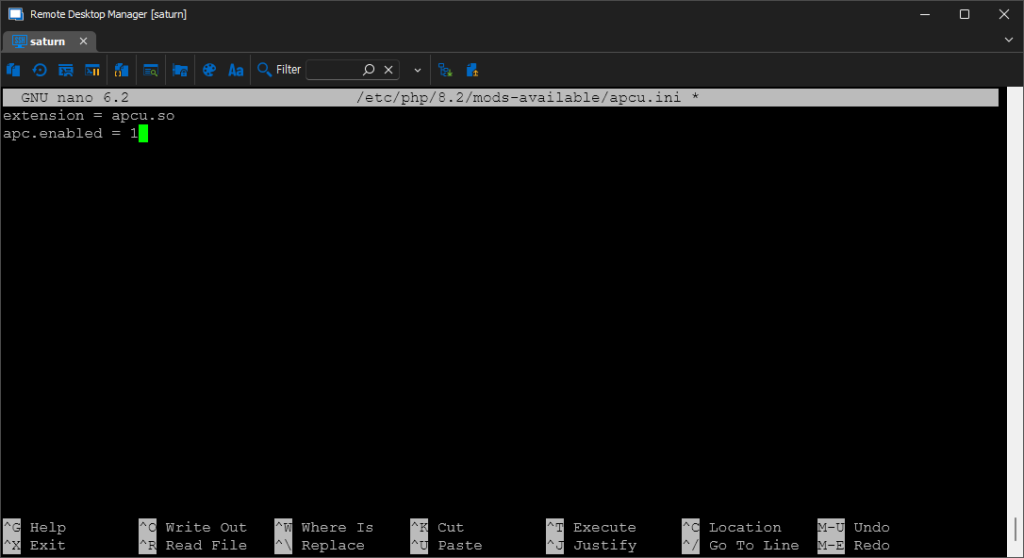
Activate the apcu module with the following command.
sudo phpenmod -v 8.2 apcuRestart the nginx server for the changes to take effect.
sudo systemctl restart nginx3) Check APCu execution (acpu.ini)
You can run the command below to print the results of the phpinfo() function and check APCu-related settings, version information, directory path, etc.
php -i | grep apcu1. Redis caching
1) Install Redis
To install Redis, run the following command: Once installation is complete, the Redis server will start automatically
sudo apt install redis-server2) Check Redis status
Run the following command to check the service status. After verifying that your Redis server is running normally, you can modify the Redis configuration file as needed. The configuration file is located in the path /etc/redis/redis.conf
sudo systemctl status redis-server
sudo usermod -a -G redis www-data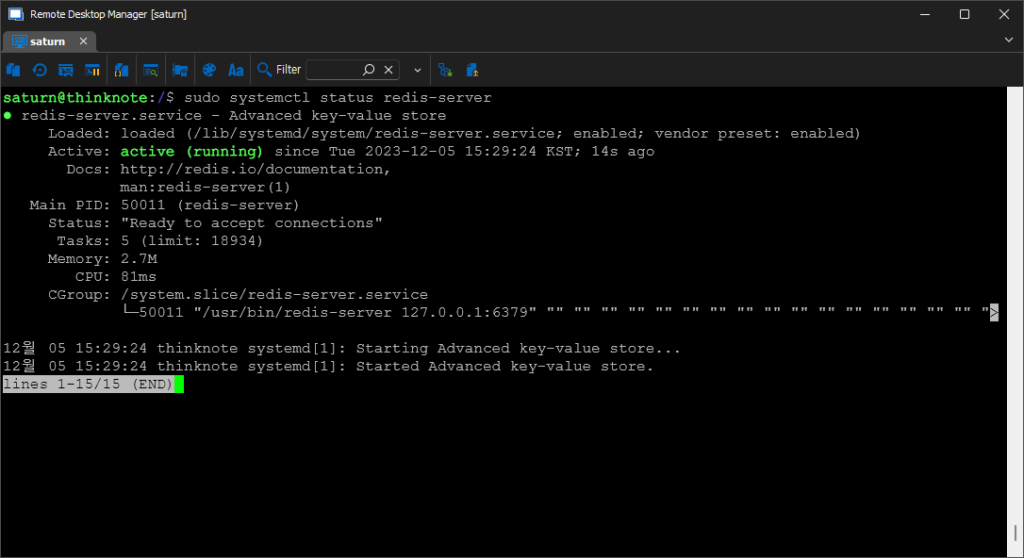
3) Firewall settings (iptables)
Open port 6379 used by redis-server and save and reload iptable.
sudo iptables -A INPUT -p tcp --dport 6379 -j ACCEPT
sudo netfilter-persistent save
sudo netfilter-persistent reload
4) Linking Redis and PHP
Install the Redis PHP extension module.
sudo apt install php8.2-redisRestart the nginx server for the changes to take effect.
sudo systemctl restart nginx5) Activate Redis (redis.ini)
Add the code below in sudo nano /etc/php/8.2/mods-available/redis.ini.
sudo nano /etc/php/8.2/mods-available/redis.ini
extension = redis.so
Restart the PHP-FPM server.
sudo systemctl restart php8.2-fpmYou can check the connection and operation with Redis by creating a new PHP file and writing the following code (value output):
<?php
$redis = new Redis();
$redis->connect('localhost', 6379);

// example example example example example
$redis->set("key", "value");
echo $redis->get("key");

// example example example example example
$redis->hSet("hash", "field", "value");
echo $redis->hGet("hash", "field");

// example example
$redis->close();
?>
2. Memcached caching
1) Install Memcached
Run the following command to install Memcache.
sudo apt install memcached2) Start Memcached service
Run the following command to start the Memcached service.
sudo systemctl start memcached
sudo systemctl status memcached
Run the code below to automatically start the Memcached service on boot.
sudo systemctl enable memcached3) Firewall settings (iptables)
Memcached runs on port 11211 on localhost (127.0.0.1). Open iptables port 11211 for Memcached to run.
sudo iptables -A INPUT -p tcp --dport 11211 -j ACCEPT
sudo netfilter-persistent save
sudo netfilter-persistent reload
Additionally, you can edit the following settings files to configure your application to use Memcached:
- Modifying memory quotas: You can adjust quotas by modifying the value of the -m option in the /etc/memcached.conf file.
- Modify binding address: You can bind to a different IP address by changing the -l option value in the /etc/memcached.conf file.
- Modifying the port: You can set it to a different port number by changing the value of the -p option in the /etc/memcached.conf file.
4) PHP integration (php.ini)
Run the command below to install the package.
sudo apt install php8.2-memcachedIn the /etc/php/8.2/fpm/php.ini file or /etc/php/8.2/mods-avaiable/memcached.ini, find the extension=memcached.so line, uncomment it and save it.
sudo nano
/etc/php/8.2/mods-available/memcached.ini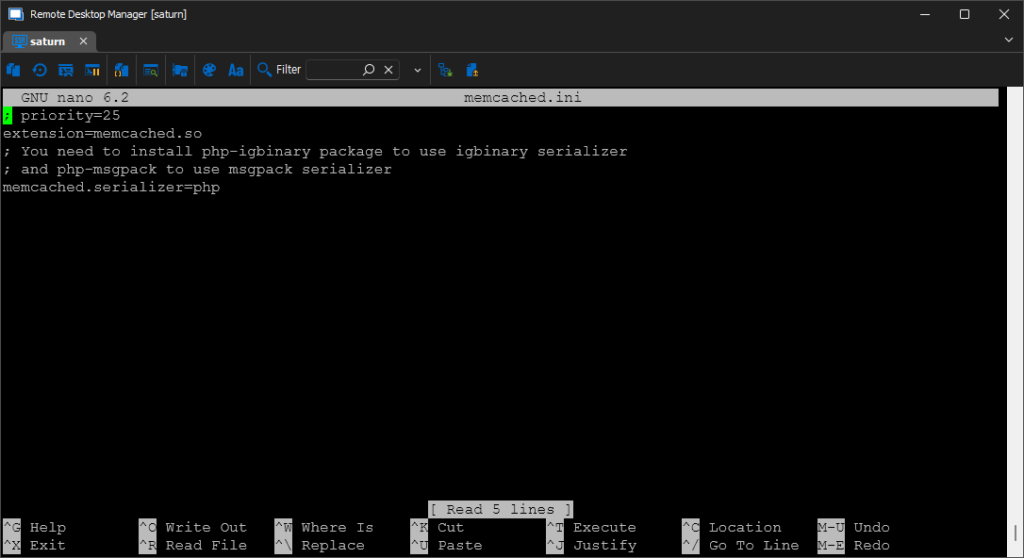
5) Check Memcached operation
You can use the following code to connect to a Memcached server and store, retrieve and test values. (value output is normal)
<?php
$memcached = new Memcached();
$memcached->addServer('localhost', 11211);

$memcached->set('key', 'value', 60); // 60example example example example

$value = $memcached->get('key');
echo $value; // example example example
?>
4. Additional study material
Links to official documentation and references related to APCu, Redis, and Memcached.
1) APCu
- APCu official documentation: https://www.php.net/manual/en/book.apcu.php
- “APCu: User Caching and Optimization” (with information and examples): https://www.sitepoint.com/caching-with-apcu/
- “APCu vs Redis vs Memcached” (comparison and performance testing): https://haydenjames.io/apcu-vs-redis-vs-memcached/
2) Redis
- Redis official documentation: https://redis.io/documentation
- “Redis Basics for Beginners” (an introduction to basic concepts): https://www.digitalocean.com/community/tutorials/redis-basics-for-beginners
- “Redis Tutorial” (Learn Redis with examples): https://www.tutorialspoint.com/redis/index.htm
3) Memcached
- Memcached official documentation: https://memcached.org/documentation
- “Memcached Tutorial” (including basic concepts and examples): https://www.tutorialspoint.com/memcached/index.htm
- “Introduction to Memcached” (Memcached introduction and use cases): https://phoenixnap.com/kb/memcached-tutorial
Thinknote
Good article to read together
- Install PHP 8 (ubuntu)
- Setting up Nginx + Php8
- Install Nginx web server (ubuntu)
- Free HTTPS setup (Let’s Encrypt, Cloudflare)
- Install Nginx web server (Centos 8)
Related Reading
Continue with these related Thinknote English articles in the Server & Infrastructure cluster.
- Nextcloud installation and settings
- Free HTTPS setup (Let’s Encrypt, Cloudflare)
- Install OpenSSL
- Installing and managing MariaDB (MySQL)
- Setting up Nginx + Php8
- Install PHP 8 (ubuntu)
FAQ
What is this article about?
This article is part of Thinknote’s English server and infrastructure archive. It focuses on practical Linux, Ubuntu, web-server, database, SSH, firewall, or hosting operations that readers can adapt to their own environment.
How should I use this guide?
Use it as a practical checklist and concept guide. Before applying commands on a live server, verify package names, OS versions, ports, and backup requirements for your own setup.
Where can I read the original Korean article?
The original Korean article is available here: Original Korean article.