
If AI builds a similar app without receiving its source code, can we say it understood the original? A similar-looking interface is different from understanding the data structures and exception handling.
Dante’s Datalab’s REA experiment illustrates this distinction. The creator had it analyze an asset management app whose source code he owned. A separate evaluation agent then compared the original with the result. It reimplemented the main features in about 23 minutes, but scored 74 out of 100 rather than achieving a complete replica. One misinterpreted piece of evidence, in particular, sent the internal design in a different direction.
REA Is More an Integration Layer for Analysis Tools Than a New Decompiler
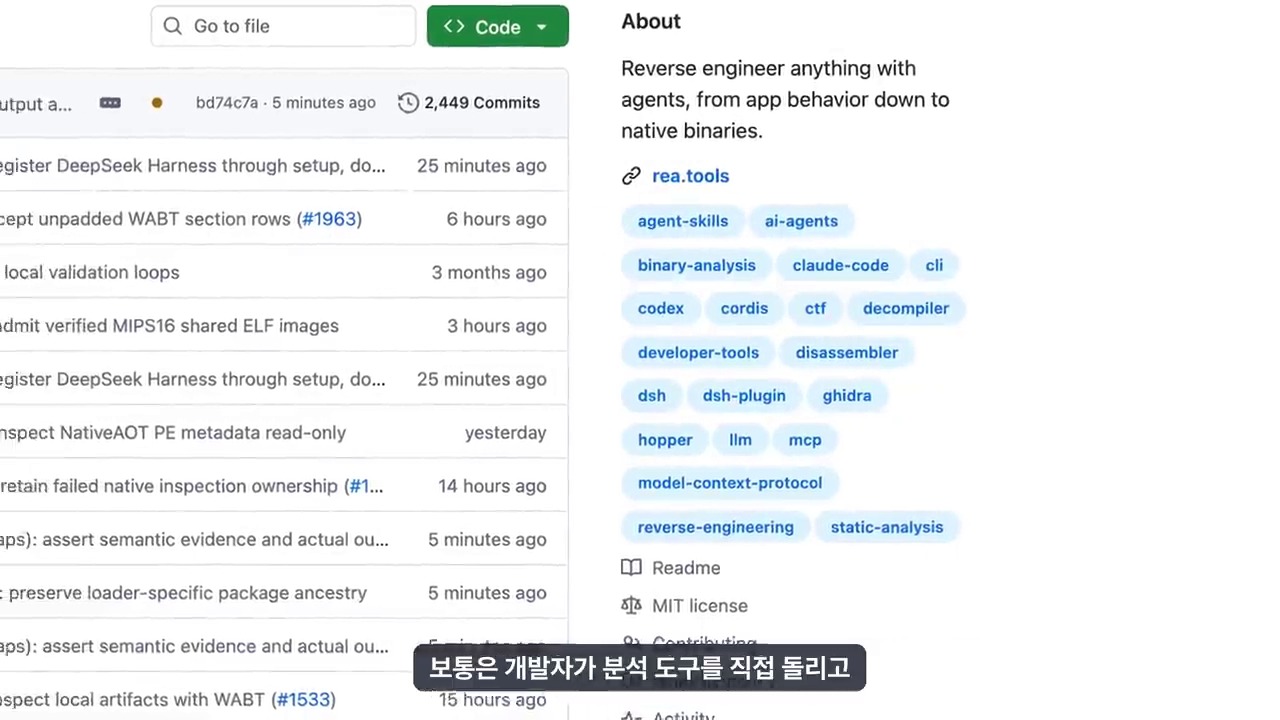
REA stands for Reverse Engineer Anything. Its official documentation describes connecting agents to tools for investigating native binaries, JavaScript and Electron apps, websites, and other targets. The agent reads analysis results, decides what to investigate next, and records both the evidence behind its judgments and their limitations.
It is therefore inaccurate to see REA as a new analysis engine that replaces Ghidra, Hopper, and IDA altogether. It instead brings existing analysis tools and runtime observation into a coding agent’s workflow. The official documentation also distinguishes static JavaScript analysis of Electron apps, which does not require a native analysis engine.
An important term in the video is Evidence. Rather than simply saying, ‘This is probably how it works,’ the agent records which files, analysis results, or runtime observations informed its judgment. But keeping a record does not guarantee that its interpretation is correct.
Original Source Access Was Blocked, but the Distributed App’s Internals Were Analyzed
The experiment targeted a Serpent-based asset management app that the creator was modifying. He held the original project’s source, allowing him to compare the analysis with the actual implementation. This differs from starting with an unauthorized attempt to copy a commercial app.
The experiment divided the work into three roles.
- Preparation agent: Packaged the app and prepared test materials and instructions.
- Analysis agent: Investigated the installed app and built a new app with the same user-facing functions.
- Evaluation agent: Examined both the original source and the reimplementation code to compare behavior and evidence.
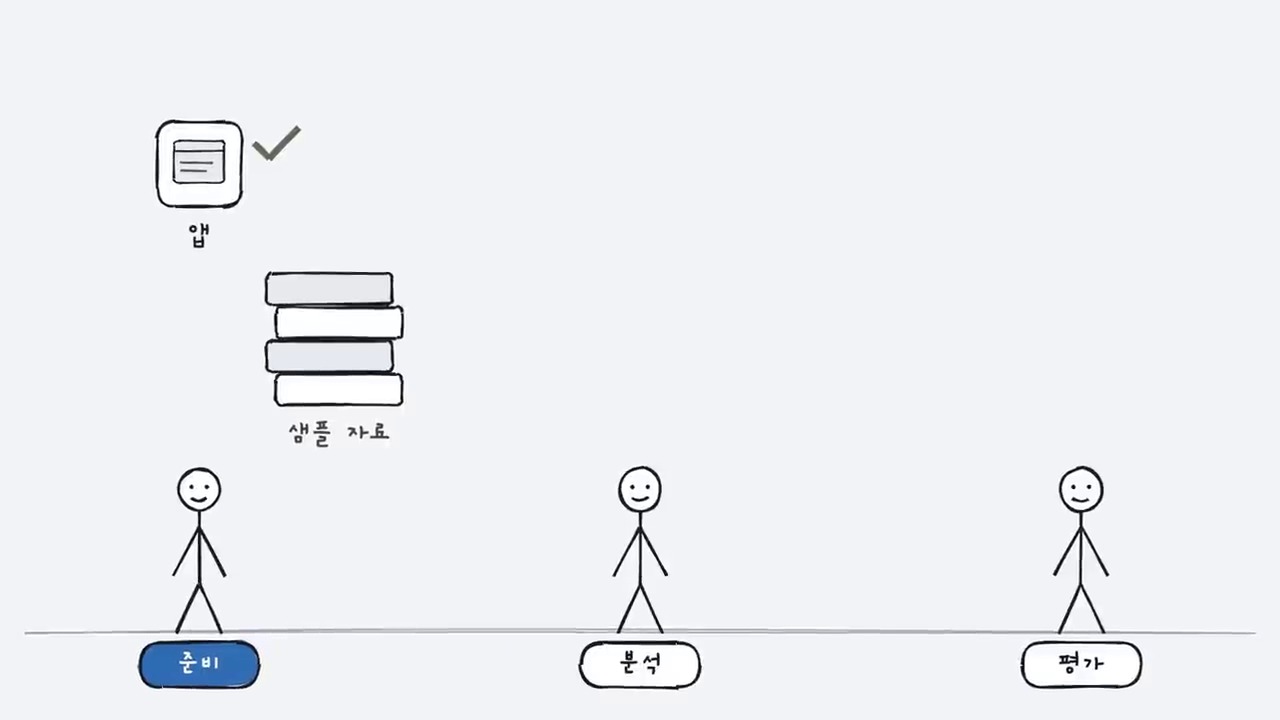
The analysis agent could not access the original project folder, perform external searches, or look things up on GitHub. It could, however, inspect the installed app’s bundled code and files left on disk. ‘The original source was not provided’ does not mean ‘no code was visible.’
This should also be distinguished from clean-room development in the strict sense. The analysis agent handled implementation too. The video acknowledges that the analyst and implementer were not separated. The agent also encountered the original name in files left by the app. Its identity was therefore not completely concealed throughout the experiment.
The 23-Minute Result Recreated Major User Flows, Not a Finished Product
According to the creator’s published record, reimplementation took about 23 minutes. It involved 9 REA calls and produced 949 lines of code without external packages. These figures describe the creator’s particular run, not a benchmark independently reproduced here.
The original was an Electron desktop app, while the rebuild used a Node.js server and a browser interface. The approach was that matching functionality need not require matching technology.
Working features included opening libraries, importing assets, grid display, tags, search, details, trash, and preserving state after restarting. Folders, collections, undo, and some views and filters were missing.
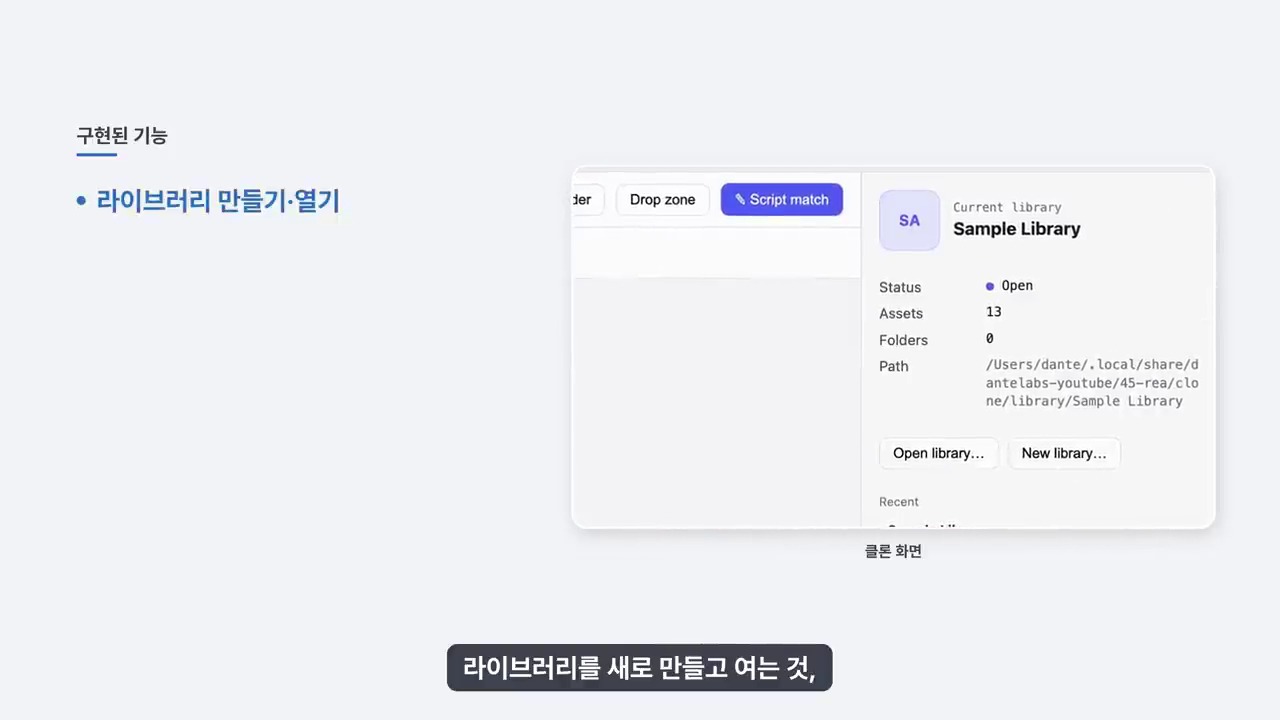
The published scorecard gave the following results.
- Interface structure: 16/20 points
- Data model: 16/20 points
- Core behavior: 25/30 points
- Edge cases: 8/15 points
- Code structure similarity: 9/15 points
- Total: 74/100 points
The score of 74 should not be read as ‘74% complete’ or as the probability of copying any app. The evaluation agent assigned it to this result using five criteria set by the creator. Those criteria included whether it adopted the original’s internal structure. This is therefore not a conventional product quality score either.
A Design Can Be Wrong Even When 22 of 24 Evidence Items Are Correct
The most noteworthy aspect of this experiment is the error, rather than the speed. Of 24 Evidence items checked against the original source, 22 were correct, 1 could not be verified, and 1 was wrong.
The problematic item concerned Electron IPC communication. Unable to find channel names, the analysis agent inferred that strings were assembled at runtime. It designed new feature-specific APIs on that basis. The original, however, used constants determined at compile time.
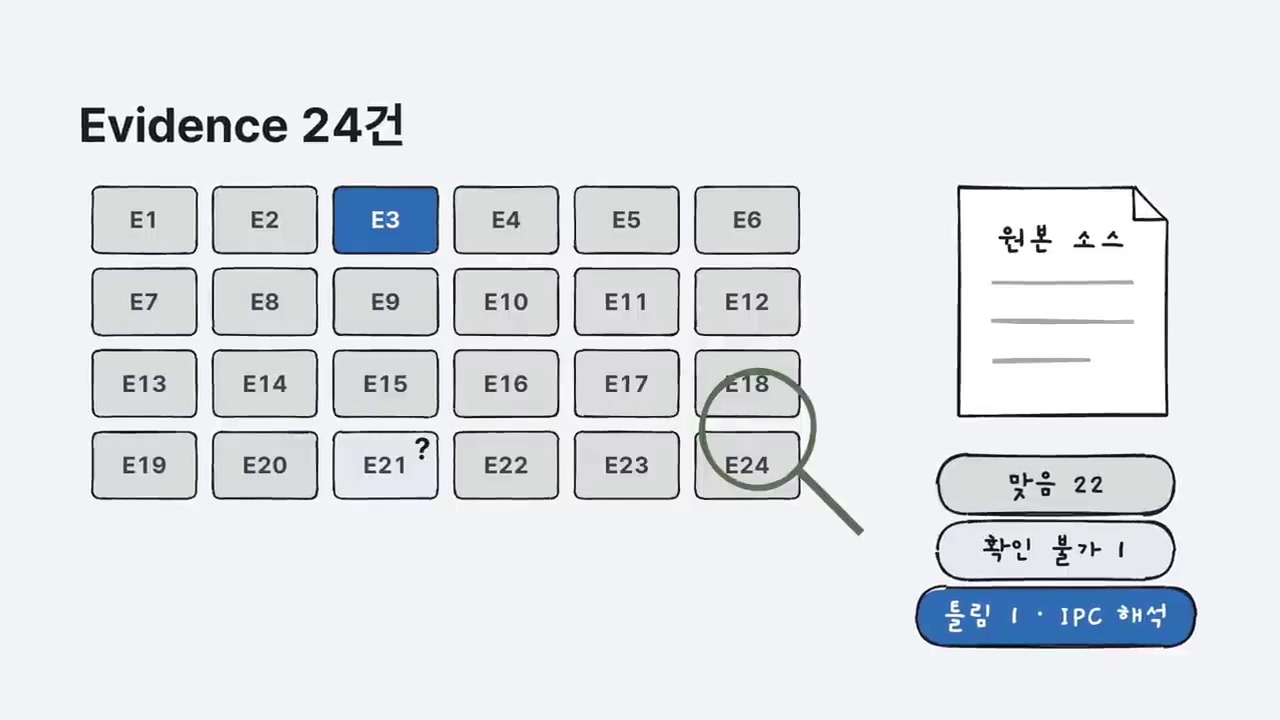
Duplicate-file handling also differed. The rebuilt app stored file fingerprints but did not use them properly to detect duplicates. It also accepted unsupported formats that the original rejected. Discovering information and implementing the reason for that information turned out to be separate tasks.
This case shows why verification cannot simply count pieces of evidence. Even when many items are correct, one mistaken core design assumption can redirect the entire result. The more important an inference, the more necessary it is to check both primary materials and actual behavior.
Understanding and Extending Features May Be More Useful Than Copying
After the rebuild, the creator added a panel that finds relevant assets when given a script paragraph. It compares tags, filenames, and notes to rank the assets. The key point is that this extension reused the data access and interface behavior already built.
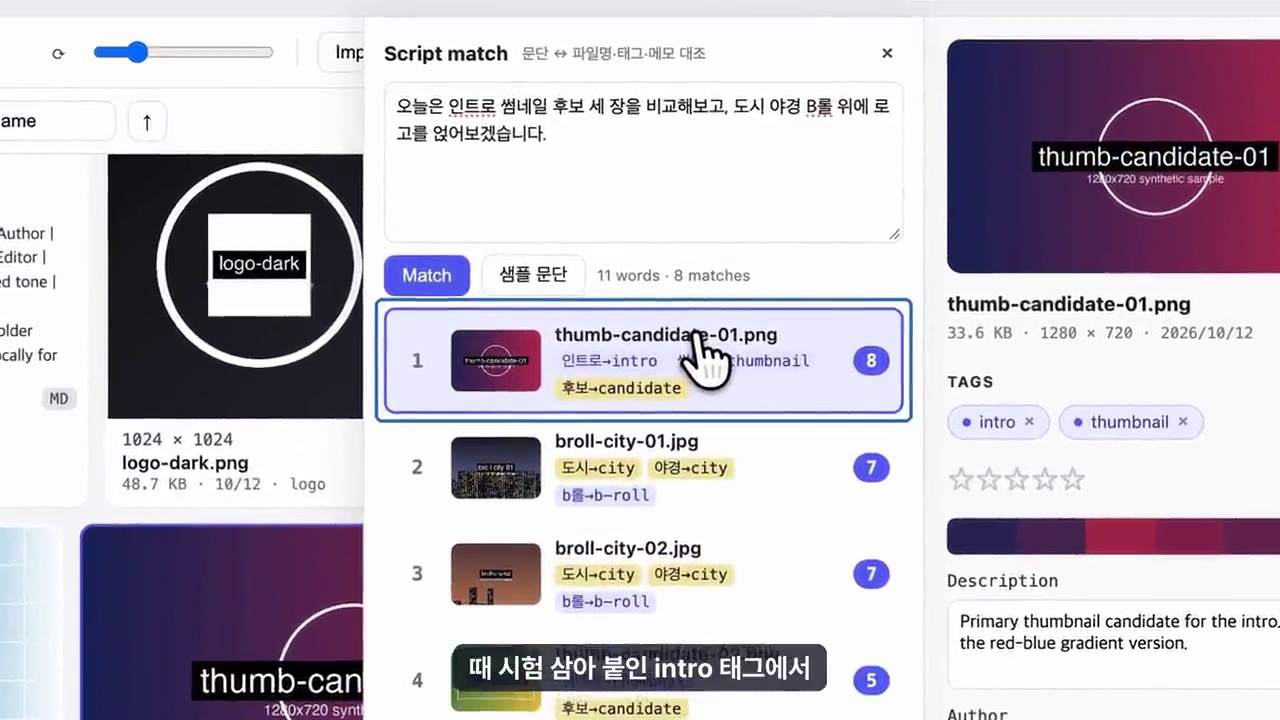
However, tags added during testing also affected search scores. A working new feature does not, by itself, validate recommendation quality. That is why it needs retesting with separate real-world work data.
From this perspective, REA is worth considering for more than other companies’ commercial apps. The following targets, for which analysis permission is clear, should come first.
- In-house business software with inadequate internal documentation after its developer has left
- Internal APIs whose actual responses have diverged from the documentation
- Old proprietary file formats and data migration work
- Existing programs that work but lack sufficient regression tests
A broad goal such as ‘build the same app’ makes verification harder to define. Narrower questions clarify the criteria: ‘How does search work?’ or ‘What rules govern saving and restoring data?’
An 11-Minute Paint Demo: The Features I Want, Not Just the Same App
Success Knowledge Encyclopedia’s additional video shows a different use for REA. The presenter rebuilt a simple Paint-style app based on Windows Paint. He added a feature that accumulates pasted images in an asset list on the right. The video directly checks basic drawing, color changes, filling, and image pasting. It also demonstrates renaming, reusing, and downloading assets, and removing them from the list.
The distinction here is that the presenter added custom features to a newly built app rather than modifying the existing Windows Paint product itself. The point is not to match the original perfectly. It is to combine a familiar workflow with features the user wanted.
The presenter says the result took about 11 minutes. Unlike the earlier Serpent experiment, however, this video provides no scorecard comparing the original source with the result. Unfinished elements, including the cursor display, remain. Features working in a short demonstration should not be mistaken for product quality suitable for long-term use.
11 Minutes and 23 Minutes Are Not a Performance Ranking
The two videos cover the same tool but demonstrate different things.
- Dante Labs’ roughly 23-minute experiment: Restricted access to the original source of an asset management app. A separate evaluation agent compared the original and rebuilt app, awarded 74 points, and disclosed incorrect evidence and missing features.
- Success Knowledge Encyclopedia’s roughly 11-minute demo: Built a Paint-style app with an asset panel and tested its main functions on screen. It provided neither a score under the same criteria nor results checked against original source code.
The apps’ complexity, implementation scope, execution environments, and evaluation methods differ. Comparing these times cannot establish which agent is faster or how much REA’s performance has improved. The former is better understood as a test of the accuracy of understanding, and the latter as a use case for building personalized features.
What Has Fallen for Non-Specialists Is the Barrier to Starting Analysis
The additional video locates REA’s value in making existing tools easier to access and connect, rather than inventing new reverse engineering technology. Previously, users had to learn tool installation and operation separately. The perspective here is that they can now start by requesting work from an agent.
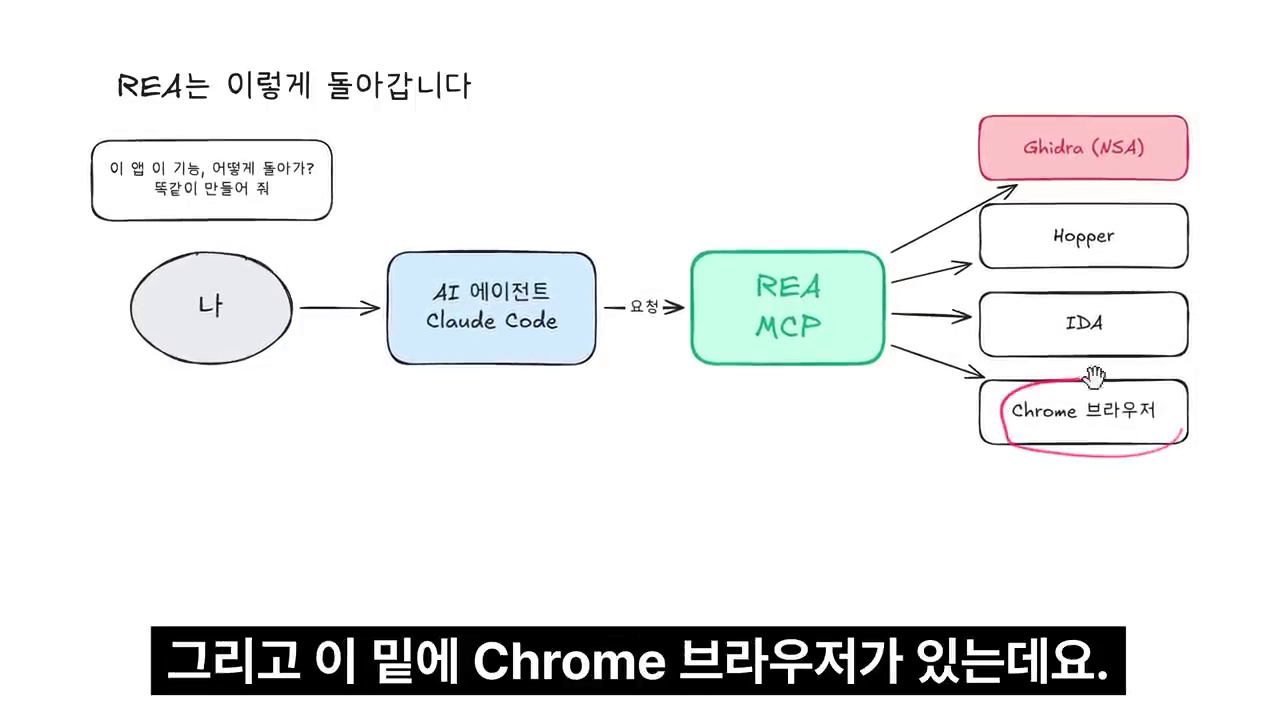
But ‘easier to start’ does not mean ‘no knowledge needed to review the result.’ The presenter also emphasizes learning enough to read, understand, analyze, and review the output. The earlier IPC interpretation error and duplicate-file handling failure show why.
In practice, it is better to narrow the scope than to hand over an entire app from the outset. Start with a program you are authorized to analyze. Check one feature’s input, output, and storage rules, test its explanation and evidence, and then expand. Comparing the same task with an ordinary coding agent without REA can also help establish whether the extra tools are actually necessary.
How Should We Interpret Predictions That Core Logic Will Move to Servers?
Success Knowledge Encyclopedia predicts that easier analysis may encourage software companies to put core logic on servers rather than inside apps. The reasoning is that implementations distributed to user devices can be investigated, creating an incentive to change how software is delivered.
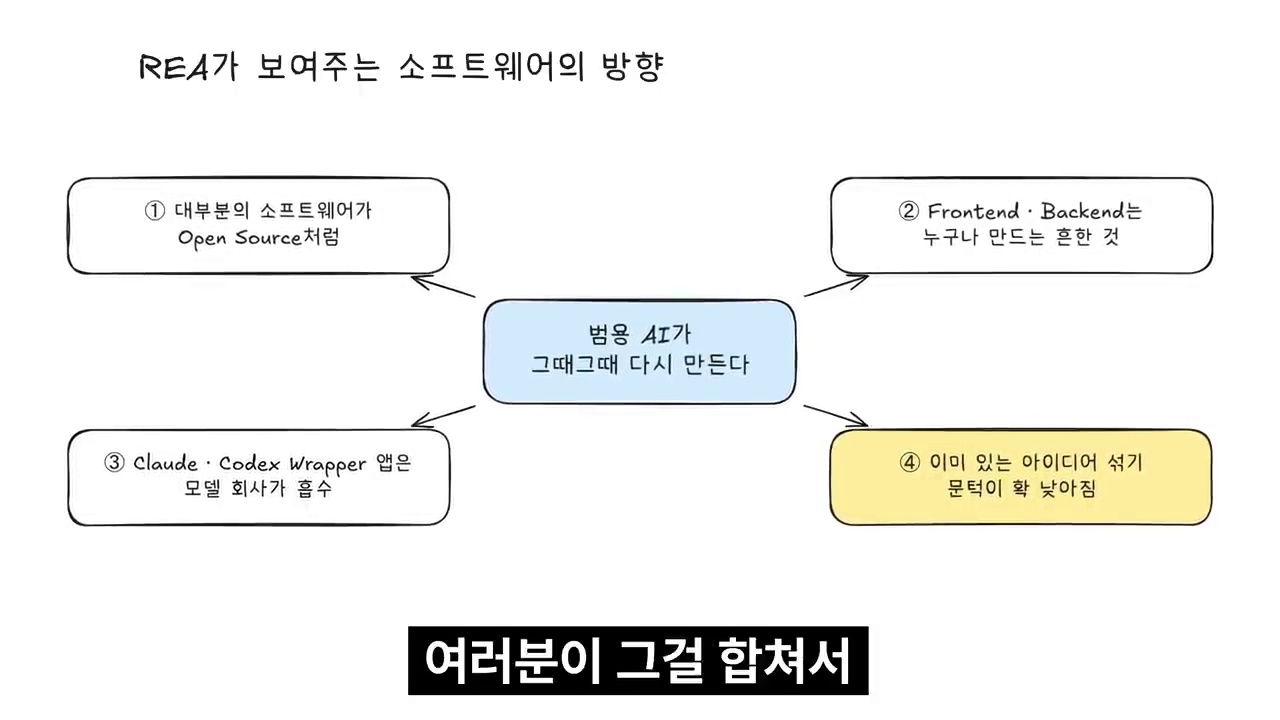
This is the presenter’s prediction, not an established fact that all apps will become server-centered. Server-based designs also require considering operating costs, network latency, offline usability, privacy, and access control. Hosting something on a server does not solve every security problem.
Likewise, statements such as ‘software is over’ or ‘most apps will become open source’ should be read as predictions emphasizing the scale of change. Easier feature implementation is separate from continuously operating a product with maintenance, security, and support. Being able to analyze a product does not grant a license to use its code or assets.
We should also avoid concluding that personal learning use is always acceptable. The additional video’s examples are useful references. But the purpose, authorization, terms, and licenses for analysis should be checked separately using the existing checklist.
What a Web App Example Adds: What Did MathSheets Reproduce?
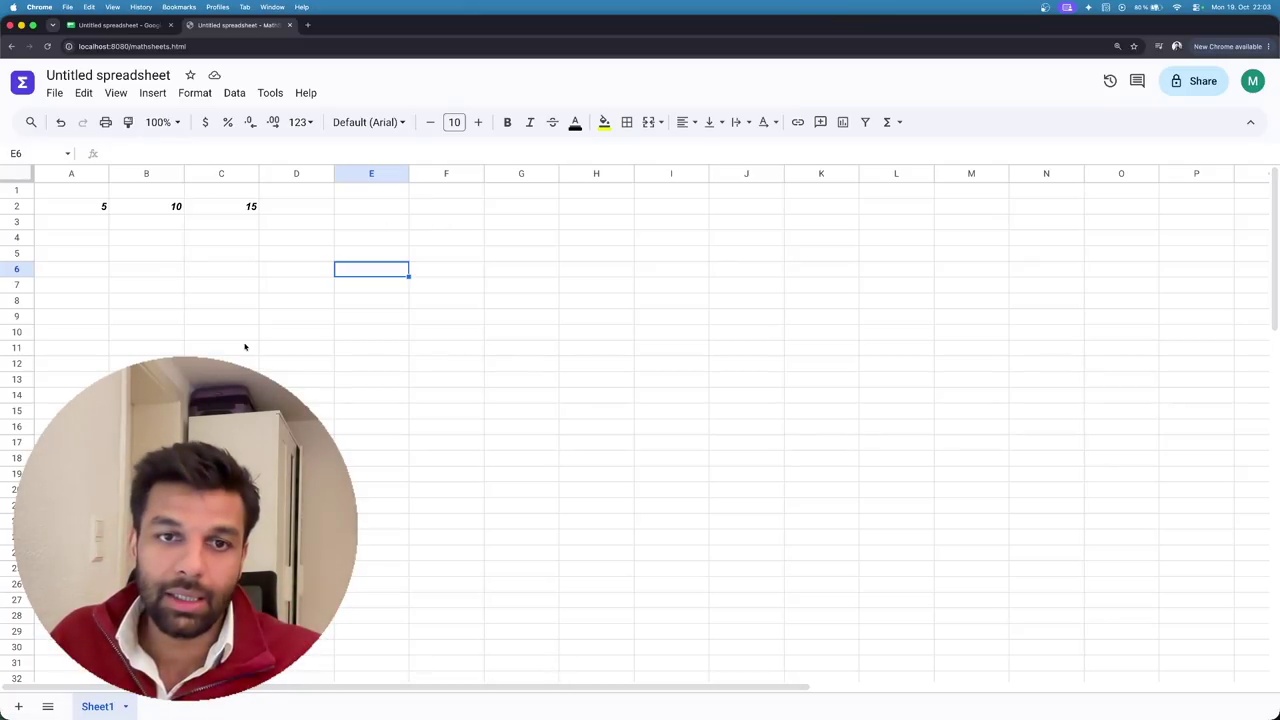
AI with Hassan’s additional video uses Google Sheets’ interface and basic behavior as a reference to show how to build a simple spreadsheet called MathSheets. The presenter requests only the tools needed for web app analysis. He asks not to install native binary analysis tools such as Ghidra and Hopper.
This approach distinguishes observable web functionality from internal analysis of installed programs, rather than using the same reverse engineering tools for every target. Inspecting a browser interface and its interactions does not establish an understanding of server-side implementation or operational architecture.
The video demonstrates cell editing, selection, and a simple addition result. The presenter says the work took about 20–30 minutes, but provides neither precise measurement records nor repeated trials of the same task. There is also no basis for directly comparing this time with the 11-minute Paint demo or the 23-minute asset management app experiment.
A Share Button Is Not the Same as Working Collaboration
The video alone may give the impression of a completed interface closely resembling Google Sheets. However, the creator’s published MathSheets repository README explains the implementation scope more specifically.
- It describes a lightweight spreadsheet built with HTML, CSS, and JavaScript, and says the app itself needs no server.
- It lists support for cell references, ranges, some formulas including SUM and AVERAGE, and CSV export.
- Data is stored in the browser’s localStorage. It explicitly warns that clearing site data deletes it, and recommends exporting anything worth keeping as CSV.
- Share and Email are unimplemented menu items marked ‘soon’, according to the documentation.
This case should therefore not be read as restoring Google Sheets’ collaborative editing, accounts and access permissions, cloud storage, or operational infrastructure. A visible Share button is different from allowing multiple users to edit the same document safely. The feature list above follows public documentation. It is not the result of separately running and verifying the app here.
The official REA repository must also be distinguished from the video’s example repository. The former is a reverse engineering tool; the latter is a learning project built using it. The example README’s License section says no license has yet been specified. Code being visible on GitHub does not, by itself, establish permission for unrestricted reuse or distribution. Before using it, separately check the repository’s latest license and usage permissions.
Define Verification Boundaries Before Dividing Work Among Agents
Hassan shows tasks such as the grid and formulas being divided among subagents. Separating interface work, such as input and selection, from formula interpretation can clarify each role. But using multiple agents does not itself demonstrate greater speed or accuracy. No comparison with a single agent performing the same task is provided.
Using a spreadsheet for work requires tests beyond visual similarity, including the following. These are checks needed before actual use, not claims that the video verified them all.
- When a cell changes, do other cells referencing it recalculate correctly?
- How are empty cells, invalid formulas, circular references, and error values handled?
- Does data survive refreshing or closing the browser, and do CSV export and reimport work as intended?
- If collaboration is required, have per-user permissions, simultaneous editing conflicts, change history, and recovery been separately implemented and tested?
The evidence REA returns and its unknowns can serve as starting points for this verification plan. Do not treat unknown items as completed implementations. Track verified behavior, inferred structures, and unimplemented features separately. Even when code generation is divided among multiple roles, final integration and verification need one consistent set of criteria.
Taken together, the three videos do not establish that ‘any app can be perfectly copied for free.’ The asset management app experiment examines the accuracy of analytical evidence; the Paint demo explores personalized feature extensions; and the MathSheets case highlights the difference between an interface with basic behavior and an entire service. Lower barriers to development do not remove the need to decide which problem to solve and how far the result can be trusted.
Three Remaining Limitations When Assessing REA’s Impact
First, these are single-run examples. Times and results may change with the target app, model, prompt, and test data.
Second, there is no comparison condition without REA. This result alone cannot show how much better it was than an ordinary coding agent or which gains came from REA.
Third, an AI agent also performed the evaluation. Comparing with the original code is useful, but that scoring is not equivalent to an independent expert audit or security assessment.
To assess the tool’s usefulness, it is therefore better to examine the experimental conditions and failures rather than just the video’s title.
Check Analysis Permissions and Licenses Before Tool Performance
REA being open source does not make the target app’s rights unrestricted. Check each separately: authorization to analyze, the target program’s license and terms, and permitted uses of code and assets such as images and icons.
The video also introduces provisions concerning computer programs in South Korea’s Copyright Act. However, observing functionality, reverse-analyzing code, achieving interoperability, and distributing results differ in purpose and scope. This should not be simplified into ‘reverse engineering is always legal’ or ‘a similar interface is never a problem.’ If you plan to analyze a commercial app or distribute the result, consulting an expert about the specific conditions is safer.
Before experimenting, check these five points.
- Did you create the program yourself, or confirm permission to analyze and use it?
- Have you checked the license terms for both the target program and the analysis tools?
- Are you avoiding unauthorized reuse of original code and design assets?
- Have you removed personal and confidential information from analysis logs and publicly shown screens?
- Do you distinguish observed facts from inferences and test edge cases as well as normal behavior?
The REA experiment’s value is both broader and more limited than the phrase ‘copying apps’ suggests. It shows potential to shorten the time needed to understand existing programs, but does not remove responsibility for interpretation and verification. Start by understanding one small feature in a program you are clearly authorized to analyze. Then check that understanding with evidence and tests.
Related Reading
- Grokbot, Buzz, and Hermes Compared: Choosing an Agent Work Environment
- Buzz Open-Source AI Collaboration Tool: Dividing Roles to Work with Agents
- Building an AI Agent Work Environment with Grok Bot and Herdr
FAQ
Can REA perfectly copy any app without source code?
That has not been established. The video presents a single case of rebuilding major features while access to the original project source was blocked. The installed app’s bundled code remained available for analysis. Features were missing, and some internal design interpretations were wrong.
Does REA replace Ghidra or IDA?
The official documentation presents REA more as a layer connecting existing analysis engines and various observation tools to agents. The tools used vary with the analysis target and environment.
Do 23 minutes and 74 points represent REA’s typical performance?
No. They are results from one run under the creator’s chosen environment and evaluation criteria. Without repeated experiments or comparison against a condition without REA, they cannot be generalized as typical performance.
Does purchasing a paid app allow unrestricted reverse engineering and redistribution?
Purchase alone does not establish every right to analyze, reuse, or distribute it. Relevant law, terms of use, licenses, and the purpose and scope of analysis require separate review.
Is the 11-minute Paint demo a better result than the earlier 23-minute experiment?
The target apps, implementation scope, and evaluation criteria differ, so direct comparison is not possible. The Paint demo illustrates custom feature extensions. The earlier experiment focuses on checking against original source code and verifying missing features. Both videos show single-run examples.
References
- Dante’s Datalab, Video of the REA App Analysis and Reimplementation Experiment
- Dante Labs, Original Experimental Rules, Evaluation Criteria, and Results
- Official REA GitHub Repository and Documentation
- Official REA Website
The images are frames quoted to explain and critique relevant scenes from the original video. Experimental figures and evaluation results follow the video creator’s public records. They are not results from a separately reproduced experiment.