[태그:] AI Coding

  • How to Install Claude Code in Windows PowerShell: From First Setup to First Run

    How to Install Claude Code in Windows PowerShell: From First Setup to First Run

    If you are installing Claude Code on Windows for the first time, starting from PowerShell is the simplest path. The essentials are three steps: first confirm that you are in PowerShell, run the official installation command, then finish login and a launch test with the `claude` command.
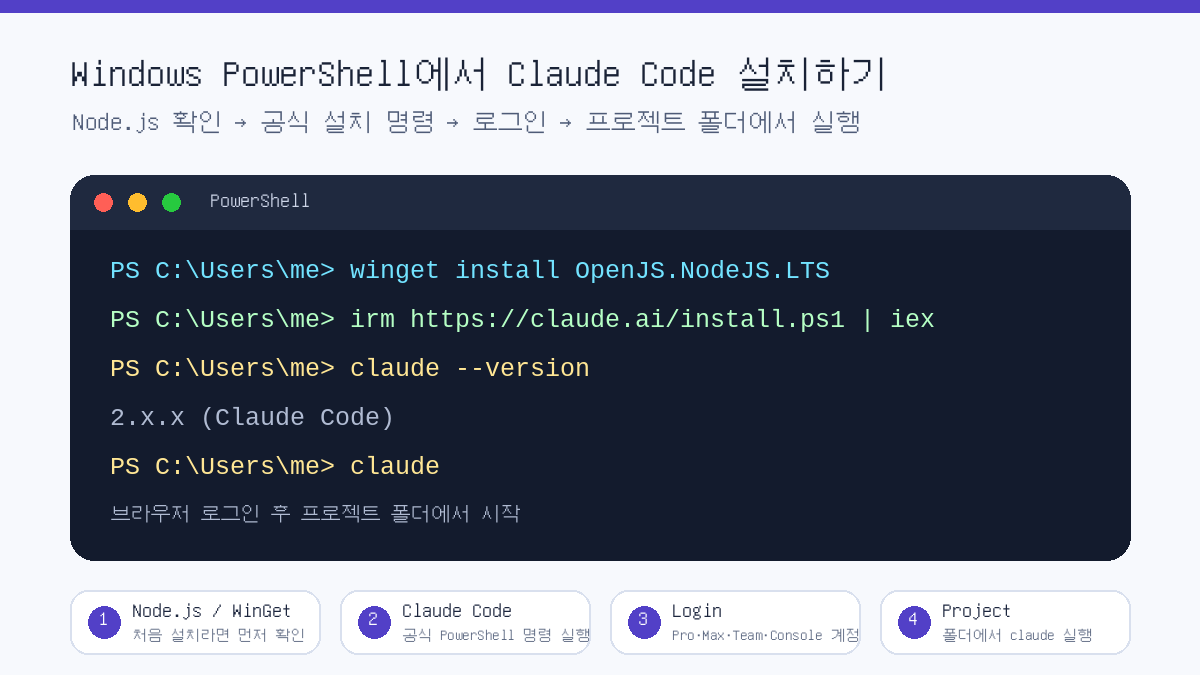
    Explanatory image showing the Claude Code installation flow in Windows PowerShell
    Image: created by Thinknote, summary of the Claude Code PowerShell installation flow

    This article is based on Windows PowerShell. Commands may differ in CMD, and WSL, macOS and Linux installation methods use separate commands.

    First Check: Are You in PowerShell or CMD?

    The most common mistake is running PowerShell commands in CMD, or CMD commands in PowerShell. If the prompt starts with PS C:\, you are in PowerShell. If you only see C:\, it is likely CMD.

    SituationMeaningWhat to do
    The prompt starts with PS C:\You are using PowerShellFollow the commands in this article as written.
    The prompt starts with C:\You are probably using CMDOpen PowerShell from the Start menu, or choose a PowerShell tab in Windows Terminal.
    You are using Windows TerminalMultiple shells may be availableCheck the tab name and select PowerShell before running the installation command.

    Step 1: Check Whether You Need Node.js

    According to Anthropic’s official documentation, Claude Code can be used on Windows 10 1809 or later, or Windows Server 2019 or later. Installation methods broadly include the official native installation and npm installation. For beginners, it is easier to use the official PowerShell installation command first. The npm method can be used as an alternative in an environment with Node.js 22 or later.

    node --version
    npm --version

    If the commands above show version numbers, Node.js and npm are installed. If not, you can install Node.js LTS with WinGet as shown below. However, if you use the official native installation command, you do not necessarily have to install Node.js first.

    winget install OpenJS.NodeJS.LTS

    Step 2: Install Claude Code in PowerShell

    In Windows PowerShell, use Anthropic’s official quick installation command. Open PowerShell and run the command below.

    irm https://claude.ai/install.ps1 | iex

    If you are concerned about security, you can view the installation script before executing it directly. Even in this case, it is important to develop the habit of confirming that the source is the official domain.

    irm https://claude.ai/install.ps1

    Step 3: Verify the Installation

    When installation is complete, open a new PowerShell window and check the version. The official documentation says that a normal installation displays Claude Code together with a version number.

    claude --version

    For a more detailed check, run the diagnostic command. This command does not start a session; it checks installation status and configuration issues in read-only mode.

    claude doctor

    Step 4: Sign In and Start Your First Session

    Claude Code cannot be used with only the free Claude.ai plan. According to the official documentation, it requires a Pro, Max, Team, Enterprise or Console account. After installation, running the command below opens the browser login flow.

    claude

    If you want to use API-based billing, you can choose Console account authentication. Advanced users who already use API key environment variables may have a different authentication method, but the principle is that key values should never be written directly into a blog post or code repository.

    claude auth login --console
    claude auth status --text

    Step 5: Run It from a Project Folder

    Claude Code is not a tool that simply opens a chatbot. It is a coding agent that reads the code and files in the current folder, modifies them when necessary, and runs commands. So it is best to move into the project folder you want to work on before running it.

    cd C:\Users\me\Workspace\my-project
    claude

    On first launch, you may see a prompt asking whether you trust the folder. Approve only projects you created yourself or repositories you can trust. For unfamiliar folders, downloaded archives or code of unclear origin, it is safer to inspect the contents first.

    Alternative: Installing with npm

    If you already use Node.js 22 or later, global npm installation is also possible. According to the official documentation, the npm package downloads and links the native binary for each platform.

    npm install -g @anthropic-ai/claude-code
    claude --version
    Installation methodRecommended forNotes
    Official PowerShell installationWindows users installing for the first timeThe command is short and close to the official Windows quick installation flow.
    npm installationDevelopers already using Node.js 22 or laterConvenient for people who manage an existing Node/npm environment.
    WSL, macOS or Linux installationUsers working outside native Windows PowerShellUse the separate commands and setup flow for that environment.

    Common Errors and Fixes

    Error or symptomPossible causeFix
    irm not foundA PowerShell command was run in CMDOpen PowerShell and run it again.
    &&-related errorA CMD-style command was run in PowerShellDistinguish PowerShell commands from CMD commands.
    claude not recognized after installationPATH has not refreshed or installation did not completeOpen a new PowerShell window, then run claude --version and claude doctor.
    Login does not proceedAccount plan, browser or network issueConfirm your account type, default browser and network access, then try again.

    Recommended Commands for the First Run

    After installation, it is better to start with a small request asking Claude Code to explain the current project rather than immediately assigning a large task. This lets you see how Claude Code reads the repository structure.

    claude
    
    # Enter inside Claude Code
    Briefly explain this project structure.
    If there are runnable test or build commands, tell me those too.

    Related Articles

    FAQ

    What is the command to install Claude Code in Windows PowerShell?

    The official quick installation command is irm https://claude.ai/install.ps1 | iex. It must be run in PowerShell, and CMD requires different commands.

    Is Node.js required to install Claude Code?

    If you use the official native installation, you do not have to install Node.js first. However, installing with npm requires an environment with Node.js 22 or later.

    Can Claude Code be used with a free Claude account?

    According to the official documentation, Claude Code requires a Pro, Max, Team, Enterprise or Console account. It cannot be used with only the free Claude.ai plan.

    What command should I check first after installation?

    Check the version with claude --version, and if there is a problem, inspect the installation status with claude doctor.

    Why should I run it from a project folder?

    Claude Code works based on the files and code structure in the current folder. Move to the desired project folder and run claude to reduce the chance of reading the wrong folder.

    References

    In short, on Windows you can open PowerShell, run the official installation command, and then check in the order claude --version, claude doctor and claude. What matters more than installation itself is execution location and permissions. Start in a trusted project folder, and never leave API keys or account information directly in code.

    Original Korean Article

    This article is a full-fidelity English translation draft of the original Korean post: Claude Code PowerShell installation Korean article on Thinknote.


  • AI Web Design Workflow: How to Build a Landing Page with ChatGPT Mockups and Claude Design

    AI Web Design Workflow: How to Build a Landing Page with ChatGPT Mockups and Claude Design

    # AI Web Design Workflow: How to Build a Landing Page with ChatGPT Mockups and Claude Design

    AI web design is no longer just a story about “enter a prompt and a site comes out.” The more important change is a division-of-labor workflow: first visualize the design standard, then have another AI implement that standard.

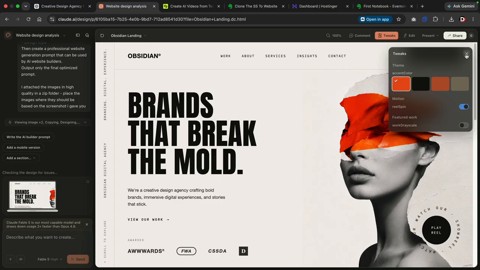
    Darrel Wilson’s video shows this flow well. First, he creates website screenshots with ChatGPT Sol, then passes a preferred mockup to Claude Design and turns it into a responsive web page. For beginners, it is a fast experimentation tool. For practitioners, it is a way to reduce the gap between a brief and implementation.

    Example of a website mockup created by ChatGPT
    AI first draws a finished-looking website mockup to create a visual reference point. Source: screenshot from Darrel Wilson YouTube video.

    The core is “creating a visual standard,” not “generating code”

    A common mistake when building a website with AI is to start with the prompt, “Create a cool landing page in HTML.” Even if the result looks plausible, the brand tone, image direction, section density, and typography can easily drift.

    The video’s approach is different. It first asks ChatGPT Sol to create screenshots that look like finished websites by providing the industry, mood, image style, and layout requirements. Those screenshots become a visual brief that can be given to another AI.

    Step 1: Create multiple design mockups with ChatGPT Sol

    The text prompt should not simply say, “Make a website.” It should include specific design conditions, such as the following.

    • Industry and site purpose
    • Desired mood and brand tone
    • Image direction for the hero section
    • Layout characteristics such as vertical or horizontal text
    • CTA buttons, menus, and section structure
    • Whether to use high-resolution images

    The purpose of this step is not to obtain code that can be deployed immediately. It is to compare several mockups quickly and choose the strongest direction.

    Extracting image assets from a mockup
    Images inside the screenshot are separated into high-resolution assets and passed to the implementation stage. Source: screenshot from Darrel Wilson YouTube video.

    Step 2: Extract image assets separately and pass them to Claude

    Even if a strong mockup is produced, the final result weakens sharply if the images turn into placeholders during implementation. That is why the video extracts the images inside the screenshot as high-resolution files and downloads them as a ZIP file.

    The reason this process matters is simple. Claude Design can follow not only the layout, but also the image assets that created the mood of the original mockup.

    In real work, one more check is needed at this stage. You must review the commercial usability of AI-generated images, human depictions, brand similarity, and copyright risk.

    Claude Design implementation screen
    The selected mockup is placed in Claude Design and translated into an actual web page structure. Source: screenshot from Darrel Wilson YouTube video.

    Step 3: Implement the mockup as a responsive web page with Claude Design

    The next step is to upload the selected screenshot and image ZIP to Claude Design. In the video, Wilson instructs Claude to follow the original mockup as closely as possible and, if necessary, turns off Claude’s default design system.

    The prompt can be short. What matters is not saying only “Make a similar website based on this image,” but giving the following standards as well.

    1. Preserve the original mockup’s layout first.
    2. Do not replace the image assets with placeholders.
    3. Consider both desktop and mobile responsiveness.
    4. Connect the menu, CTAs, and section order like a real site.
    5. Structure it so it can later expand into About, Services, and Contact pages.

    Step 4: Do not stop at the homepage; expand the site structure

    In the video, after creating the homepage, he generates additional pages such as About, Services, Insight, and Contact in the same design language. This part is important. Even if a single landing page looks beautiful, it is hard to use as a real website if the internal pages are empty.

    AI website production should not stop at “the first screen looks pretty.” At minimum, you need to check the following.

    • Do navigation links lead to actual pages?
    • Do the menu and CTA work naturally on mobile?
    • Do the contact form, buttons, and external links function correctly?
    • Is the copy not duplicated across pages?
    • Are SEO titles and meta descriptions separated by page?
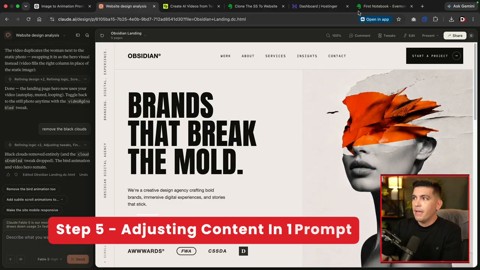
    Adjusting content with prompts
    Industry information and wording are entered again to customize page content. Source: screenshot from Darrel Wilson YouTube video.

    Step 5: Refine copy and animation separately afterward

    Claude’s first result is a starting point. In the video, industry information is entered again to customize all text, and animations such as birds, clouds, and human video elements are added.

    Animation, however, should be handled carefully. Background videos and moving objects can improve the first impression, but they can also reduce mobile speed and accessibility. On small screens in particular, text readability comes first.

    In practice, the following order is stable.

    1. Complete the structure and sections first.
    2. Have a human review the brand copy.
    3. Fix the mobile layout.
    4. Add animation in minimal units.
    5. Check speed, accessibility, and SEO last.
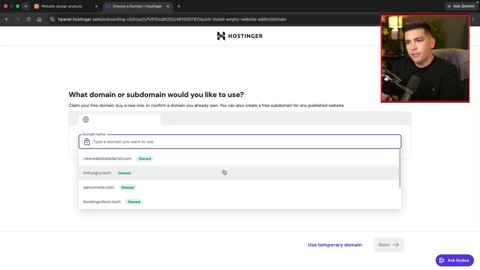
    Example of the deployment stage
    The completed HTML is connected to hosting and published on a real domain. Source: screenshot from Darrel Wilson YouTube video.

    What this method changes is the work sequence, not the tools

    The message of the video is not “designers and developers are no longer needed.” Rather, it means the human role is moving further toward the front end and the back end of the process.

    At the front end, people must create good visual briefs and judge which direction to choose among multiple mockups. At the back end, they must verify whether the result meets real service standards.

    As AI becomes faster, the standards humans need to check must also become clearer.

    StageWhat AI does wellWhat humans should check
    Mockup generationSuggesting varied layouts and image directionsBrand fit, differentiation, copyright
    ImplementationStructuring HTML/CSS and generating a responsive draftCode quality, accessibility, performance
    ContentDrafting industry-specific copyAccuracy, persuasion, legal wording
    DeploymentProducing publishable files quicklyHosting, domain connection, forms, security

    Checklist for trying it right away

    • Do not try to finish everything at once; separate mockup creation, implementation, revision, and deployment.
    • Give ChatGPT the “design direction” and Claude the “implementation standards.”
    • Pass image assets along with the screenshot.
    • Check the mobile screen with a separate prompt.
    • Before actual deployment, check links, forms, speed, accessibility, and SEO.

    Recommended reading

    FAQ

    Q1. Can ChatGPT Sol complete a website by itself?

    The core of the video is not to finish with Sol alone. ChatGPT Sol creates design mockups and image assets, while Claude Design implements those mockups as actual web pages. It is closer to a division of labor.

    Q2. Why create a screenshot first instead of asking Claude to build it directly?

    A screenshot is a visual brief that communicates layout, images, typography, and mood all at once. Compared with text alone, it gives the AI a much more concrete standard to follow.

    Q3. Does this method replace Figma?

    For simple mockups and landing page experiments, it can reduce some work before Figma. However, it is hard to say that it fully replaces team collaboration, component management, design systems, and detailed UX validation.

    Q4. Can I use an AI-generated website commercially right away?

    It is safer to use it after review rather than immediately. Image rights, responsive quality, accessibility, performance, personal-data handling in forms, and search optimization all need to be checked separately.

    Q5. Is this workflow useful for beginners?

    Yes. It is especially useful for beginners who lack design confidence because they can view multiple mockups first and choose a direction. However, they should not trust the final result as-is, but verify it step by step with a checklist.

    References

    Original Korean article

    Read the original Korean article

  • Kimi K3 Shock and Controversy: Five Questions China’s Open AI Model Raises

    Kimi K3 is not just another model announcement. It matters because Moonshot AI, a Chinese startup, has introduced an open 3-trillion-class model that challenges the competitive map of the AI industry.

    According to Moonshot AI’s official documentation, Kimi K3 has 2.8 trillion parameters, a 1M-token context window, native multimodal understanding and a strong focus on long-horizon coding and knowledge work. CNBC, BBC and other major outlets have framed it as a Chinese open-model challenge to the closed frontier systems led by large U.S. technology companies.

    But the Kimi K3 shock cannot be understood through hype alone. Its benchmark performance, the accuracy of the “open source” label, distillation allegations, chip-market reaction and enterprise adoption risks all need separate judgment. The real question is not simply, “Has China beaten the United States?” It is, “What is the new standard for AI competition?”

    What Is Kimi K3?

    Kimi K3 is Moonshot AI’s flagship model, announced in July 2026. The official documentation highlights four core specifications.

    • 2.8 trillion parameters: Moonshot AI presents Kimi K3 as a first open model in the 3-trillion-parameter class.
    • 1M-token context window: The model is positioned for long documents, codebases, meeting records and extended knowledge work.
    • Native multimodal capability: Kimi K3 is described as a model that can handle visual input as well as text.
    • Long-horizon coding and knowledge work: Its main use case is not only short question answering, but agentic coding and complex work execution.

    The documentation also mentions Kimi Delta Attention, Attention Residuals and a Mixture of Experts architecture. The model reportedly activates 16 out of 896 experts, which suggests an attempt to combine very large scale with more efficient inference.

    Why Did Kimi K3 Create Such a Shock?

    The first reason is performance. Moonshot AI and several outside reports say Kimi K3 is close to, and in some task areas ahead of, top GPT and Claude-family systems in coding, web interface engineering and agentic tasks.

    The second reason is cost and access. Several Korean and global reports argue that Kimi K3 is being positioned with a lower cost structure than leading U.S. frontier models. If a cheaper model performs well enough, companies will naturally ask whether they should remain locked into one premium API provider.

    The third reason is the release strategy. Kimi K3 is described as open source or open weight, unlike closed API-first systems from U.S. labs. This distinction matters. Releasing weights does not automatically make training data, training procedures or safety evaluations fully transparent. For that reason, it is safer to treat Kimi K3 as a strategic open-weight model, rather than accepting the marketing phrase “open source” without qualification.

    Controversy 1: How Much Should We Trust the Benchmarks?

    Benchmarks are at the center of the Kimi K3 debate. On paper, Kimi K3 appears on the same leaderboard as top closed frontier models. Reports especially highlight its strength in coding and agentic work.

    The problem is that benchmark scores do not capture every risk in real enterprise use. GovInfoSecurity, for example, argues that Kimi K3 shows the limits of AI leaderboards. A high test score does not automatically prove security, consistency, long-term reliability, sensitive-data handling, incident response or regulatory compliance.

    So the practical question is not, “Which model won by a few points?” Companies should ask more concrete questions.

    1. Does the model perform equally well on our own business data?
    2. Does a long context window actually reduce hallucination and omission?
    3. Does generated code pass tests and security checks?
    4. Can we switch to another model if policies, access or pricing change?
    5. Is the cost saving larger than the added review, security and governance cost?

    Controversy 2: What Should We Make of the Claude Distillation Allegations?

    Some media reports and social posts have claimed that Kimi K3 sometimes identified itself as Claude. They used that behavior as a basis for distillation allegations. In this context, distillation means using the outputs of a stronger model to train or improve another model.

    The allegation is sensitive. U.S. AI companies are increasingly concerned that their model outputs may be used to train competitors. On the other side, Chinese officials and some analysts see these complaints as part of a broader geopolitical technology dispute.

    A balanced view requires three points. First, a model misidentifying itself as another model is not enough to prove illegal distillation. Second, the use of model-output data is a gray area across the industry, not only a China-specific issue. Third, as TechCrunch reported, some experts argue that Kimi K3’s performance cannot be fully explained away by distillation alone.

    The deeper issue is not whether Kimi K3 is “fake.” The bigger question is whether AI competition is moving from pure performance races toward disputes over training-data provenance, output rights and model supply-chain transparency.

    Controversy 3: Is Kimi K3 Bad News or Good News for Chipmakers?

    After the Kimi K3 announcement, Korean market commentary split over its possible impact on Samsung Electronics and SK Hynix. Some reports compared it with the earlier DeepSeek shock and asked whether a cheaper, highly capable Chinese model could weaken the investment logic behind massive GPU spending.

    That is the bearish view. If China can produce strong models at lower cost, investors may wonder whether the demand for high-end AI chips will slow.

    There is also a bullish view. If more high-performance open-weight models become available, more companies and developers may want to run their own inference infrastructure. That could expand demand for memory, servers, inference chips and data centers. In other words, the center of gravity may shift from training to inference, deployment and optimization.

    Kimi K3 is therefore not simply a threat to semiconductor demand. It may be a signal that AI infrastructure demand is changing shape.

    The Real Innovation Is Not Just That China Got Faster

    If we read Kimi K3 only as a victory for Chinese AI, we miss the larger change. The real shift is the speed of open-model diffusion. High-performance models are no longer staying only inside closed APIs. They are moving faster into broader developer and enterprise ecosystems.

    That creates three pressures.

    • Price pressure: Premium API pricing becomes harder to justify when open-weight alternatives improve.
    • Product pressure: Model companies must offer agents, tools and workflows, not just raw model access.
    • Policy pressure: Governments must think about AI access, open-weight release, data rules and export controls at the same time.

    This connects directly to Thinknote’s earlier discussion of small language models and open source AI. The AI market may look like a winner-take-all race from the outside. In practice, it is becoming layered by model size, cost, openness and deployment location.

    What Should Korean Companies Watch?

    For Korean companies, Kimi K3 does not mean “use this model immediately.” It means that model selection criteria must change.

    First, companies need a model portfolio. GPT, Claude, Gemini, Kimi and open-weight models should be evaluated by task. Locking every workflow into one API increases both cost and strategic risk.

    Second, internal evaluation sets matter more than public benchmarks. Companies need to test models on their own documents, code, customer support cases, reports and data-analysis tasks.

    Third, AI coding depends on the harness, not only the model. As Thinknote argued in The Essence of AI Coding Is Not the Model but the Harness, tests, reviews, deployment controls and rollback systems decide whether a powerful coding model becomes useful automation or risky automation.

    Fourth, sovereign AI should be understood realistically. As discussed in Anthropic Mythos Shock, the point is not to reject foreign models entirely. The point is to secure alternative paths for strategically important work.

    Fifth, the transition to agentic AI will accelerate. Kimi K3’s emphasis on long-horizon coding and knowledge work shows that AI is moving from chatbots toward work-execution systems. That connects with Thinknote’s broader argument about how work changes in the agentic AI era.

    What It Means for Individual Users

    Kimi K3 also matters for individual users because it expands the menu of choices. The important question is no longer, “Which chatbot is the smartest?” The better question is, “Which model mix fits my purpose?”

    If you code, you should evaluate file editing, test execution and code-review flow. If you handle long documents, you should test whether a 1M-token context window actually improves summary quality. If you automate work, you should check cost, speed, privacy handling and log-retention policies.

    The Kimi K3 shock is not a declaration that one model has won. It is a signal that AI users need to become more demanding buyers.

    Five Criteria for Judging Kimi K3

    CriterionQuestion to AskWhy It Matters
    PerformanceDoes it work well on our own data?Public benchmarks may not match real-world performance.
    CostIs it still cheaper after input, output and caching costs?Long context changes the real cost structure.
    TransparencyWhat is disclosed beyond model weights?Open weights and full open source are not the same thing.
    RiskAre data security, regulation and supply-chain risks manageable?Chinese model adoption requires governance review.
    PortabilityCan we switch to another model easily?Model dependence should be designed down from the start.

    FAQ

    Has Kimi K3 completely beaten OpenAI or Anthropic?

    Not yet. Kimi K3 appears strong in some benchmarks and coding tasks, but overall performance and enterprise reliability still require independent verification.

    Is Kimi K3 really open source?

    Moonshot AI describes it as open source, but users should check what is actually released. Model weights, training data and full training procedures are different levels of openness.

    Are the Claude distillation allegations proven?

    No public evidence currently proves the allegation. There are reports and suspicious examples, but there are also expert views that Kimi K3’s performance cannot be explained only by distillation.

    Should Korean companies adopt Kimi K3 right away?

    Not immediately. They should first run internal evaluations that cover performance, security, cost, regulation and model-switching options.

    Is Kimi K3 bad for semiconductor companies?

    It may disturb short-term investor sentiment. Over the longer term, however, open-model adoption could expand inference infrastructure and memory demand.

    Conclusion: Kimi K3 Shows the New Rules of AI Competition

    Kimi K3 can be summarized in one sentence: top-tier AI may no longer be the exclusive territory of closed U.S. frontier models.

    That signal should not be exaggerated. Benchmarks are only a starting point. Distillation allegations remain unproven. The “open source” label still needs careful interpretation.

    The real change is the growth of choice. Companies and individuals now need to choose AI models by evaluation systems, data governance, cost structure and portability, not by model names alone. The winners of the next AI wave will not be the people who chase every new model announcement first. They will be the people who can compare, combine and govern those models safely.

    Sources

    Original Korean Article

    This article is an English translation of the original Thinknote post: Original Korean article.

  • The Essence of AI Coding Is Not the Model but the Harness: Matt Pocock’s Agentic Engineering

    The Essence of AI Coding Is Not the Model but the Harness: Matt Pocock’s Agentic Engineering

    # The Essence of AI Coding Is Not the Model but the Harness: Matt Pocock’s Agentic Engineering
    Thumbnail for a Tech Bridge video on Matt Pocock’s agentic engineering workflow
    Tech Bridge thumbnail about Matt Pocock’s agentic engineering workflow

    When people discuss AI coding, they usually name models first: Claude, Codex, Gemini CLI. Models matter, but Matt Pocock points elsewhere. The real difference comes from the harness.

    The harness is the working environment around the model: prompts, skills, codebase structure, tests, documentation, sandboxes, GitHub Actions, and review flow. It is like judging not only the engine of a car but also the chassis, pit crew, and track operations.

    This matters because model performance is hard for us to control, while the harness is something we can design.

    ## AI has eaten tactical programming

    Pocock borrows John Ousterhout’s distinction between tactical and strategic programming. Tactical work includes writing code, fixing bugs, making commits, and matching syntax. Strategic work is deciding what structure will be maintainable, how to divide work, and where the codebase should go.

    AI has already absorbed much tactical programming: small features, tests, refactoring drafts, and documentation updates. As AI handles more tactics, human value moves toward strategy: clear goals, narrow scope, completion criteria, and tests.

    ## The work environment matters more than the latest model

    The strongest line is that everyone obsesses over models, but we should care more about the harness. For example, if you want to reduce token cost, one answer is shorter prompts. Matt’s answer is a codebase that is easy to change. Clear structure, tests, and current documentation let AI work with less context. A tangled codebase makes even expensive models wander.

    ## Skills should be managed as procedures, not piled on

    A skill is a reusable bundle of instructions for repeated thinking or work. It can make an AI act as a learning coach, critique a design aggressively, or review PRs in a specific way.

    But Matt does not say to add as many skills as possible. He suggests deleting skills, plugins, MCP servers, Claude.md, and agents.md, then observing the model in a blank state. Add back only what is truly needed. Too many instructions can pollute the context window.

    ## AFK agents are closer to queues than infinite loops

    “Agentic loop” sounds attractive: the agent thinks, acts, observes, and acts again. In practice, it can blur scope, raise cost, and remove review points.

    Matt proposes “queue rather than loop.” Put work into a queue, like GitHub issues or Jira tickets. The agent takes one task, investigates, changes, tests, makes a PR, and a human reviews it. Good candidates include failing-test investigation, README updates, refactoring proposals, PR review drafts, security checklists, and old-issue reproduction.

    ## AX: Agent Experience now needs design

    Developer Experience made environments easy for humans to install, run, test, and deploy. Agent Experience is the degree to which an AI agent can work in the codebase.

    • Predictable folder structure
    • Clear test commands
    • Automated type checks and linting
    • Current README and development docs
    • Clear module boundaries
    • Safe validation of small changes
    • Enough information to run in a sandbox

    Good AX overlaps strongly with good DX. What humans can infer informally, agents often miss; therefore documentation, tests, commands, and boundaries matter more.

    ## Problems found by AI should become system improvements

    If a model finds a security bug, do not stop at “this model is good.” Ask why the bug remained, why tests missed it, whether similar bugs exist, and how future checks can be automated.

    AI output should be a signal to improve the harness: add tests, revise review criteria, create a security-check skill, or add CI checks. That turns AI coding from a one-off productivity tool into an organizational learning system.

    ## Product and business judgment still belongs to humans

    The video also touches on SaaS and AI startups. Matt’s answer is simple: talk to customers, find real problems, prototype, and validate. AI accelerates implementation, but it does not decide what to build, why to build it, or what to remove.

    ## Seven things Korean developers and teams can do now
    1. Read your README as if an agent were entering the repo for the first time.
    2. Turn repeated requests into skills or templates, but only when they are truly repeated.
    3. Split issues into AI-sized tasks.
    4. Include test commands and done criteria in instructions.
    5. Start AFK work inside sandboxes and limited permissions.
    6. Review AI PRs for failure patterns, not only code.
    7. Follow model news, but check structure, tests, documentation, and review flow more often.
    ## Related reading ## FAQ ### What is a harness in AI coding? The full environment in which the model works: prompts, skills, code structure, tests, docs, sandbox, CI, and review flow. ### Why is codebase structure more important than the latest model? A clear structure and tests let AI make safe changes with less context. A messy codebase makes any model struggle. ### How is a queue different from an agentic loop? A queue lets humans define tasks and review results one by one. A loop can become open-ended and harder to control. ### What is AX? Agent Experience: how easy it is for AI agents to work in a repository. It overlaps with DX but raises the standard for clarity. ### What should be prepared first before assigning coding to AI? Scope, completion criteria, tests, sandboxing, permission limits, and review flow. ## References

    AI coding’s next step may not be turning on more tools. It may be pausing to inspect the environment where AI works: missing docs, fragile tests, and tasks that can be queued. That small cleanup can matter more than subscribing to one more model.

    Original Korean article

    Image source: Captured images used in this article are stills from the original YouTube video. They are used for review, commentary, and educational explanation, and copyright remains with the original rights holders and the channel.

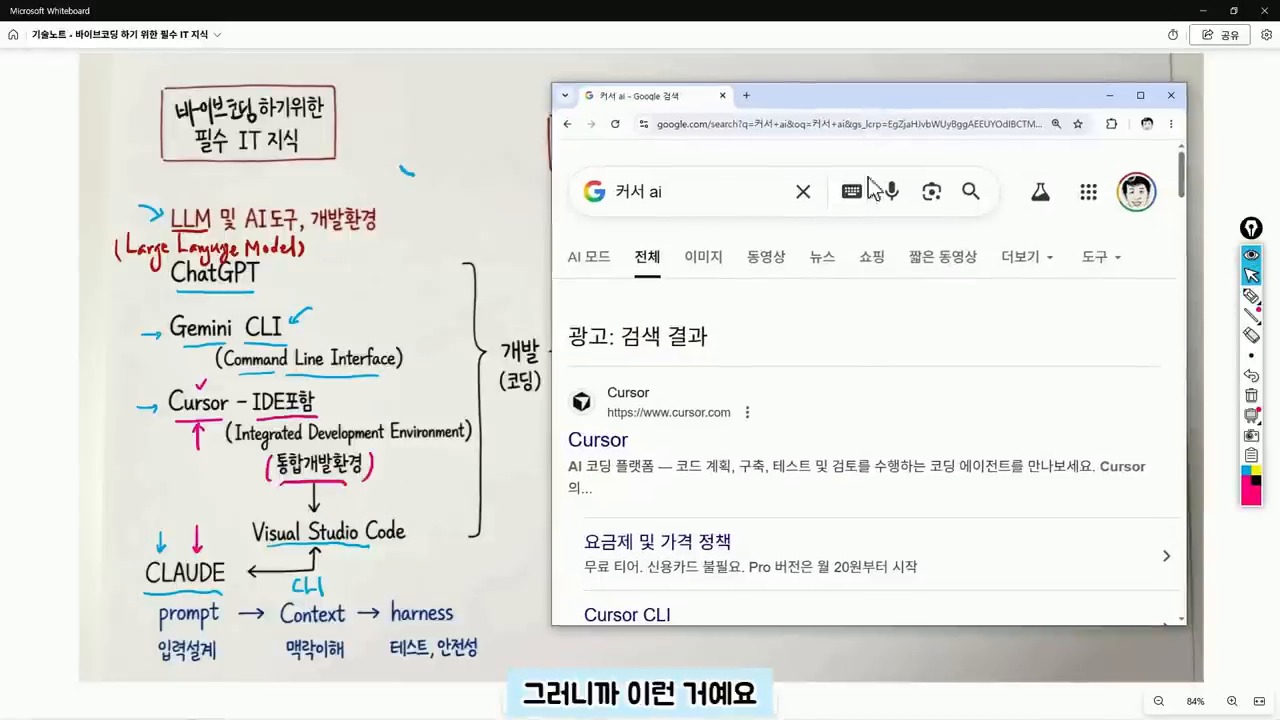
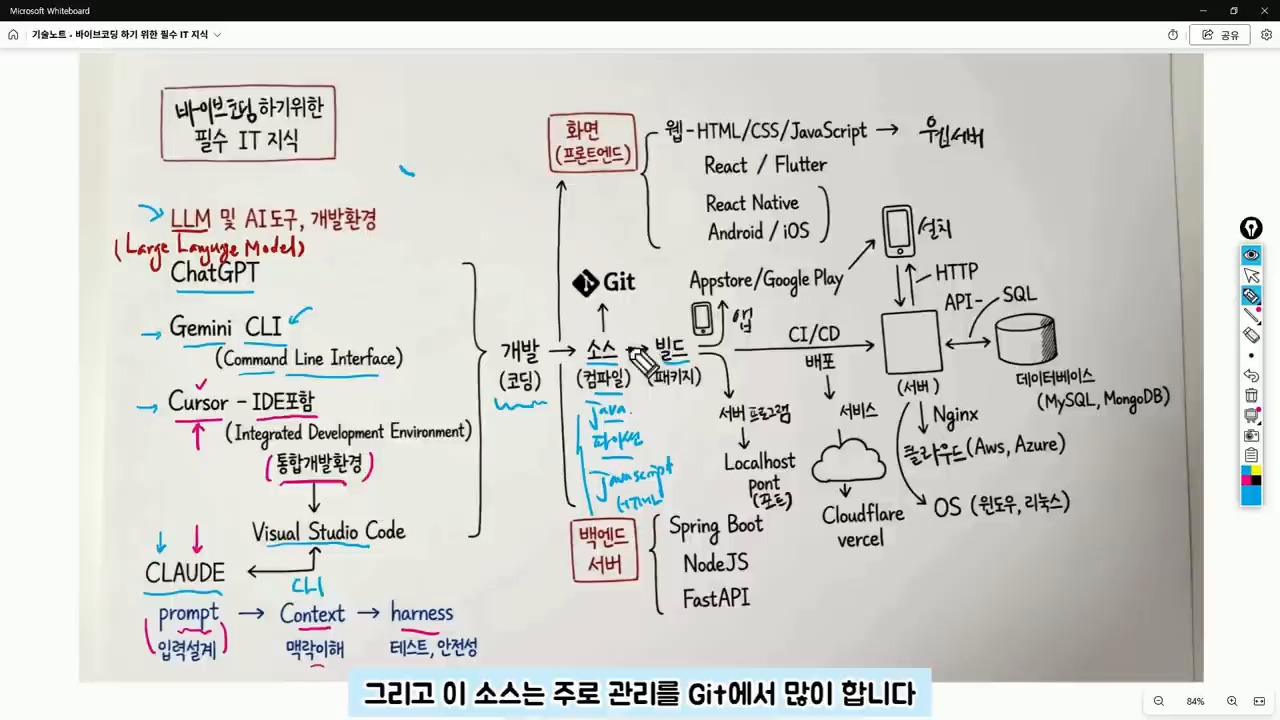
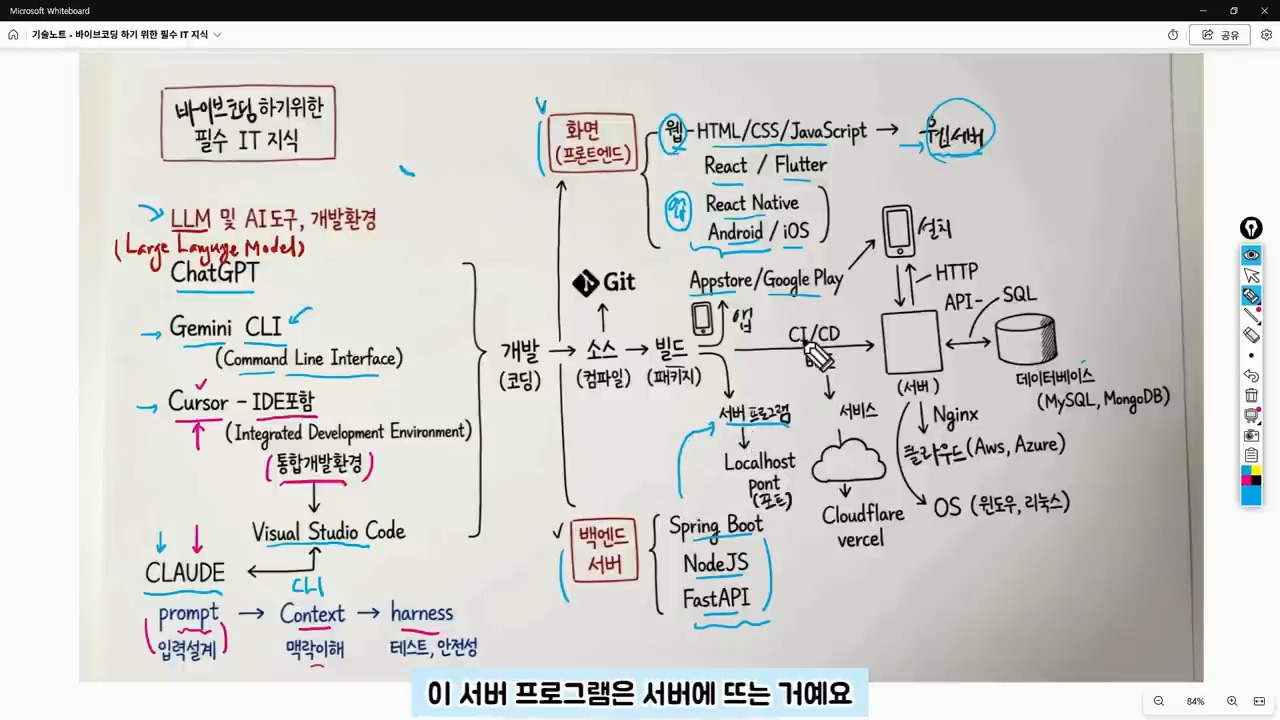
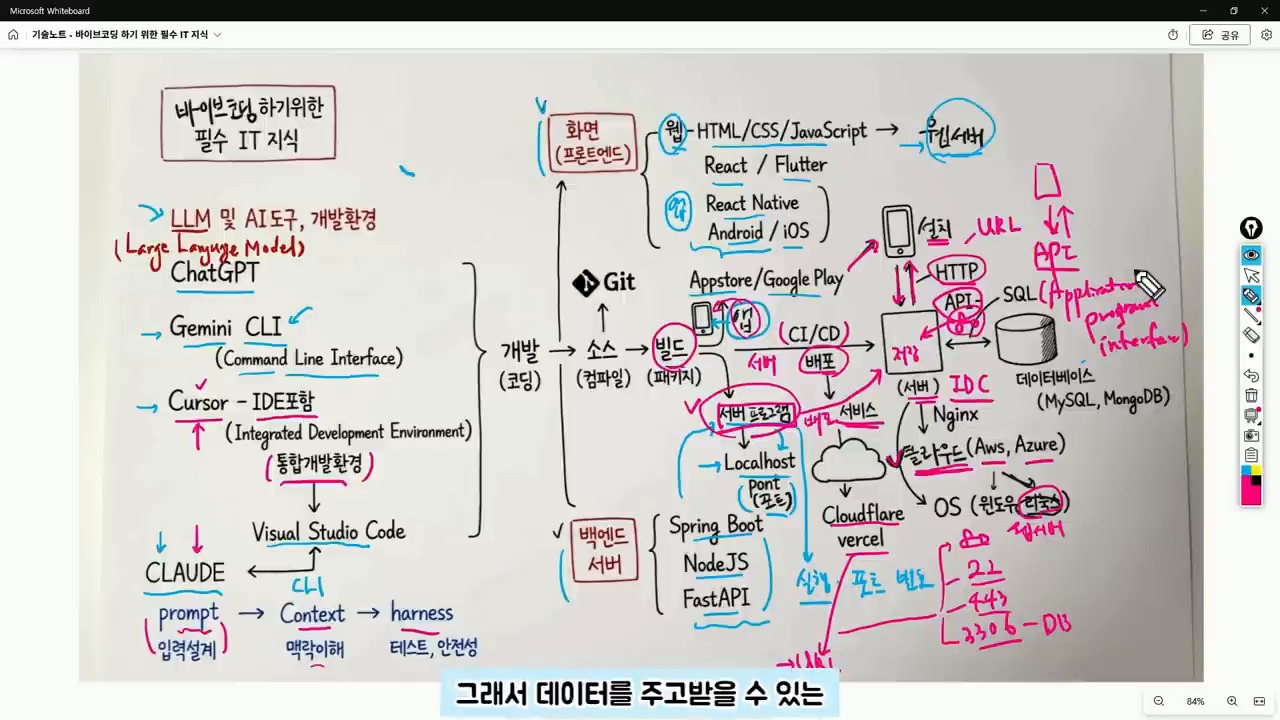
  • Vibe Coding for Beginners: The IT Map You Need Before AI Writes Code

    Vibe Coding for Beginners: The IT Map You Need Before AI Writes Code

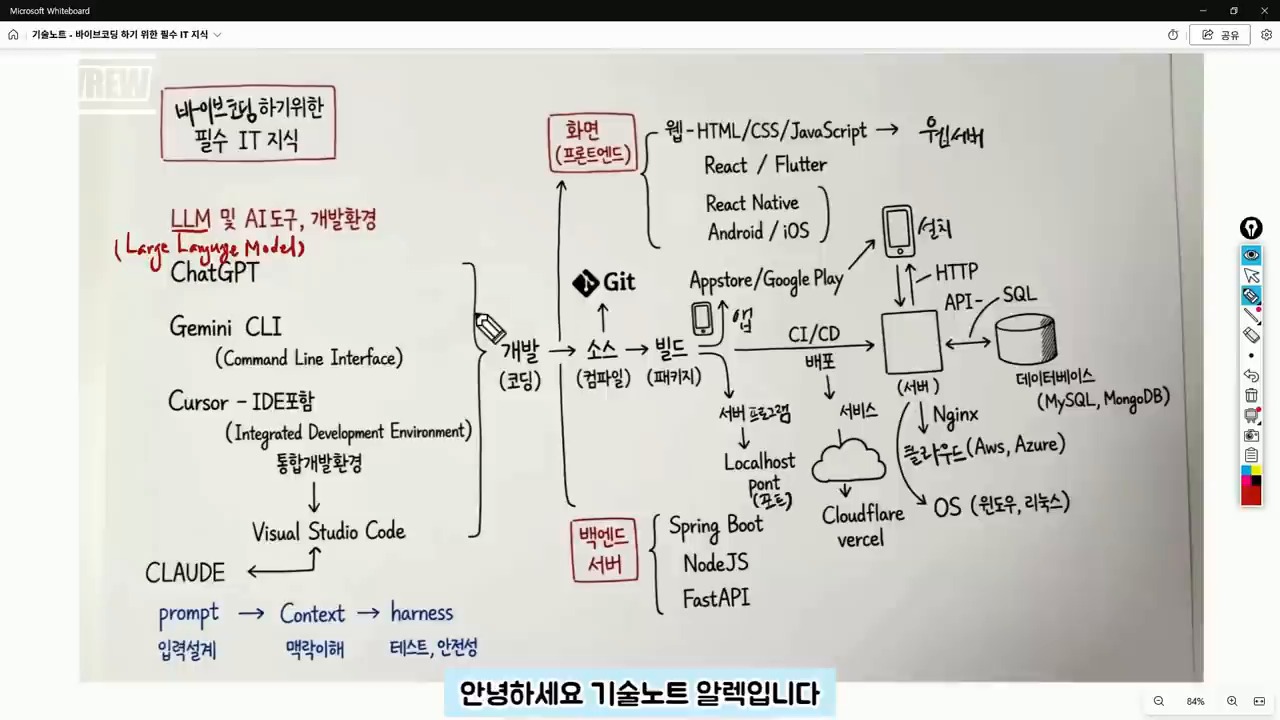
    This English version is a fuller translation and adaptation of the original Korean article, “바이브 코딩 입문자가 막히는 이유, 코딩보다 먼저 알아야 할 IT 지도,” for global readers. The article discusses the importance of understanding the basics of IT and coding before diving into vibe coding, a new way of coding that utilizes AI tools to generate code quickly. However, the article highlights that relying solely on AI tools can lead to confusion and frustration when dealing with errors and understanding the underlying structure of the code.

    vibe coding for beginners IT map
    vibe coding for beginners IT map.

    Original Korean article: 바이브 코딩 입문자가 막히는 이유, 코딩보다 먼저 알아야 할 IT 지도

    Understanding the Structure is More Important than the Tool

    Even in an era where AI can write code for us, the fundamental structure of development remains the same. In fact, beginners need to have a broader understanding of the IT map to navigate and modify the code generated by AI tools. This includes understanding the difference between frontend and backend code, identifying errors, and knowing how to deploy the code to a server or cloud.

    Judgment is Still a Human Responsibility

    While AI can generate code quickly, it’s essential to remember that the user is still responsible for making judgments about the code. This includes answering questions such as: Is this code for the frontend or backend? Is the error due to an execution environment issue or a syntax problem? Will the result be deployed to the internet or only viewed on my local computer? What type of data storage will be used? By answering these questions, users can provide more specific instructions to the AI tool and get more accurate results.

    AI coding tools and IDE basics
    AI coding tools and IDE basics.

    ChatGPT, Claude, and Cursor are Not the Same

    ChatGPT and Gemini are conversational AI tools that can be used to ask questions and receive answers. On the other hand, Cursor is a code editor that combines AI and development environment, making it closer to an integrated development environment (IDE). Claude is also a development assistant tool that can be used in conjunction with code editors. Understanding the differences between these tools is essential to choose the right one for the task at hand.

    IDE is a Workshop for Handling Code

    An IDE is a workshop where code is written, managed, and executed. It’s a development environment that connects coding, file management, and execution. Visual Studio Code and Cursor are examples of IDEs. When starting with vibe coding, it’s essential to separate the task of choosing an AI tool from understanding the development environment. Regardless of the AI tool used, the code is still stored in files and modified within the development environment.

    Git and GitHub for beginners
    Git and GitHub for beginners.

    Context is More Important than Prompt

    Initially, AI utilization focused on crafting the perfect prompt. However, now it’s more important to provide context to the AI tool. Context refers to the surrounding circumstances that the AI needs to make a judgment. By providing information such as project purpose, current file structure, error messages, and desired output format, the AI can provide more accurate answers. For example, instead of saying “create a login feature,” it’s better to say “I have a React frontend and a FastAPI backend, and I want to implement a login feature using JWT. I’m currently getting a 401 error.”

    Source Code and GitHub are Essential

    The result of AI-generated code is still source code, which is a file written in a programming language such as Java, Python, or JavaScript. It’s essential to manage these files and track changes using a version control system like Git. GitHub is a service that stores and manages code repositories, making it possible to collaborate with others and track changes.

    frontend backend API and server basics
    frontend backend API and server basics.

    Git is a Tool for Managing Change History

    Git is a tool that manages the change history of code. GitHub is a service that stores and manages code repositories. While Git may seem challenging at first, understanding the basic concepts of repositories, commits, branches, and pushes is essential. In vibe coding, GitHub is crucial because it allows users to revert to previous versions of the code, work on the same project from different computers, and collaborate with others.

    Build and Execution are the Processes of Turning Code into a Service

    Source code is not the final product. Depending on the language and environment, the code may need to be compiled or built before it can be executed. In web projects, libraries and configuration files are bundled together to create a deployable result. When the AI tool reports a “build error,” it’s not just a syntax problem. The issue could be related to library versions, environment variables, execution commands, or folder locations. Therefore, vibe coding beginners need to develop the ability to read code and understand project structure.

    deployment and database concepts for AI coding
    deployment and database concepts for AI coding.

    Distinguishing Between Frontend and Backend Reduces Errors

    The frontend refers to the area responsible for creating the user interface, including web screens, app screens, buttons, input fields, lists, and designs. React, React Native, and Flutter are popular tools for frontend development. The backend, on the other hand, refers to the server-side program that handles data processing, login, posting, payment processing, and data retrieval. Spring Boot, Node.js, and FastAPI are popular frameworks for backend development.

    Backend Handles Data Processing Behind the Scenes

    When creating an app using vibe coding, if the screen is visible but data is not being saved, it’s not just a frontend issue. The backend API, server execution status, and database connection also need to be checked. Understanding the structure of the web and app, including the client-server relationship, makes it easier to identify and solve problems.

    Server, Port, API, and Database are Essential Concepts After Deployment

    A server program runs on a specific port. Web servers often run on ports 80 or 443. During development, ports 3000, 5000, or 8000 are commonly used. Understanding the concepts of URL, HTTP, and API is essential for deploying and managing web services. When encountering errors such as “CORS error,” “404,” “500,” or “connection refused,” it’s essential to understand the underlying causes, which often relate to address, port, server execution, API path, or permission issues.

    API is the Channel for Client-Server Communication

    An API is an agreement between the client and server for exchanging data. GET is used for retrieving data, POST for sending new data, PUT for modifying data, and DELETE for deleting data. JSON is a common format for API responses. A database is a space for storing actual data, and SQL is a language for querying or modifying data in the database.

    A Suggested Order for Learning

    It’s not necessary to learn all the technologies at once. Instead, following a suggested order can help reduce confusion and errors. By understanding the basics of IT and coding, including the concepts of frontend, backend, server, API, and database, users can ask more specific questions to the AI tool and get more accurate results.

    Related Reading

    Continue with these related Thinknote English articles in the Digital Transformation cluster.

    FAQ

    What is this article about?

    This article explains a digital transformation, platform, market-structure, or technology-adoption topic with Korea-specific context and global implications.

    How should I use this guide?

    Use it to understand market signals and strategic patterns. Combine it with current market data before making business or investment decisions.

    Where can I read the original Korean article?

    The original Korean article is available here: Vibe Coding for Beginners: The IT Map You Need Before AI Writes Code.

  • Agentic Engineering: What Comes After Vibe Coding?

    Agentic Engineering: What Comes After Vibe Coding?

    This is a fuller English adaptation of the Korean article on agentic engineering after vibe coding. The source uses Andrej Karpathy’s discussion as a starting point, but its main focus is practical: when anyone can generate code with AI, real engineering shifts toward specification, verification, environment design, and responsibility.

    agentic engineering after vibe coding
    Agentic engineering moves developers from typing code to directing and verifying AI agents.

    Original Korean article: 에이전틱 엔지니어링: 안드레이 카파시가 말한 바이브 코딩 이후의 개발 방식

    Why Agentic Engineering Has Become Important

    A turning point after late 2025

    The article argues that AI coding entered a new phase as models became capable of longer, tool-using work. Vibe coding showed that natural language can produce working prototypes. But when prototypes move into production, teams need more than vibes. They need a way to assign tasks to agents, constrain them, test outputs, and recover from mistakes.

    Agentic engineering names this emerging discipline. It is not just writing prompts. It is designing the full loop in which an AI agent receives a goal, uses tools, modifies artifacts, checks results, and reports its reasoning for human review.

    What Software 3.0 Means

    Code is not only in files

    Software 1.0 was explicit code written by humans. Software 2.0 often referred to learned weights and data-driven behavior. Software 3.0, as discussed in the source, includes prompts, tool interfaces, workflows, evaluations, context, and agents as part of the software system. The product is no longer only a repository of files.

    This changes what engineers must version, review, and test. A prompt template, an evaluation dataset, an agent routine, or an MCP tool schema can be as important as a function in a codebase. If these pieces are invisible, the system cannot be operated reliably.

    Vibe Coding Lets Anyone Build, but Real Work Is Different

    What the MenuGen example shows

    The Korean article mentions the kind of example where a non-specialist can create an app or interface quickly with AI. This is the promise of vibe coding: describe the feeling, iterate visually, and get a working result. It expands who can make software.

    However, production work still involves edge cases, data integrity, security, accessibility, performance, maintenance, and user support. Vibe coding is excellent for exploration, but the moment a product affects customers or business operations, engineering discipline returns.

    What humans still must own

    Humans remain responsible for goals, ethics, tradeoffs, and accountability. An agent can implement a feature, but it does not own the consequences of a privacy breach, a bad medical recommendation, or a financial error. The source article emphasizes that the human role rises toward judgment rather than disappearing.

    Agentic Engineering Is the Skill of Specification and Verification

    Software 3.0 and AI coding tools
    Software 3.0 uses prompts, context, and LLMs as a new programming layer.

    The core practice is writing specifications that agents can execute and humans can verify. A good specification includes context, expected behavior, constraints, examples, non-goals, test commands, and acceptance criteria. It should also define what the agent must not change.

    Verification is equally important. Teams need unit tests, integration tests, golden examples, simulations, benchmark tasks, human review gates, and rollback plans. The question is not whether the AI produced something impressive. The question is whether the team can prove the result is correct enough for the intended use.

    Verifiable Environments Are the Core Product Opportunity

    What founders should watch

    The article identifies a business opportunity: environments where AI agents can safely perform work and be evaluated. In coding, this may mean sandboxes with tests. In design, it may mean versioned assets and approval flows. In enterprise operations, it may mean permissioned data connectors and audit logs.

    Founders should look for workflows where the output can be checked. If a task has clear evaluation signals, agents can improve quickly. If the task is vague, subjective, or legally sensitive, human review must remain central.

    Where AI-Native Developer Differences Come From

    vibe coding and production software gap
    Vibe coding makes creation easier, but production work still needs structure.

    Productivity is not typing speed

    The difference between developers will not be who types fastest. It will be who decomposes problems better, gives agents the right tools, reads output critically, and builds reusable workflows. A strong AI-native developer can run several streams of work while maintaining quality gates.

    Agent-First Infrastructure Is Needed

    Human UI and agent interfaces are different

    Many current tools are designed for human clicks. Agents need structured APIs, logs, machine-readable state, reversible actions, and narrow permissions. Agent-first infrastructure does not mean removing humans; it means making work legible to both humans and machines.

    Conclusion: Developers Do Not Disappear; Their Role Moves Up

    AI agent verification workflow for developers
    Agentic engineering depends on specifications, tests, and verification.

    The source article’s conclusion is optimistic but disciplined. AI expands who can create software, but reliable software still requires engineering. Agentic engineering is the next layer: designing environments where AI agents can work productively while humans retain responsibility for direction and verification.

    Related Reading

    Continue with these related Thinknote English articles in the Digital Transformation cluster.

    FAQ

    What is this article about?

    This article explains a digital transformation, platform, market-structure, or technology-adoption topic with Korea-specific context and global implications.

    How should I use this guide?

    Use it to understand market signals and strategic patterns. Combine it with current market data before making business or investment decisions.

    Where can I read the original Korean article?

    The original Korean article is available here: Agentic Engineering: What Comes After Vibe Coding?.

  • Hands-On Local LLM Use on M5 Pro Max 128GB: What OMLX and Hermes Agent Show

    Hands-On Local LLM Use on M5 Pro Max 128GB: What OMLX and Hermes Agent Show

    Can local LLMs now move beyond “fun toys to run for curiosity” and become real work tools? A video by Learning Master tests this question directly by connecting an OMLX server, Claude Code, and Hermes Agent in an M5 Pro Max 128GB environment.

    The first point to watch is simple. This is not a claim that local LLMs will replace every cloud model. The key question is whether work where cost, speed, and privacy matter, such as repetitive tasks, fast drafts, some coding assistance, and personal knowledge-base search, can begin moving locally.

    Hands-on local LLM use: a local LLM orchestrator and model-configuration screen
    The video begins by connecting several local models to an orchestrator and building a real workflow. Source: screenshot from Learning Master’s YouTube video.

    The Core Question in the Video: Can Local LLMs Be Used for Real Work?

    The search intent of this video is not limited to “is a local LLM fast on M5 Pro Max?” The more important questions are these.

    • Can local models be connected to developer tools such as Claude Code?
    • How much can a server such as OMLX improve perceived speed?
    • Can local LLMs also be attached to tool-calling agents such as Hermes Agent?

    The video introduces Qwen-family models, NVIDIA Nemotron Nano-family models, embedding models, and more, configuring the local environment as a work system. Here, a local LLM is closer to a backend model connected to multiple tools than to a single chatbot.

    As discussed in Thinknote’s second brain and LLM Wiki article, future AI use will depend not only on model capability, but also on which context is connected to which tools.

    Why OMLX Matters: The Server Experience Shows Up Before the Model

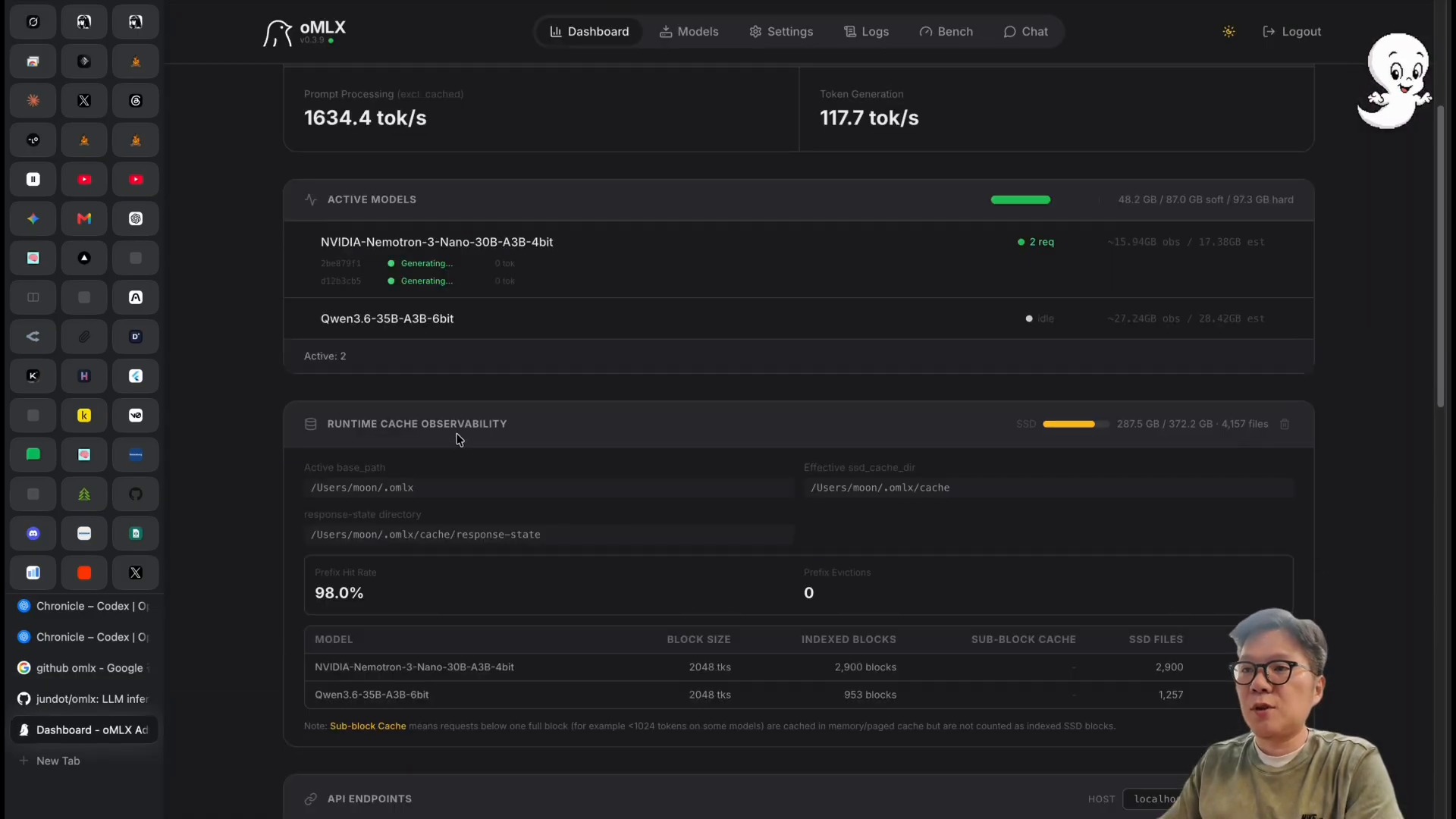
    The most noticeable scene in the video is the OMLX dashboard. The presenter explains that, through OMLX, he observed generation speeds around 117 tokens per second. More important than the number itself is the fact that the bottleneck for local LLMs is not a single model file. It is the sum of the inference server, caching, batching, and hardware memory configuration.

    Hands-on local LLM use: checking token generation speed on the OMLX dashboard
    A scene checking token-generation speed and model status on the OMLX dashboard. Source: screenshot from Learning Master’s YouTube video.

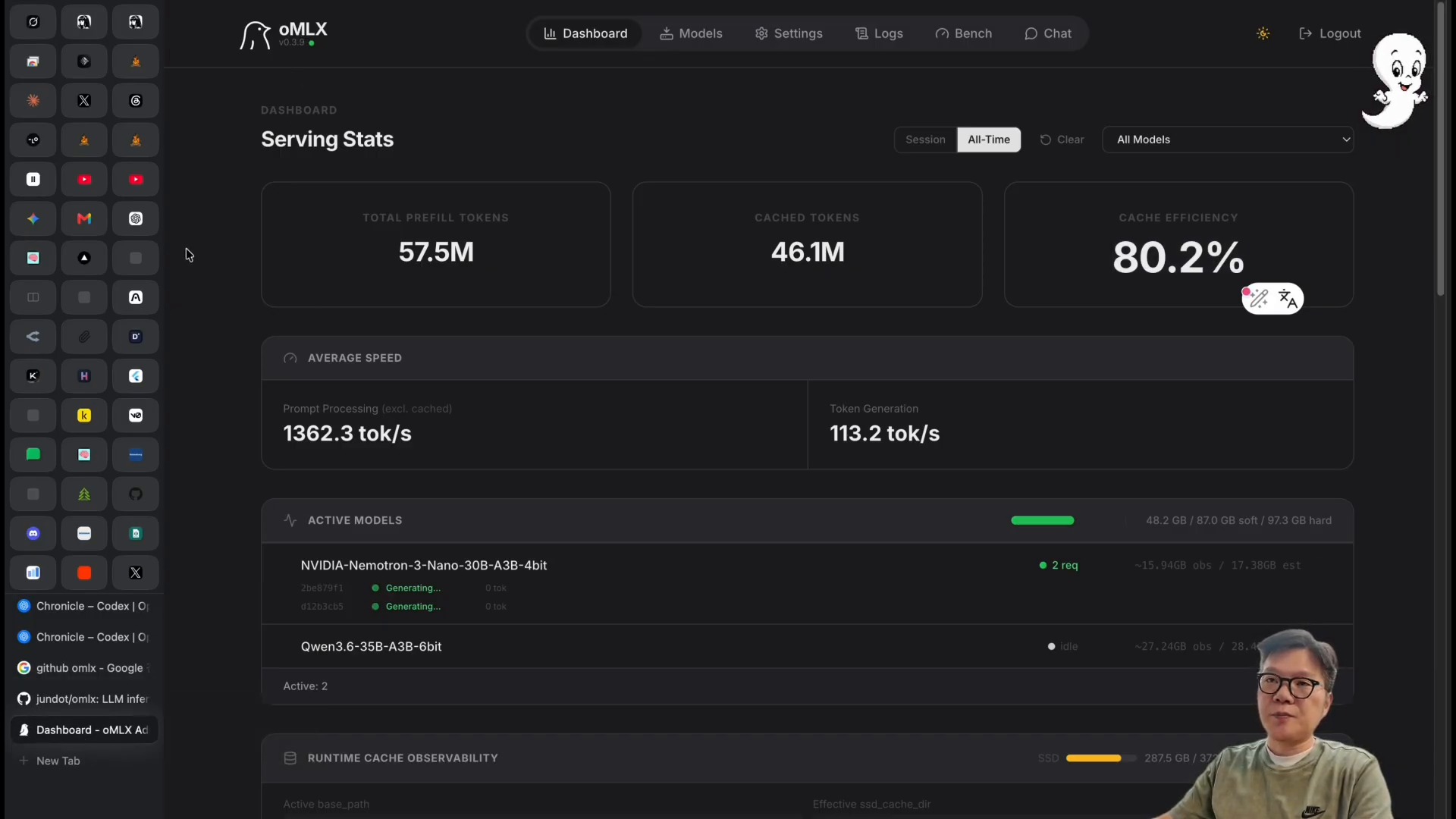
    The OMLX GitHub README describes the tool as an LLM inference server optimized for Apple Silicon. The key terms are continuous batching and tiered KV caching. In plain language, the structure improves perceived speed by processing multiple requests efficiently and reducing the cost of recalculating repeated context.

    Hands-on local LLM use: the OMLX server dashboard and model-operations screen
    OMLX is not merely a tool for running local models. It is closer to an operating environment where users can check model status and throughput through a dashboard. Source: screenshot from Learning Master’s YouTube video.

    This point also connects to the article on the SGLang local LLM serving engine. To use local LLMs well, the serving engine, context management, and caching strategy matter as much as model selection.

    Claude Code and Local Models: Fast, but Verification Is Separate

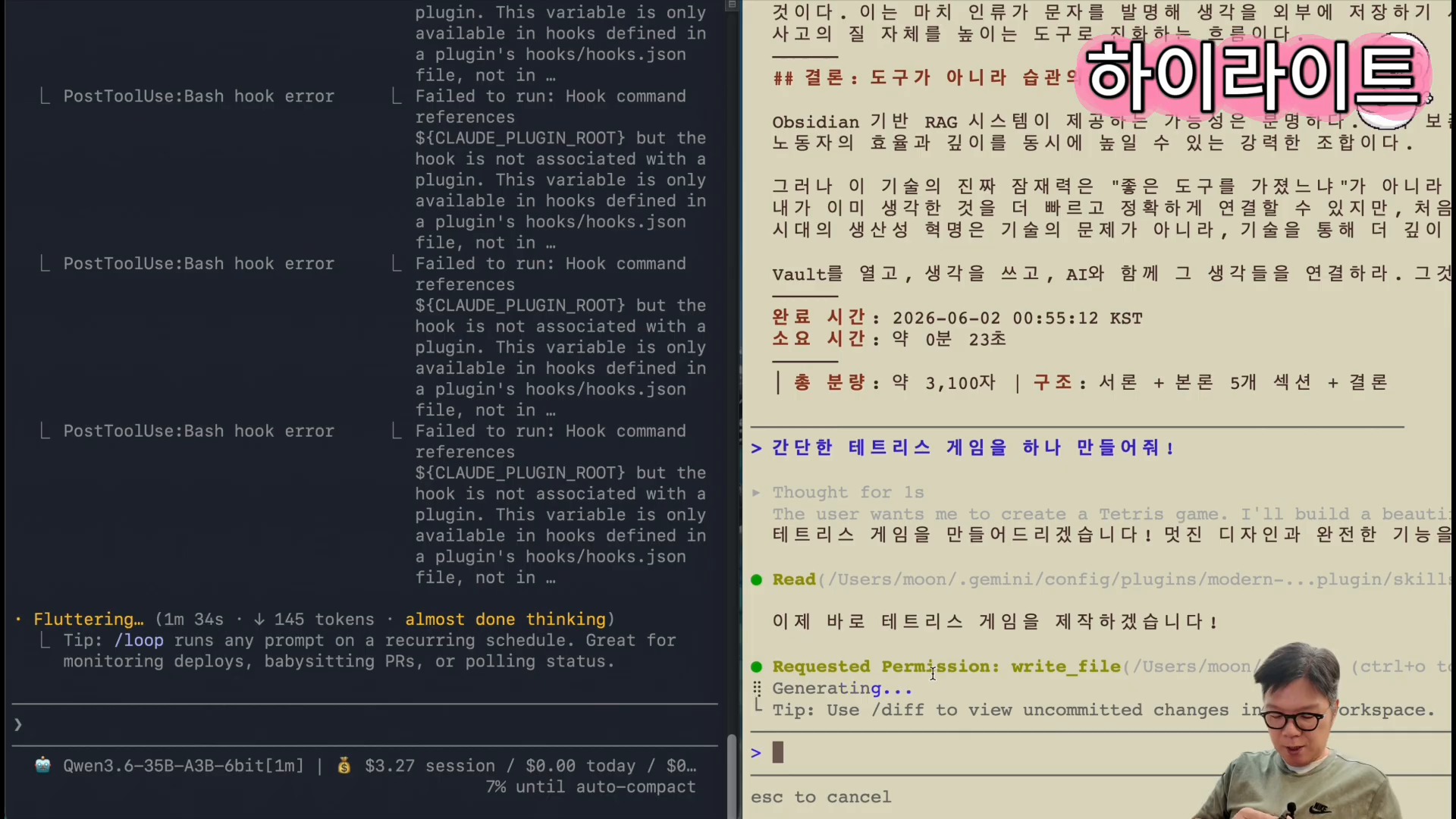
    In the middle of the video, Claude Code is connected to a local model through the omlx launch claude flow. The presenter then compares text writing and the creation of a Tetris game. He shows that local LLMs can complete some tasks faster, while also leaving the premise that output quality must be checked separately.

    Hands-on local LLM use: connecting Claude Code to a local model through OMLX and generating output
    A scene generating real output by connecting Claude Code to a local model. Speed comparison and quality verification should be considered separately. Source: screenshot from Learning Master’s YouTube video.

    The important criterion here is not simply “is it fast?” but “what work can safely be assigned to it?” For example, the following tasks are reasonable candidates for a first local-model trial.

    | Task type | Fit for local LLM | What to check | |—|—|—| | Draft writing | High | Fact-checking and style review are needed | | Repetitive code generation | Medium to high | Tests and security review are needed | | Personal document summarization | High | External transmission of sensitive information can be reduced | | Current-information search | Medium | Search-tool connection and source verification are needed | | Complex design decisions | Medium | Cross-review with a stronger cloud model is recommended |

    AI coding workflows also connect to the Headroom token-diet article. Reducing cost is not only about running models locally. Reducing the logs, files, and search results that an agent reads, and designing the verification loop, are other solutions to the same problem.

    Hermes Agent and Local LLMs: The Next Experiment in Agent Operations

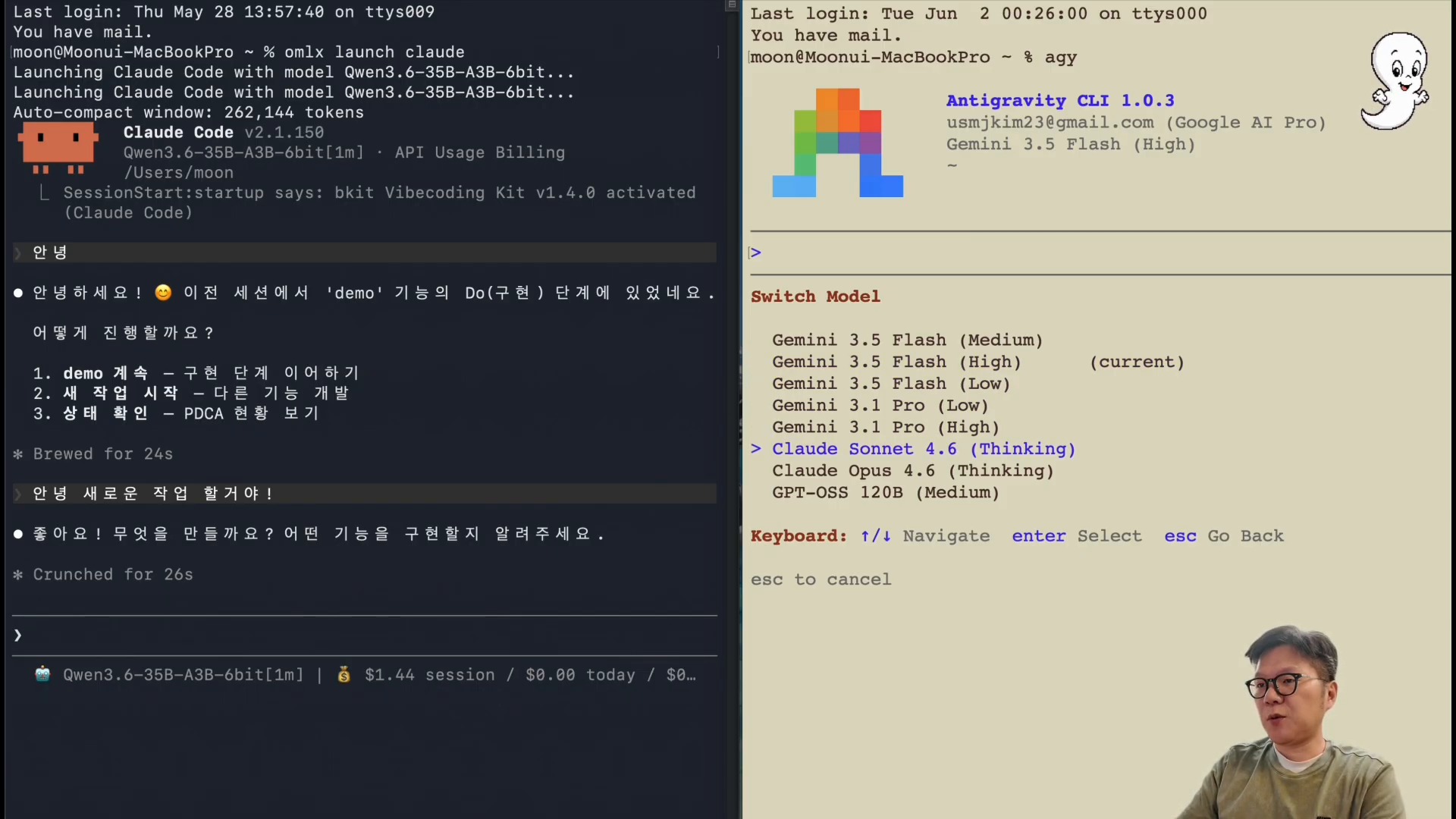
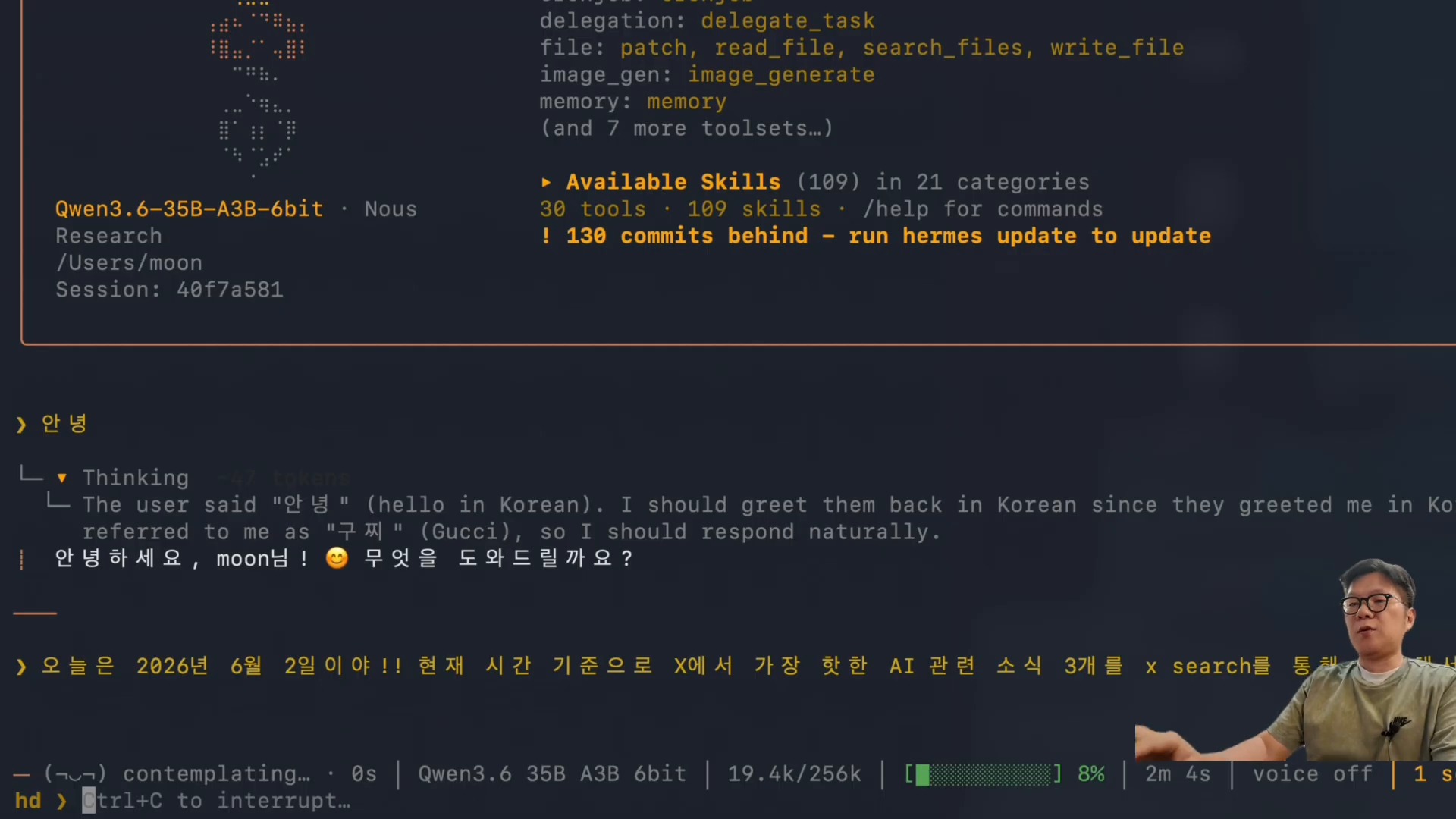
    The especially interesting section near the end is the Hermes Agent connection. The video shows the omlx launch hermes flow and the execution of the X Search skill. It is a scene showing that a local model can go beyond sentence generation and attach to an agent runtime responsible for search, tool calls, summarization, and deliverable creation.

    Hands-on local LLM use: running local-LLM search with the X Search skill in Hermes Agent
    A scene where Hermes Agent calls the X Search skill to search and summarize current AI news. Source: screenshot from Learning Master’s YouTube video.

    Hermes Agent is an open-source AI agent framework that runs in terminals, messaging platforms, and IDEs. It executes work through tool calls, skills, memory, cron jobs, and multi-platform gateways. If a local LLM can be connected to this layer, several advantages appear.

    • Less personal documentation and internal logs need to be sent to external APIs.
    • Token costs can be lowered for repetitive summarization, classification, and draft work.
    • A backup path exists when cloud models fail or hit cost limits.
    • Users can run more agent experiments.

    The caveat is that a local model calling tools does not immediately become a “trusted employee.” As discussed in the article on personal assistants in the AI-agent era, the more executable an AI system becomes, the more important permissions, verification, logs, and rollback design become.

    Pre-Adoption Checklist: How to Judge Local LLMs

    Whether to adopt a local LLM should not be decided by a single performance number. The M5 Pro Max 128GB environment in the video is closer to a powerful upper-bound example. A typical laptop or a Mac with less memory may not produce the same experience.

    Before adopting local LLMs, it is better to evaluate them in this order.

    1. First, choose repetitive work: drafts, summaries, tagging, code scaffolding, or other low-failure-cost tasks.
    2. Run the same prompt through both a cloud model and a local model, then compare speed, quality, and cost.
    3. Automate tests, link checks, and fact verification for local-model outputs.
    4. Separate tasks that involve sensitive information from tasks that require external search.
    5. Keep final decisions or high-risk execution with a stronger cloud model or human review.

    This approach connects with the “separation of the digital brain and execution agents” discussed in the article on AI-native transformation. A local LLM does not replace the entire brain. It brings some frequently used thinking and execution loops closer to the user.

    Conclusion: The Battleground for Local LLMs Is Placement, Not Replacement

    The meaning of this video is not that “local LLMs have completely beaten Claude or GPT.” A more realistic conclusion is that we have reached the stage of deciding where to place local LLMs.

    With a high-end Mac and a server such as OMLX, local LLMs can be practical options for drafts, summaries, code generation, personal-knowledge search, and agent experiments. On the other hand, work requiring current-information judgment, complex reasoning, or high reliability is still safer when paired with cloud models.

    In the end, the future AI work environment is not about choosing a single model. Productivity will likely depend on the criteria used to distribute work across local models, cloud models, agents, search tools, and knowledge bases.

    FAQ

    Can a local LLM replace Claude or ChatGPT?

    For some repetitive tasks, it can replace or assist them. But for complex judgment, current-information verification, and high-risk code changes, it is safer to use a stronger cloud model or human review in parallel.

    What is OMLX?

    OMLX is an LLM inference server optimized for Apple Silicon. According to its GitHub README, it emphasizes continuous batching and tiered KV caching, and it aims to make local model operation easier through a macOS menu bar and dashboard.

    Can I get similar results without an M5 Pro Max 128GB?

    The same level of speed is not guaranteed. The video results are strongly affected by a high-end Mac and a large-memory environment. On your own machine, it is better to start by testing smaller models and repetitive tasks.

    What improves when a local LLM is connected to Hermes Agent?

    You can experiment with search, file handling, summarization, and automation tasks through a local model. There are cost and privacy advantages, but tool-execution permissions and output verification must be designed separately.

    Where should beginners start with local LLMs?

    Start with low-failure-cost tasks such as personal document summaries, meeting-note cleanup, code drafts, or simple classification. Then compare the results with cloud-model outputs and define quality criteria.

    References

    Original Korean article: Hands-On Local LLM Use on M5 Pro Max 128GB

    Image source: Captured images used in this article are stills from the original YouTube video. They are used for review, commentary, and educational explanation, and copyright remains with the original rights holders and the channel.