
Linux is managed by groups and users. User accounts can be created/edited/deleted. Information about user accounts is stored in /etc/passwd.
Original Korean article: Original Korean article.
Check user list
sudo cat /etc/passwdAdd user and register password
You can register a user with the adduser command.
- -m or –create-home: Add the new user’s home directory. -s or –shell: The shell can be set differently for each user. -u or –uid: Specifies a specific user ID (UID). -c or –comment : GECOS field
sudo adduser [example]User default settings can be checked in /etc/defaults/useradd.
sudo cat /etc/default/useradd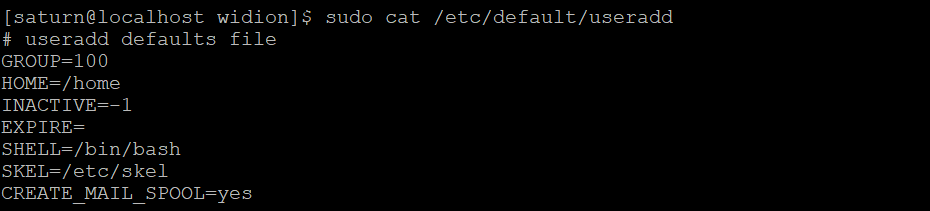
- Register the user’s password with the passwd [user name] command. Existing users can change their password.
sudo passwd [example]
Edit user information
For existing user accounts, you can change the user name, change the shell, or lock or unlock the account.
- -c or –comment: Modify GECOS field -d or –home: Modify home directory information -e or –expiredate: Set account expiration -l (lowercase L) or –login: Modify username
- -L or –lock: Lock user account
- -U or –unlock : Unlock user
sudo usermod [option] [example]Delete user
Unnecessary user accounts can be deleted with the userdel command.
- -f or –force: Delete account even when user is logged in -r or –remove: Delete account including mail and home directory
sudo userdel [example]Good article to read together
- Linux administrator tool – enable cockpit
- Activate Centos 8 RHEL & REMI Repository
- Install OpenSSL
- Installing and managing MariaDB (MySQL)
- Install Ubuntu 22.04.1 (VirtualBox)
Practical DNS and Name-Server Notes
DNS changes can take time to propagate, so plan edits carefully and keep a record of the previous values. Before changing name servers, confirm the authoritative provider, required A or CNAME records, MX records for email, and any TXT records used for verification. After the change, test from multiple networks and keep the previous configuration available until the migration is stable.
Related Reading
Continue with these related Thinknote English articles in the Server & Infrastructure cluster.
- Nextcloud installation and settings
- Install memory caching APCu, Redis, Memcached
- Free HTTPS setup (Let’s Encrypt, Cloudflare)
- Install OpenSSL
- Installing and managing MariaDB (MySQL)
- Setting up Nginx + Php8
FAQ
What is this article about?
This article is part of Thinknote’s English server and infrastructure archive. It focuses on practical Linux, Ubuntu, web-server, database, SSH, firewall, or hosting operations that readers can adapt to their own environment.
How should I use this guide?
Use it as a practical checklist and concept guide. Before applying commands on a live server, verify package names, OS versions, ports, and backup requirements for your own setup.
Where can I read the original Korean article?
The original Korean article is available here: Original Korean article.