
Have you created several AI employees but still copy one employee’s answer and paste it into another’s chat? The problem may lie in how you hand off work, rather than the number of agents. Even with an analyst and a writer, you remain the intermediary unless requests, evidence, and deliverables are connected.
Hermes Bot Mode displays existing profiles as a list of bots. Persistent chats, messages between bots, and group chats help connect their work. A video by Citizen Developer 9c demonstrates this process through a fictional product launch. This guide compares the video’s actual workflow with the official documentation to explain when to choose regular sessions, Bot Chat, mention-based delegation, or group chat .
Bots in Bot Mode are existing profiles, not a new employee system
In the official documentation, a Bot is a Hermes profile. Each profile separately manages its settings, model, memory, skills, credentials, and conversation history. Bot Mode is a UI that presents these profiles as a list with names and roles. It comes built into the desktop app.
Creating bots does not merge all their context and permissions. You still need to decide how the analyst’s findings reach the writer. You must also determine which files each can access and who reviews the work before publication.
Jarvis, Newton, and Hemingway in the video are examples of roles, not feature names. Jarvis coordinates, Newton analyzes, and Hemingway writes content. For your own work, define distinct responsibilities and deliverables before choosing names.
How do the four ways of assigning work differ?
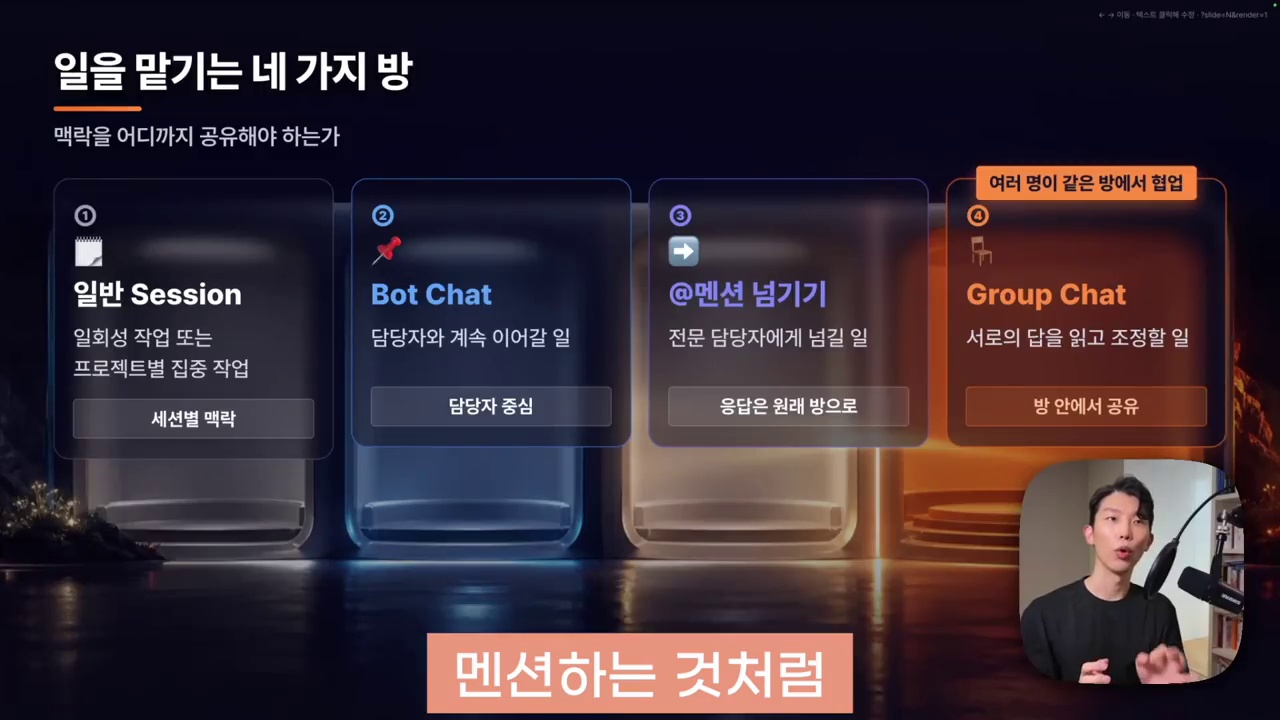
Regular sessions: keeping projects and tasks separate
Regular sessions may be suitable when you want separate conversations for different projects or topics. They fit situations where separating task-specific context matters more than maintaining a long conversation with one employee.
For example, keep projects, source folders, and sessions separate when writing reports for different clients. This helps prevent mixing their information and judgments. However, separate sessions do not automatically separate file access permissions.
Bot Chat: coordinating repeatedly with the same employee
Bot Chat is a dedicated, persistent conversation for each bot. According to the official documentation, clicking a bot in the list returns you to its dedicated Bot Chat, not an arbitrary recent session. You can open other regular sessions separately.
This suits recurring, role-based work, such as always assigning tasks to the same PM. However, retained conversations make it important to distinguish current reference documents from earlier drafts. A persistent chat does not mean every memory is reproduced permanently and accurately.
Mention-based delegation: getting another employee’s output within the current conversation
While talking with the PM, you can specify a bot with a mention such as @Analyst to hand off a task. Check the actual bot list and autocomplete for the correct name. The friendly display name may differ from the internal profile tag.
The delegation examples here refer to persistent Bot Chats in Bot Mode. The official documentation describes bot-to-bot messaging tools as available under conditions that distinguish these chats from regular sessions. Do not assume that entering the same name in any conversation window produces identical behavior.
The official documentation does not describe this as simply copying and forwarding the user’s words. The current bot composes a delegation message based on the request. Rather than assuming important conditions will be passed along, explicitly state the scope, sources, and completion criteria.
Group chat: reviewing work together while reading each other’s results
Group chat lets several bots view the same conversation, contribute, or pass their turn. It can help compare analytical findings with a draft or let employees with different perspectives review a deliverable.
One-to-one delegation may be enough when an employee only needs to receive analytical findings and write the content. A shared conversation becomes useful when the analyst and writer must check each other’s reasoning and make revisions.
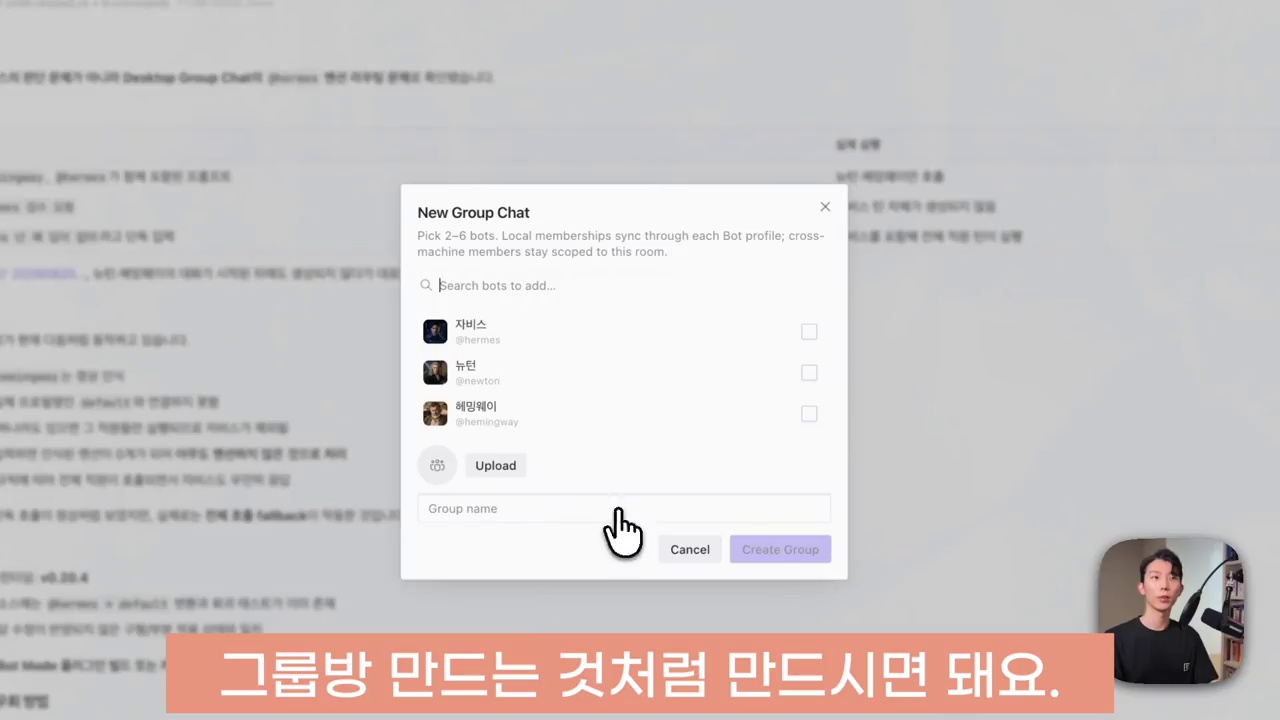
The launch preparation example: connecting analysis and writing through one PM
The video sets up a fictional brand and product. It prepares documents covering product descriptions, customer feedback, and the boundaries of permissible claims. This is a demonstration of the Bot Mode workflow, not evidence of results achieved by an actual organization.
The process is as follows.
- Prepare shared materials: Gather the necessary documents in one folder and specify which files to read.
- Ask the PM: Have Jarvis coordinate and ask it to delegate the analysis to Newton.
- Organize the findings: Group product facts, insights, and items requiring human confirmation from the PM’s perspective.
- Hand off to the writer: Ask Hemingway for draft headlines and FAQs based on the evidence and brief.
- Review together: Provide the necessary document paths again in the group chat and compare the wording against the evidence.
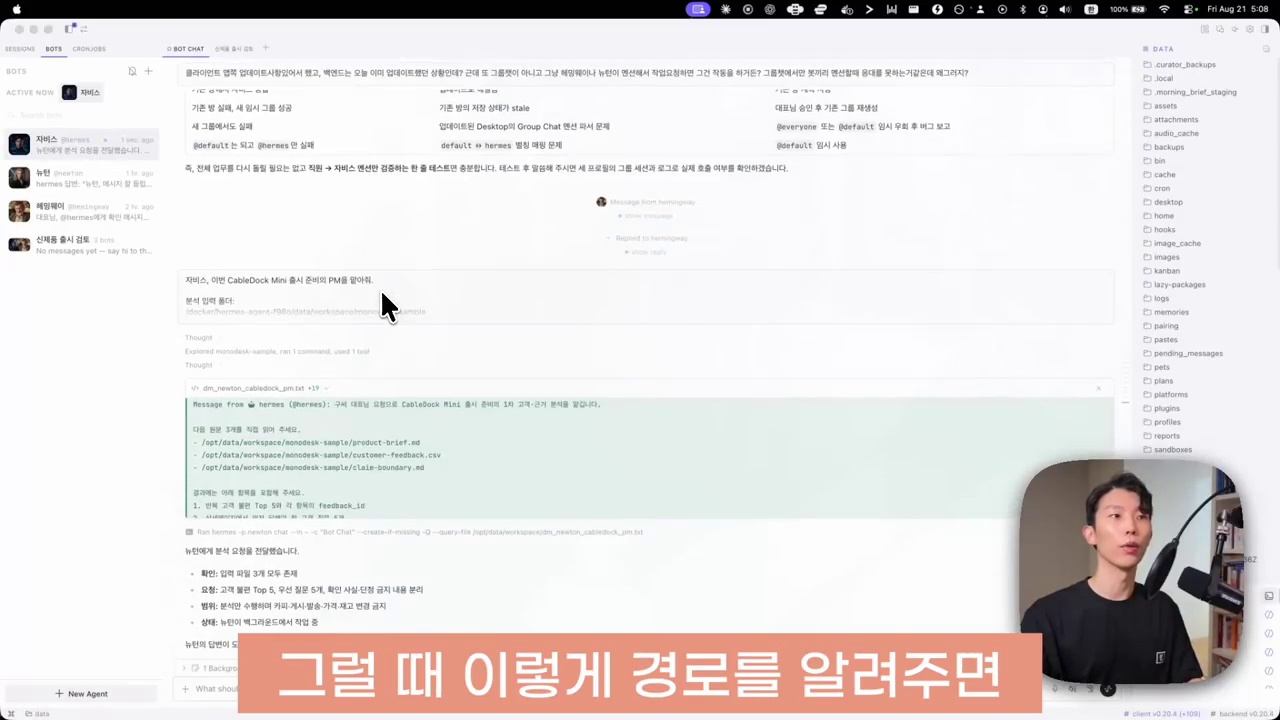
The important moments are those where the process is not seamless. The analysis returns, but it does not immediately become the desired summary. The presenter asks again for a summary from the PM’s perspective. The content draft also requires a request to reorganize the material.
The video demonstrates a collaborative workflow that can reduce copying and pasting. It does not prove that one user request completes every step perfectly. It helps to distinguish message delivery, response arrival, summary completion, and deliverable verification as separate states.
Put completion criteria in delegation requests, not just employee names
The following sample requests adapt the video’s approach to practical work. They are suggestions with commonly missed conditions added, not verbatim instructions executed in the demonstration.
- Delegate analysis: “Have the analyst compare the product description with customer feedback. Ask them to separate verified facts, sources, and uncertainties. Tell them not to use claims about benefits without supporting evidence.”
- Delegate writing: “Send the writer only the reviewed brief and supporting documents. Ask them not to invent figures or performance claims. Have them save headlines and FAQs as drafts for review.”
- Final PM report: “Report each employee’s completion status, generated files, unverified items, and matters requiring human approval.”
Because the current bot reformulates the delegation message, reference documents and prohibitions need to be clear. Do not stop at a notification that the result was ‘delivered.’ Check that the actual files and content meet the expected scope.
In particular, confirmation of sending or queue registration is not the same as completion by the receiving bot. Immediately repeating a request because a reply is slow can create duplicate work. Check the status and results before deciding what to request again.
Sharing a source path does not automatically merge permissions or context
The video provides reference document paths instead of repeatedly attaching files. This lets analysts and writers inspect the same materials directly. However, sending a path does not guarantee access.
For bots running on different devices or servers, the same path may point elsewhere or may not exist. Tool settings and file permissions may also differ. Check the results to see whether the bot actually opened the document and which version it read.
Do not assume that everything discussed in the PM’s private Bot Chat is automatically copied into the group chat. The video supplies generated document paths and their order of use again before starting the shared review. When moving into a group, briefly package the purpose, reference documents, latest deliverables, and unresolved decisions.
The official documentation explains that each bot uses a separate profile. This does not mean it automatically determines the appropriate sharing boundaries for confidential business information. Check options such as credential copying when duplicating profiles. Provide only the necessary materials and tool permissions.
Group chat is neither an unlimited meeting nor simultaneous parallel execution
The default group chat limits found in the official documentation are 2–6 bots, up to 3 sequential rounds per user message, and a maximum of 10 bot messages. These caps limit cost and conversation growth. Check the documentation for your installed version for actual settings and behavior.
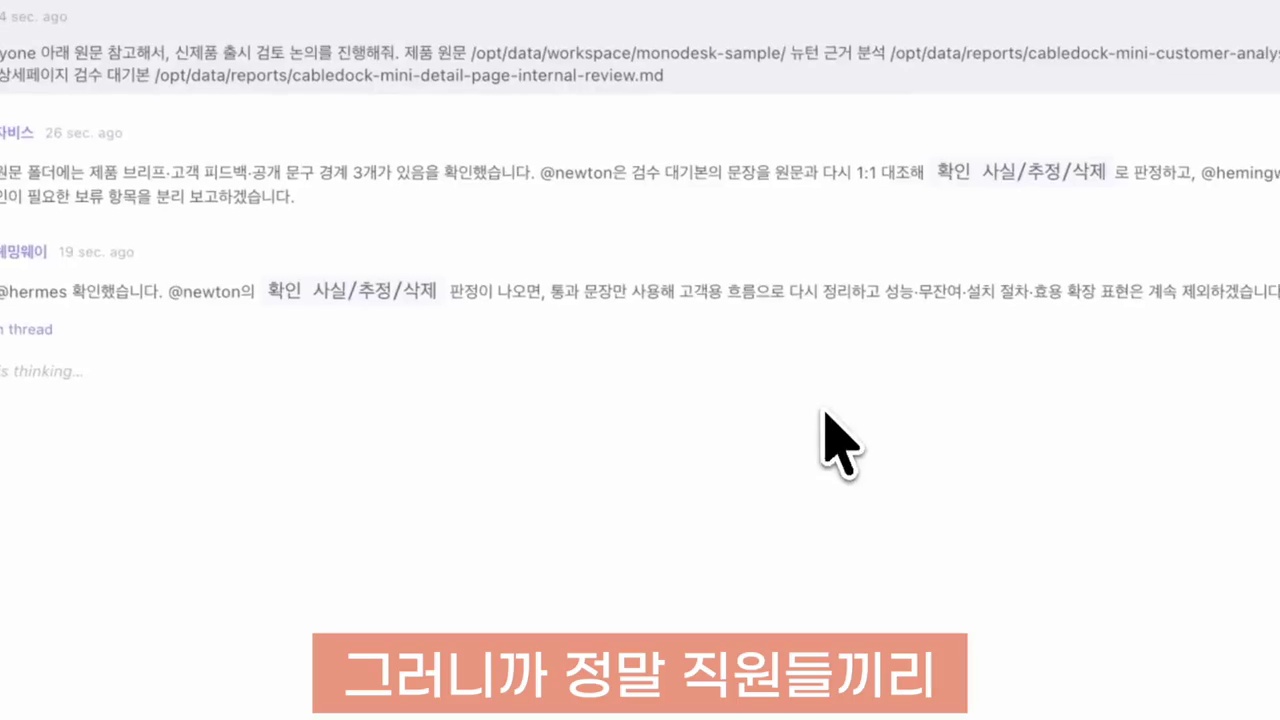
Bots in the same room do not all respond simultaneously. Turns proceed in sequence. Each bot can respond if it has something new to add, or pass otherwise. Mentioning a specific bot narrows the request to that employee. You can address everyone with @everyone or @all.
‘All three reviewers agreed’ is not equivalent to independent fact-checking. They may have accepted the same source error or repeatedly summarized one another’s drafts. Tie review criteria to source material, references, and approval conditions.
For a shared review, define roles and stopping conditions as follows.
- The analyst checks only whether each statement has supporting evidence and whether any evidence conflicts.
- The writer refines the language while retaining the facts that passed review.
- The PM does more than combine opinions. It records unverified items and decisions still needed.
- Additional work beyond the agreed scope, publication, or external transmission requires human approval.
Group chat round limits do not guarantee a cap on the total cost of every task. Costs can vary with tool calls, models, and context length. There is no need to summon the whole group for every minor sentence edit.
Before starting, check the app, backend, roles, and source materials together
The video advises checking updates for both the client and backend. An updated desktop interface may behave differently if its connected server is outdated. Update procedures depend on whether your installation is local, on a remote server, or in a container. Follow the official instructions for your setup.
Once Bot Mode appears, first use a small private task to check the following.
- Does it return to the intended bot’s persistent Bot Chat?
- Can you select the intended employee accurately through mention autocomplete?
- Does the delegated employee read the materials and leave a result?
- Does the PM distinguish those results from unverified matters in its report?
- Are the final file and required human decisions clear when the group review ends?
The presenter reports encountering errors with persistent session indicators and mention delivery during early use. This describes the creator’s experience at the time. It does not mean every current installation has the same errors. Nor can an update be guaranteed to resolve every problem. If problems arise, check the display, delivery status, and actual results separately.
This guide compares the video with official documentation. The demonstration was not reproduced in a separate environment, and no user app, profile, or server settings were changed.
Bot Mode’s value lies in handoffs, not employee headcount
Consider Bot Chat for repeated coordination with one employee and regular sessions for separating task-specific context. Use mention-based delegation to hand off specific analysis or writing. Add group chat when employees need to read and revise one another’s results.
Rather than placing many bots in one room from the start, try a small workflow such as PM → analysis → writing → shared review within the necessary scope → human approval. Check the convenience of reduced copying and pasting separately from the quality needed to trust and use the results.
Related reading
- AI Agent Tool Comparison: Working Environments for Grokbot, Buzz, and Hermes
- Getting Started with CrewAI: Designing Multi-Agent Roles and Tasks
- AI Agent Framework Comparison and Current Selection Criteria
FAQ
Do I need a new profile system for Hermes Bot Mode?
In the official documentation, bots are existing Hermes profiles. Bot Mode is a desktop UI for managing them through a list, persistent chats, messaging, and group chats. You do not need to treat it as a separate new agent concept.
Should I choose a regular session or Bot Chat?
Consider regular sessions to separate conversation context by project. Consider Bot Chat for repeated coordination with the same employee. The introduction of Bot Chat does not make regular sessions unnecessary.
Does a mention forward my exact request and the entire conversation?
The official documentation says the current bot composes a delegation message. Do not assume your original wording and the entire conversation are forwarded unchanged. Clearly specify the required materials, scope, deliverables, and prohibitions.
How many bots can join a group chat?
The official documentation reviewed specifies 2–6 bots, up to 3 rounds per user message, and a cap of 10 bot messages. Bots can speak sequentially or pass. Not every bot responds every time.
References
- Citizen Developer 9c, source Hermes Bot Mode walkthrough video
- Hermes Agent official Bot Mode documentation
- Hermes Agent official profile documentation
- Hermes Agent official GitHub repository
- Hermes Agent official releases
The images are screenshots used to explain and critique the demonstration in the source video. The video’s user experience is distinguished from feature guidance in official documentation checked on October 27, 2026, and this guide’s practical suggestions.