[태그:] AI Agents

  • What Is the OpenHuman AI Agent? The Promise and Limits of an Open-Source AI Assistant with Local Memory

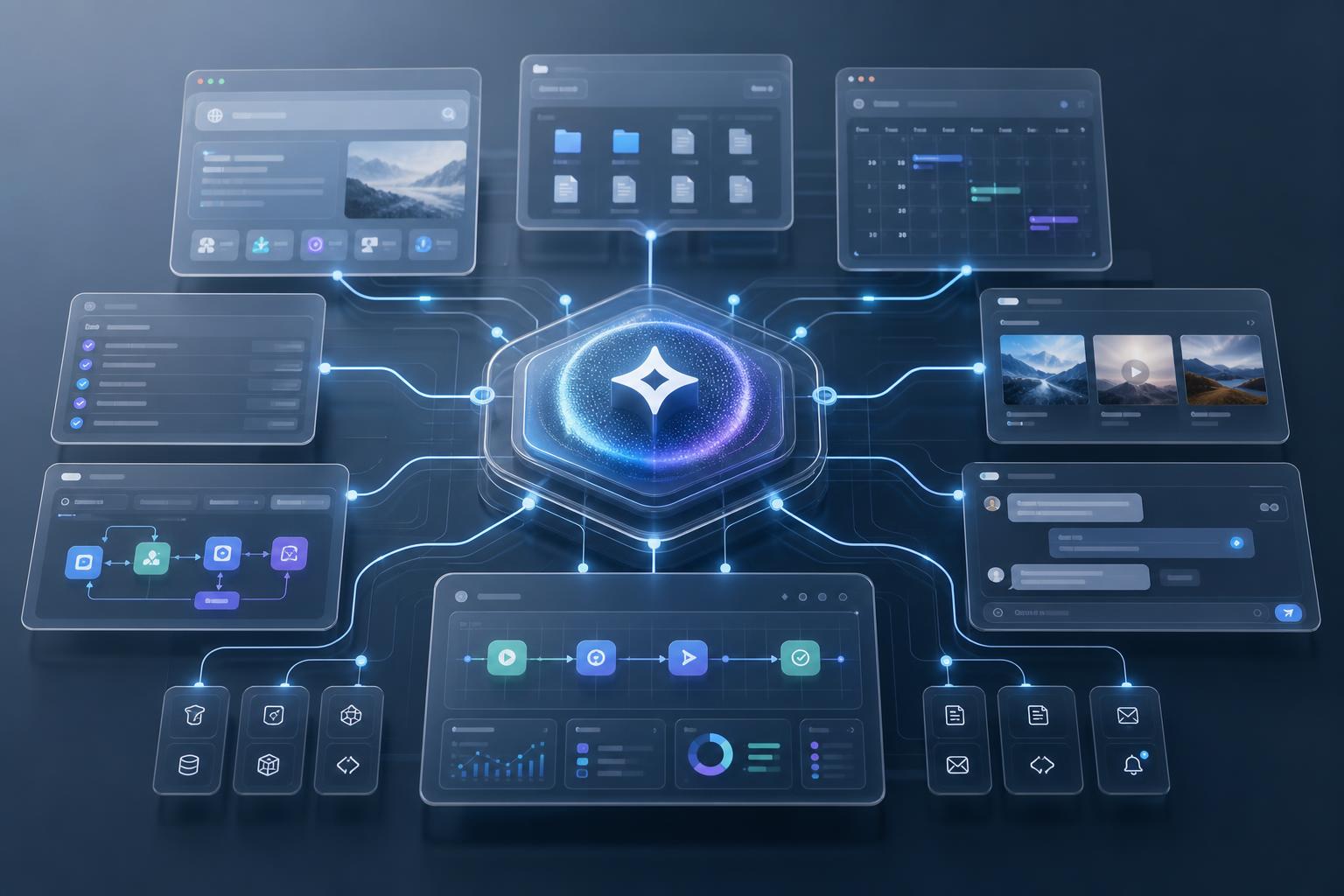
    OpenHuman AI agent is attracting attention because it is not simply “one more chatbot.” It aims at something larger than a single conversation window. It tries to bring a person’s files, notes, apps, web research and automation flows together into one AI work environment.

    Its official GitHub repository says OpenHuman aims to be “a brain that builds local-first memory.” It also describes itself as an orchestrator running a fleet of agents and as a deep researcher. The phrasing is ambitious, but the direction is clear. It wants AI to stop asking from scratch every time. Instead, it imagines a work system that continuously remembers and acts within the user’s world.

    What Kind of Project Is OpenHuman?

    OpenHuman is an open-source AI agent platform published in the `tinyhumansai/openhuman` repository. According to the official repository, its primary language is Rust and its license is GPL-3.0. As of July 2026, the latest release is v0.61.8, and the README explicitly describes the project as Early Beta.

    There are three core ideas.

    1. A structure that remembers personal data with a local-first approach
    2. An orchestration structure for running multiple agents and workflows
    3. An execution environment that combines web, files, browser, voice and research tools

    So OpenHuman is less like a standalone model such as ChatGPT or Claude. It is closer to an “agent harness” that connects multiple models and tools to real workflows.

    First Difference: Local-First Memory

    The point OpenHuman emphasizes most strongly is memory. The README mentions Memory Tree together with Obsidian Wiki. It describes a system that organizes user data into SQLite and a Markdown tree. It then connects that data to an Obsidian vault that humans can open and inspect.

    This approach matters. Many AI tools say, “I remember.” But users often cannot tell where that memory is stored, how it is retrieved, or how to fix incorrect memories. At least in its direction, OpenHuman aims for an editable knowledge structure rather than black-box memory.

    Of course, the actual quality still has to be verified separately. Even if a memory structure looks good, automatically collected information can become a burden if it accumulates as duplicate or outdated content. For a personal knowledge system, “organizing well and making corrections easy” matters more than “saving a lot.”

    Second Difference: Agent Orchestration

    OpenHuman emphasizes agent orchestration more than a single assistant. It aims to create workflows, run them based on triggers and build automation with approval gates. The README also mentions related open-source subcomponents such as `tinyflows` and `tinyagents`.

    This direction fits well with the current AI agent trend. Work automation no longer ends with “how to write good prompts.” It is now more important to decide what should run when. Teams also need retry rules and clear points where user approval is required.

    That is also why OpenHuman is interesting. If a personal AI assistant is to enter real work, it needs an execution structure more than conversational ability. Calendar checks, meeting summaries, file investigation, research, code work and report drafting need to connect into a single flow.

    Third Difference: Combining Research and Execution Tools

    OpenHuman introduces features such as web search, scraping, browser use, coding tools, voice and meeting agents. Its official documentation also uses the concept of SuperContext. The direction is to scan local memory, files and the web first. That secures context before the user has even finished asking.

    If this structure works properly, the advantage is significant. You do not have to explain again from the beginning what the AI knows. It can answer after reviewing work context, file locations, recent conversations and related documents.

    However, permission design is the core issue for this kind of tool-based agent. Connecting accounts such as Gmail, Slack, Notion and GitHub is convenient, but it also expands access to sensitive information. If the tool has automatic execution features, even more caution is needed. You need to check what data remains local and what requests are sent to external model APIs.

    Who Might Want to Try OpenHuman?

    OpenHuman is not a tool everyone needs. It becomes more worth considering if you are close to the following conditions.

    • You already use Obsidian, Markdown or local-file-based knowledge management.
    • You want to connect an AI assistant to work automation rather than simple Q&A.
    • You want to handle context from multiple tools such as Gmail, Notion, GitHub and Slack in one place.
    • You are interested in extensibility structures such as AI agent workflows, MCP and Skills.
    • You can tolerate the instability of a beta tool and test it.

    On the other hand, you may expect a work tool that you can install and use reliably right away. In that case, it is better to wait a little. The official repository also states that it is Early Beta. The more data access a tool has, the more important it is to start with small tests during the beta stage.

    What to Check When Installing

    The official INSTALL document primarily recommends native installation by operating system. macOS can use a Homebrew tap. Ubuntu and Debian can use the `.deb` from GitHub Releases. Windows can use an MSI installer.

    There are also cautions. Script-based installation is convenient, but the official documentation also explains that separate signature verification is limited. For that reason, it is safer to use the operating system’s standard installation method or release files when possible.

    Another issue is the Linux environment. The INSTALL document notes that AppImage may crash because of Wayland or some system library issues. On Debian/Ubuntu, installing the `.deb` may be the more stable choice.

    Criteria for Evaluating OpenHuman

    An agent platform like OpenHuman should not be judged only by its feature list. The real evaluation criteria are a little different.

    1. Is the Memory Editable?

    Users should be able to see what the AI remembers. They should be able to correct wrong memories and delete outdated context.

    2. Are There Approval Points in Automation?

    A good agent does not execute everything on its own. Tasks such as sending email, modifying files, posting externally and making payments require clear approval steps.

    3. Does It Leave the Cause When It Fails?

    Agents will inevitably fail. What matters is not pretending they do not fail, but showing where they got stuck and what logs or retry paths are available.

    4. Is It Clear What Data Goes to External Models?

    The phrase local-first is not enough by itself. You need to check what data stays local and what data is sent to external APIs.

    5. Does It Conflict with My Existing Workflow?

    AI tools change how work is done. That can be a positive change, but it can also create confusion in existing file structures and collaboration methods. It is best to test first in a small project.

    Compared with Hermes Agent

    OpenHuman gives the impression of being close to a personal desktop AI operating system. It puts local memory, Obsidian wiki, various app integrations and background loops at the front.

    By contrast, Hermes Agent is strong in task execution, tool calls, skills, cron and workspace-based automation. It is closer to a method that continues from research and writing to uploading and verification. It works inside project folders and procedures the user has already defined.

    The two tools differ more in perspective than in direct competition. OpenHuman is oriented toward building a “whole personal AI environment.” Hermes is closer to an “agent runtime that executes tools all the way through real work.” This difference will become more important in the age of AI agents. That is because harnesses and memory structures, more than models alone, will determine real productivity.

    Conclusion: Worth Watching, but Start with Small Tests

    OpenHuman is an interesting project that shows where AI agents are heading. It is an attempt to move beyond conversational chatbots and combine local memory, workflows, research and execution tools into one system.

    But it is still Early Beta. Before connecting personal data and work tools, you need to check permissions, storage locations, the scope of external transmission, failure logs and the range of automatic execution. Rather than entrusting it with core work from the start, it is safer to begin with a separate test account and a small folder.

    Ultimately, the question is not “Is OpenHuman good?” The more precise question is this: Are you ready to let AI continuously remember and execute around your knowledge and workflow? OpenHuman is a tool that poses that question quite clearly.

    Further Reading

    FAQ

    Is OpenHuman an AI model like ChatGPT?

    No. OpenHuman is closer to an AI agent platform that connects multiple models, tools, memory and workflows than to a specific model.

    Is OpenHuman free?

    The official GitHub repository is an open-source project under the GPL-3.0 license. However, actual use may require external model APIs, connected services or subscription features, so you should check the cost structure separately after installation.

    What Is OpenHuman’s Biggest Strength?

    It aims to combine local-first memory with agent orchestration. Rather than being a simple conversational AI, it is structured to connect the user’s files, apps, goals and automation flows.

    Can I Use It for Real Work Right Now?

    Because the official repository says it is Early Beta, it is better to test it first with a test account and limited data instead of applying it immediately to core work.

    What Should I Be Most Careful About When Installing?

    Account integration permissions and the installation method. When possible, use the official release’s native package, and connect sensitive accounts such as Gmail, Slack and GitHub with minimum required permissions.

    References

    Original Korean Article

    This article is a full-fidelity English translation draft of the original Korean post: OpenHuman AI agent Korean article on Thinknote.

  • How to Install Claude Code in Windows PowerShell: From First Setup to First Run

    How to Install Claude Code in Windows PowerShell: From First Setup to First Run

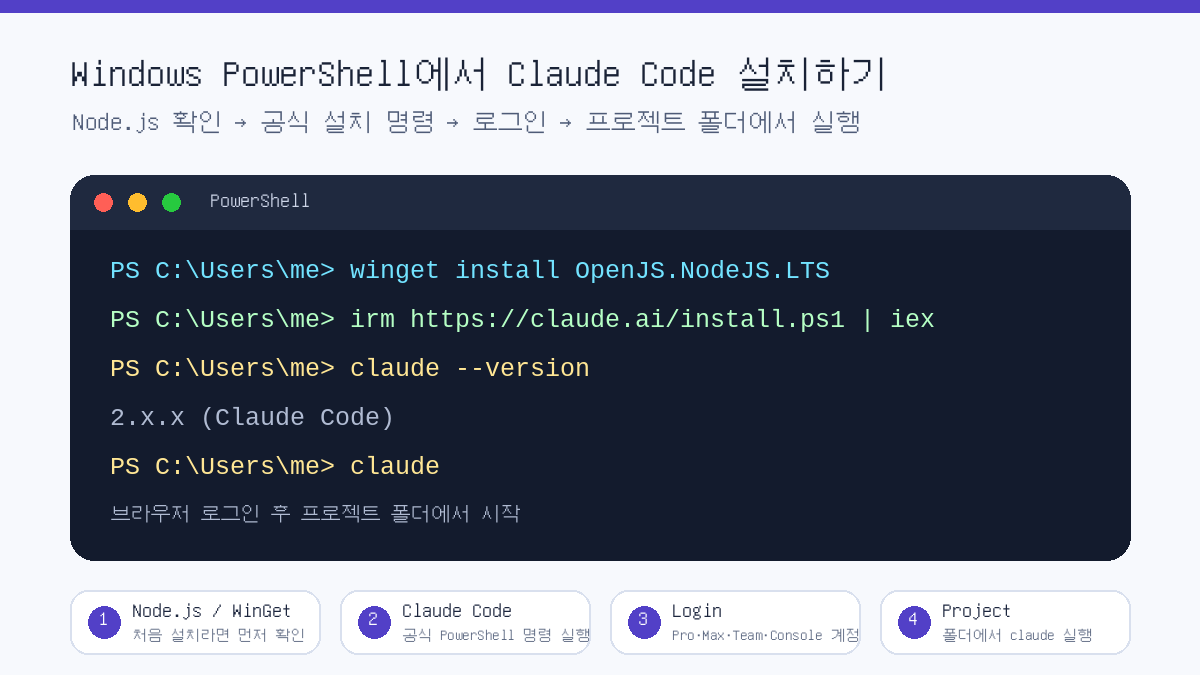
    If you are installing Claude Code on Windows for the first time, starting from PowerShell is the simplest path. The essentials are three steps: first confirm that you are in PowerShell, run the official installation command, then finish login and a launch test with the `claude` command.

    Explanatory image showing the Claude Code installation flow in Windows PowerShell
    Image: created by Thinknote, summary of the Claude Code PowerShell installation flow

    This article is based on Windows PowerShell. Commands may differ in CMD, and WSL, macOS and Linux installation methods use separate commands.

    First Check: Are You in PowerShell or CMD?

    The most common mistake is running PowerShell commands in CMD, or CMD commands in PowerShell. If the prompt starts with PS C:\, you are in PowerShell. If you only see C:\, it is likely CMD.

    SituationMeaningWhat to do
    The prompt starts with PS C:\You are using PowerShellFollow the commands in this article as written.
    The prompt starts with C:\You are probably using CMDOpen PowerShell from the Start menu, or choose a PowerShell tab in Windows Terminal.
    You are using Windows TerminalMultiple shells may be availableCheck the tab name and select PowerShell before running the installation command.

    Step 1: Check Whether You Need Node.js

    According to Anthropic’s official documentation, Claude Code can be used on Windows 10 1809 or later, or Windows Server 2019 or later. Installation methods broadly include the official native installation and npm installation. For beginners, it is easier to use the official PowerShell installation command first. The npm method can be used as an alternative in an environment with Node.js 22 or later.

    node --version
    npm --version

    If the commands above show version numbers, Node.js and npm are installed. If not, you can install Node.js LTS with WinGet as shown below. However, if you use the official native installation command, you do not necessarily have to install Node.js first.

    winget install OpenJS.NodeJS.LTS

    Step 2: Install Claude Code in PowerShell

    In Windows PowerShell, use Anthropic’s official quick installation command. Open PowerShell and run the command below.

    irm https://claude.ai/install.ps1 | iex

    If you are concerned about security, you can view the installation script before executing it directly. Even in this case, it is important to develop the habit of confirming that the source is the official domain.

    irm https://claude.ai/install.ps1

    Step 3: Verify the Installation

    When installation is complete, open a new PowerShell window and check the version. The official documentation says that a normal installation displays Claude Code together with a version number.

    claude --version

    For a more detailed check, run the diagnostic command. This command does not start a session; it checks installation status and configuration issues in read-only mode.

    claude doctor

    Step 4: Sign In and Start Your First Session

    Claude Code cannot be used with only the free Claude.ai plan. According to the official documentation, it requires a Pro, Max, Team, Enterprise or Console account. After installation, running the command below opens the browser login flow.

    claude

    If you want to use API-based billing, you can choose Console account authentication. Advanced users who already use API key environment variables may have a different authentication method, but the principle is that key values should never be written directly into a blog post or code repository.

    claude auth login --console
    claude auth status --text

    Step 5: Run It from a Project Folder

    Claude Code is not a tool that simply opens a chatbot. It is a coding agent that reads the code and files in the current folder, modifies them when necessary, and runs commands. So it is best to move into the project folder you want to work on before running it.

    cd C:\Users\me\Workspace\my-project
    claude

    On first launch, you may see a prompt asking whether you trust the folder. Approve only projects you created yourself or repositories you can trust. For unfamiliar folders, downloaded archives or code of unclear origin, it is safer to inspect the contents first.

    Alternative: Installing with npm

    If you already use Node.js 22 or later, global npm installation is also possible. According to the official documentation, the npm package downloads and links the native binary for each platform.

    npm install -g @anthropic-ai/claude-code
    claude --version
    Installation methodRecommended forNotes
    Official PowerShell installationWindows users installing for the first timeThe command is short and close to the official Windows quick installation flow.
    npm installationDevelopers already using Node.js 22 or laterConvenient for people who manage an existing Node/npm environment.
    WSL, macOS or Linux installationUsers working outside native Windows PowerShellUse the separate commands and setup flow for that environment.

    Common Errors and Fixes

    Error or symptomPossible causeFix
    irm not foundA PowerShell command was run in CMDOpen PowerShell and run it again.
    &&-related errorA CMD-style command was run in PowerShellDistinguish PowerShell commands from CMD commands.
    claude not recognized after installationPATH has not refreshed or installation did not completeOpen a new PowerShell window, then run claude --version and claude doctor.
    Login does not proceedAccount plan, browser or network issueConfirm your account type, default browser and network access, then try again.

    Recommended Commands for the First Run

    After installation, it is better to start with a small request asking Claude Code to explain the current project rather than immediately assigning a large task. This lets you see how Claude Code reads the repository structure.

    claude
    
    # Enter inside Claude Code
    Briefly explain this project structure.
    If there are runnable test or build commands, tell me those too.

    Related Articles

    FAQ

    What is the command to install Claude Code in Windows PowerShell?

    The official quick installation command is irm https://claude.ai/install.ps1 | iex. It must be run in PowerShell, and CMD requires different commands.

    Is Node.js required to install Claude Code?

    If you use the official native installation, you do not have to install Node.js first. However, installing with npm requires an environment with Node.js 22 or later.

    Can Claude Code be used with a free Claude account?

    According to the official documentation, Claude Code requires a Pro, Max, Team, Enterprise or Console account. It cannot be used with only the free Claude.ai plan.

    What command should I check first after installation?

    Check the version with claude --version, and if there is a problem, inspect the installation status with claude doctor.

    Why should I run it from a project folder?

    Claude Code works based on the files and code structure in the current folder. Move to the desired project folder and run claude to reduce the chance of reading the wrong folder.

    References

    In short, on Windows you can open PowerShell, run the official installation command, and then check in the order claude --version, claude doctor and claude. What matters more than installation itself is execution location and permissions. Start in a trusted project folder, and never leave API keys or account information directly in code.

    Original Korean Article

    This article is a full-fidelity English translation draft of the original Korean post: Claude Code PowerShell installation Korean article on Thinknote.
  • Will the AI Singularity Arrive Within Five Years? Five Questions for Preparing for the Agent Era

    Will the AI Singularity Arrive Within Five Years? Five Questions for Preparing for the Agent Era

    # Will the AI Singularity Arrive Within Five Years? Five Questions for Preparing for the Agent Era

    Talk about the AI singularity usually flows in two directions. One is trying to guess the date when AI will surpass humans. The other is the more tangible question: when will my work and daily life actually change?

    The EBS knowledge video “The latest it will arrive is five years from now” is closer to the second question. The core issue is not a grand prophecy about the future. It is what we should prepare for when AI moves beyond chatbots and approaches the agent stage, where it handles real work.

    Scene from a discussion on the AI singularity
    Scene from a discussion on the AI singularity

    For the singularity, the “felt threshold” matters more than the date

    In the video, the singularity is described as the turning point when artificial intelligence surpasses human intelligence. The speaker mentions that some AI scientists point to around 2030. That is why the phrase “it could arrive within five years” appears.

    But if we focus only on the date, the discussion is easily exaggerated. There is a more important question: When will people begin to feel that AI is not just a simple tool, but a colleague at work or even a substitute?

    That felt threshold is closer to agents than to the grand word “superintelligence.” When AI carries out multi-step tasks such as finding documents, comparing materials, calculating in Excel, sending emails, and coordinating schedules, people already feel, “This is a different phase.”

    In relation to this topic, Thinknote’s summary of AGI and superintelligence risk is also worth reading. If that article looks at the larger risk landscape, this one focuses on changes felt in everyday work.

    Why digital intelligence moves differently

    One interesting point in the video is the difference between natural intelligence and digital intelligence. Human genius is bound to individuals. Even if the experience a person builds over a lifetime is recorded, it does not become another person’s ability as-is.

    AI is different. The level one model reaches can become the starting line for the next model. A movement learned by one robot can also be copied across an entire fleet of robots. In the video, this is explained roughly as: “In AI, once an Einstein appears, that becomes the bottom line.”

    Another difference is time. AI can simulate, in compressed time, the trial and error that humans would repeat over hundreds of years. That is why the singularity discussion is not simply about “smarter machines.” It is about changes in learning speed, replicability, and the way knowledge is transferred.

    Slide showing questions for the AI era
    Slide showing questions for the AI era

    What will change when the agent stage arrives?

    As in OpenAI’s discussions of AGI stages, AI development is often described as moving from chatbots to reasoning, agents, innovators, and organization-level systems. The stage the public will most strongly feel first is the agent stage.

    An agent does not stop at giving an answer. It receives a user’s goal, handles multiple apps and tools, checks intermediate results, and continues the necessary work. That is why how work changes in the agentic AI era has already become a practical topic for both individuals and companies.

    Preparation must also change. Being good at prompts is not enough. You must design which tasks to entrust to AI, which data should not be entrusted to it, who will review the results, and how logs will be kept if something fails.

    Hallucination is a risk and also a shadow of creativity

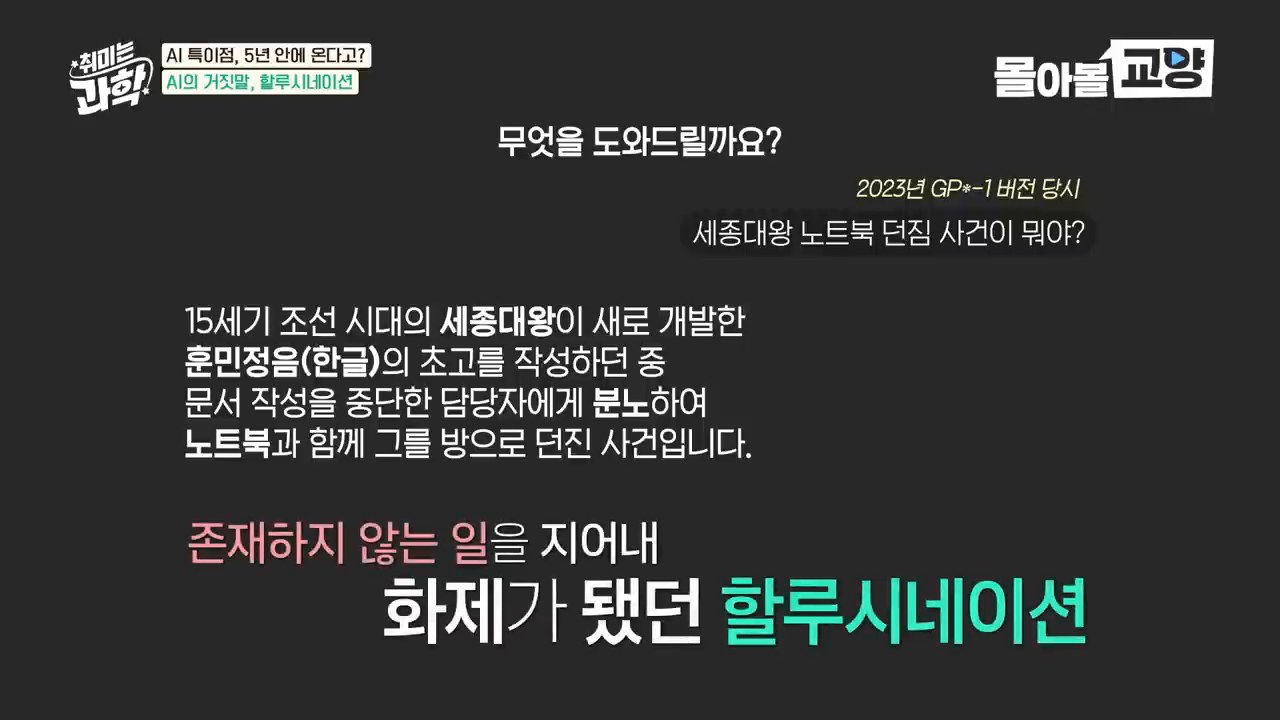
    The video also spends considerable time on hallucination: the problem of AI producing answers that sound plausible but are wrong. In areas where errors cause serious harm, such as medicine, pharmaceuticals, law, and finance, this can be fatal.

    But if hallucination is seen only as a bug, we miss something about the nature of AI. The video also introduces the view that “hallucination is not a bug but a feature.” New combinations and creative answers require some room for imagination and inference.

    So the practical conclusion is not “Do not trust AI.” It is closer to use AI with verification mechanisms attached. Retrieval augmentation, source checks, calculation tools, expert review, and work logs should be used together. As discussed in the Obsidian deep-research automation article, the quality of AI use depends less on the answer itself than on the verification loop.

    Embodied AI and the problems of the real world

    In the latter part, humanoids and embodied AI appear. The question is whether AI that has learned only from text and images can truly understand the world. Experimenting in a lab, grasping objects, falling down, and readjusting are different from knowledge learned only through words.

    Discussion of humanoids and embodied AI
    Discussion of humanoids and embodied AI

    Platforms such as NVIDIA Cosmos are attempts to solve this problem in virtual worlds. They simulate physical environments similar to reality and allow robots or autonomous-driving systems to accumulate large amounts of experience within them.

    This point makes the singularity discussion more realistic. Rather than an AI surpassing humans suddenly appearing one day, the picture is closer to software agents and robots in the physical world developing at different speeds and entering various parts of society.

    Five questions individuals and organizations should ask now

    The conclusion of the video is closer to preparation than fear. AI may not be a tool that grows everyone equally. It can become a device that amplifies people who already have knowledge and resources even further.

    That is why the following five questions are necessary.

    1. What repetitive tasks in my work can AI already do instead? You need to separate small tasks first, such as report drafts, research, summarization, and schedule coordination.
    2. What judgments should not be entrusted to AI? Human review is essential in areas with high error costs, such as legal responsibility, personnel evaluation, and medical or financial judgment.
    3. Is there a loop for verifying AI results? If you do not check sources, calculations, logs, and reproducibility, AI can become a fast error-production machine.
    4. Are our organization’s data and permissions designed safely? When agents manipulate real tools, permission management and work records become important.
    5. Do I have enough background knowledge to ask AI good questions? As the video puts it, the AI era may be a comeback for broad knowledge. If the question is shallow, the answer will be shallow too.
    Possibilities and anxieties of the AI era
    Possibilities and anxieties of the AI era

    Conclusion: Changes in how we work arrive before the singularity

    No one can state with certainty exactly how many years remain before the AI singularity. The definition of intelligence is still not clear either. So it is better to read the number “2030” not as a prophecy, but as a warning signal.

    What is clear is that the shift from chatbots to agents has already begun. AI is moving from an answering tool to an execution tool. This change touches personal productivity, organizational permission design, the direction of education, and debates over social distribution.

    Closing scene from an AI singularity discussion
    Closing scene from an AI singularity discussion

    In the end, the core of preparation is one thing: not using AI more, but designing what to delegate, what to verify, and what questions to ask.

    Recommended reading

    FAQ

    Will the AI singularity really arrive within five years?

    The exact timing cannot be stated with certainty. However, the video emphasizes that the discussion timeline has moved forward enough for some experts to mention around 2030. More important than the date is the felt change when agentic AI begins to handle real work.

    Are AGI and AI agents the same thing?

    They are not the same. AGI refers to intelligence that can generally solve diverse problems like a human. An AI agent is closer to a system that receives a goal and executes multiple steps. However, many people may first experience changes that feel close to AGI at the agent stage.

    Can AI hallucination disappear?

    It is hard to assume it will disappear completely. Instead, risks can be reduced by adding retrieval augmentation, source checks, calculation tools, and expert review. The more important the domain, the more AI answers should be placed inside a verification loop rather than used as final judgments.

    What should individuals prepare first for the AI era?

    Work decomposition comes before a list of tools. You need to separate the repetitive parts of your work, the parts requiring judgment, and the parts with serious responsibility. Only then can you decide what to entrust to AI and what humans should review.

    Why do broad knowledge and questioning ability matter in the AI era?

    AI is strongly affected by the quality of the question. Background knowledge is needed to make good questions and judge whether the answer is correct. The ability to use AI well is therefore not merely prompt technique, but an ability to handle knowledge and context.

    References

    Image source: the captured images used in this article are used as quoted images from the original YouTube video for review, commentary, and educational purposes. Image copyrights belong to the original rights holders and the channel.

    Original Korean article

    Read the original Korean article

  • AI Web Design Workflow: How to Build a Landing Page with ChatGPT Mockups and Claude Design

    AI Web Design Workflow: How to Build a Landing Page with ChatGPT Mockups and Claude Design

    # AI Web Design Workflow: How to Build a Landing Page with ChatGPT Mockups and Claude Design

    AI web design is no longer just a story about “enter a prompt and a site comes out.” The more important change is a division-of-labor workflow: first visualize the design standard, then have another AI implement that standard.

    Darrel Wilson’s video shows this flow well. First, he creates website screenshots with ChatGPT Sol, then passes a preferred mockup to Claude Design and turns it into a responsive web page. For beginners, it is a fast experimentation tool. For practitioners, it is a way to reduce the gap between a brief and implementation.

    Example of a website mockup created by ChatGPT
    AI first draws a finished-looking website mockup to create a visual reference point. Source: screenshot from Darrel Wilson YouTube video.

    The core is “creating a visual standard,” not “generating code”

    A common mistake when building a website with AI is to start with the prompt, “Create a cool landing page in HTML.” Even if the result looks plausible, the brand tone, image direction, section density, and typography can easily drift.

    The video’s approach is different. It first asks ChatGPT Sol to create screenshots that look like finished websites by providing the industry, mood, image style, and layout requirements. Those screenshots become a visual brief that can be given to another AI.

    Step 1: Create multiple design mockups with ChatGPT Sol

    The text prompt should not simply say, “Make a website.” It should include specific design conditions, such as the following.

    • Industry and site purpose
    • Desired mood and brand tone
    • Image direction for the hero section
    • Layout characteristics such as vertical or horizontal text
    • CTA buttons, menus, and section structure
    • Whether to use high-resolution images

    The purpose of this step is not to obtain code that can be deployed immediately. It is to compare several mockups quickly and choose the strongest direction.

    Extracting image assets from a mockup
    Images inside the screenshot are separated into high-resolution assets and passed to the implementation stage. Source: screenshot from Darrel Wilson YouTube video.

    Step 2: Extract image assets separately and pass them to Claude

    Even if a strong mockup is produced, the final result weakens sharply if the images turn into placeholders during implementation. That is why the video extracts the images inside the screenshot as high-resolution files and downloads them as a ZIP file.

    The reason this process matters is simple. Claude Design can follow not only the layout, but also the image assets that created the mood of the original mockup.

    In real work, one more check is needed at this stage. You must review the commercial usability of AI-generated images, human depictions, brand similarity, and copyright risk.

    Claude Design implementation screen
    The selected mockup is placed in Claude Design and translated into an actual web page structure. Source: screenshot from Darrel Wilson YouTube video.

    Step 3: Implement the mockup as a responsive web page with Claude Design

    The next step is to upload the selected screenshot and image ZIP to Claude Design. In the video, Wilson instructs Claude to follow the original mockup as closely as possible and, if necessary, turns off Claude’s default design system.

    The prompt can be short. What matters is not saying only “Make a similar website based on this image,” but giving the following standards as well.

    1. Preserve the original mockup’s layout first.
    2. Do not replace the image assets with placeholders.
    3. Consider both desktop and mobile responsiveness.
    4. Connect the menu, CTAs, and section order like a real site.

    5. Structure it so it can later expand into About, Services, and Contact pages.

    Step 4: Do not stop at the homepage; expand the site structure

    In the video, after creating the homepage, he generates additional pages such as About, Services, Insight, and Contact in the same design language. This part is important. Even if a single landing page looks beautiful, it is hard to use as a real website if the internal pages are empty.

    AI website production should not stop at “the first screen looks pretty.” At minimum, you need to check the following.

    • Do navigation links lead to actual pages?
    • Do the menu and CTA work naturally on mobile?
    • Do the contact form, buttons, and external links function correctly?
    • Is the copy not duplicated across pages?
    • Are SEO titles and meta descriptions separated by page?
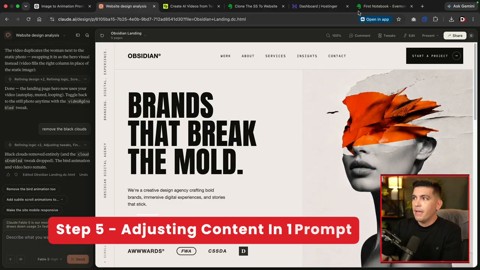
    Adjusting content with prompts
    Industry information and wording are entered again to customize page content. Source: screenshot from Darrel Wilson YouTube video.

    Step 5: Refine copy and animation separately afterward

    Claude’s first result is a starting point. In the video, industry information is entered again to customize all text, and animations such as birds, clouds, and human video elements are added.

    Animation, however, should be handled carefully. Background videos and moving objects can improve the first impression, but they can also reduce mobile speed and accessibility. On small screens in particular, text readability comes first.

    In practice, the following order is stable.

    1. Complete the structure and sections first.
    2. Have a human review the brand copy.
    3. Fix the mobile layout.
    4. Add animation in minimal units.
    5. Check speed, accessibility, and SEO last.
    Example of the deployment stage
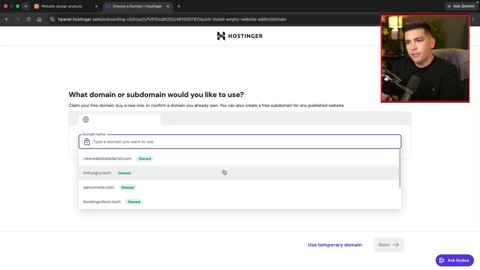
    The completed HTML is connected to hosting and published on a real domain. Source: screenshot from Darrel Wilson YouTube video.

    What this method changes is the work sequence, not the tools

    The message of the video is not “designers and developers are no longer needed.” Rather, it means the human role is moving further toward the front end and the back end of the process.

    At the front end, people must create good visual briefs and judge which direction to choose among multiple mockups. At the back end, they must verify whether the result meets real service standards.

    As AI becomes faster, the standards humans need to check must also become clearer.

    StageWhat AI does wellWhat humans should check
    Mockup generationSuggesting varied layouts and image directionsBrand fit, differentiation, copyright
    ImplementationStructuring HTML/CSS and generating a responsive draftCode quality, accessibility, performance
    ContentDrafting industry-specific copyAccuracy, persuasion, legal wording
    DeploymentProducing publishable files quicklyHosting, domain connection, forms, security

    Checklist for trying it right away

    • Do not try to finish everything at once; separate mockup creation, implementation, revision, and deployment.
    • Give ChatGPT the “design direction” and Claude the “implementation standards.”
    • Pass image assets along with the screenshot.
    • Check the mobile screen with a separate prompt.
    • Before actual deployment, check links, forms, speed, accessibility, and SEO.

    Recommended reading

    FAQ

    Q1. Can ChatGPT Sol complete a website by itself?

    The core of the video is not to finish with Sol alone. ChatGPT Sol creates design mockups and image assets, while Claude Design implements those mockups as actual web pages. It is closer to a division of labor.

    Q2. Why create a screenshot first instead of asking Claude to build it directly?

    A screenshot is a visual brief that communicates layout, images, typography, and mood all at once. Compared with text alone, it gives the AI a much more concrete standard to follow.

    Q3. Does this method replace Figma?

    For simple mockups and landing page experiments, it can reduce some work before Figma. However, it is hard to say that it fully replaces team collaboration, component management, design systems, and detailed UX validation.

    Q4. Can I use an AI-generated website commercially right away?

    It is safer to use it after review rather than immediately. Image rights, responsive quality, accessibility, performance, personal-data handling in forms, and search optimization all need to be checked separately.

    Q5. Is this workflow useful for beginners?

    Yes. It is especially useful for beginners who lack design confidence because they can view multiple mockups first and choose a direction. However, they should not trust the final result as-is, but verify it step by step with a checklist.

    References

    Original Korean article

    Read the original Korean article

  • Kimi K3 Shock and Controversy: Five Questions China’s Open AI Model Raises

    Kimi K3 is not just another model announcement. It matters because Moonshot AI, a Chinese startup, has introduced an open 3-trillion-class model that challenges the competitive map of the AI industry.

    According to Moonshot AI’s official documentation, Kimi K3 has 2.8 trillion parameters, a 1M-token context window, native multimodal understanding and a strong focus on long-horizon coding and knowledge work. CNBC, BBC and other major outlets have framed it as a Chinese open-model challenge to the closed frontier systems led by large U.S. technology companies.

    But the Kimi K3 shock cannot be understood through hype alone. Its benchmark performance, the accuracy of the “open source” label, distillation allegations, chip-market reaction and enterprise adoption risks all need separate judgment. The real question is not simply, “Has China beaten the United States?” It is, “What is the new standard for AI competition?”

    What Is Kimi K3?

    Kimi K3 is Moonshot AI’s flagship model, announced in July 2026. The official documentation highlights four core specifications.

    • 2.8 trillion parameters: Moonshot AI presents Kimi K3 as a first open model in the 3-trillion-parameter class.
    • 1M-token context window: The model is positioned for long documents, codebases, meeting records and extended knowledge work.
    • Native multimodal capability: Kimi K3 is described as a model that can handle visual input as well as text.
    • Long-horizon coding and knowledge work: Its main use case is not only short question answering, but agentic coding and complex work execution.

    The documentation also mentions Kimi Delta Attention, Attention Residuals and a Mixture of Experts architecture. The model reportedly activates 16 out of 896 experts, which suggests an attempt to combine very large scale with more efficient inference.

    Why Did Kimi K3 Create Such a Shock?

    The first reason is performance. Moonshot AI and several outside reports say Kimi K3 is close to, and in some task areas ahead of, top GPT and Claude-family systems in coding, web interface engineering and agentic tasks.

    The second reason is cost and access. Several Korean and global reports argue that Kimi K3 is being positioned with a lower cost structure than leading U.S. frontier models. If a cheaper model performs well enough, companies will naturally ask whether they should remain locked into one premium API provider.

    The third reason is the release strategy. Kimi K3 is described as open source or open weight, unlike closed API-first systems from U.S. labs. This distinction matters. Releasing weights does not automatically make training data, training procedures or safety evaluations fully transparent. For that reason, it is safer to treat Kimi K3 as a strategic open-weight model, rather than accepting the marketing phrase “open source” without qualification.

    Controversy 1: How Much Should We Trust the Benchmarks?

    Benchmarks are at the center of the Kimi K3 debate. On paper, Kimi K3 appears on the same leaderboard as top closed frontier models. Reports especially highlight its strength in coding and agentic work.

    The problem is that benchmark scores do not capture every risk in real enterprise use. GovInfoSecurity, for example, argues that Kimi K3 shows the limits of AI leaderboards. A high test score does not automatically prove security, consistency, long-term reliability, sensitive-data handling, incident response or regulatory compliance.

    So the practical question is not, “Which model won by a few points?” Companies should ask more concrete questions.

    1. Does the model perform equally well on our own business data?
    2. Does a long context window actually reduce hallucination and omission?
    3. Does generated code pass tests and security checks?
    4. Can we switch to another model if policies, access or pricing change?
    5. Is the cost saving larger than the added review, security and governance cost?

    Controversy 2: What Should We Make of the Claude Distillation Allegations?

    Some media reports and social posts have claimed that Kimi K3 sometimes identified itself as Claude. They used that behavior as a basis for distillation allegations. In this context, distillation means using the outputs of a stronger model to train or improve another model.

    The allegation is sensitive. U.S. AI companies are increasingly concerned that their model outputs may be used to train competitors. On the other side, Chinese officials and some analysts see these complaints as part of a broader geopolitical technology dispute.

    A balanced view requires three points. First, a model misidentifying itself as another model is not enough to prove illegal distillation. Second, the use of model-output data is a gray area across the industry, not only a China-specific issue. Third, as TechCrunch reported, some experts argue that Kimi K3’s performance cannot be fully explained away by distillation alone.

    The deeper issue is not whether Kimi K3 is “fake.” The bigger question is whether AI competition is moving from pure performance races toward disputes over training-data provenance, output rights and model supply-chain transparency.

    Controversy 3: Is Kimi K3 Bad News or Good News for Chipmakers?

    After the Kimi K3 announcement, Korean market commentary split over its possible impact on Samsung Electronics and SK Hynix. Some reports compared it with the earlier DeepSeek shock and asked whether a cheaper, highly capable Chinese model could weaken the investment logic behind massive GPU spending.

    That is the bearish view. If China can produce strong models at lower cost, investors may wonder whether the demand for high-end AI chips will slow.

    There is also a bullish view. If more high-performance open-weight models become available, more companies and developers may want to run their own inference infrastructure. That could expand demand for memory, servers, inference chips and data centers. In other words, the center of gravity may shift from training to inference, deployment and optimization.

    Kimi K3 is therefore not simply a threat to semiconductor demand. It may be a signal that AI infrastructure demand is changing shape.

    The Real Innovation Is Not Just That China Got Faster

    If we read Kimi K3 only as a victory for Chinese AI, we miss the larger change. The real shift is the speed of open-model diffusion. High-performance models are no longer staying only inside closed APIs. They are moving faster into broader developer and enterprise ecosystems.

    That creates three pressures.

    • Price pressure: Premium API pricing becomes harder to justify when open-weight alternatives improve.
    • Product pressure: Model companies must offer agents, tools and workflows, not just raw model access.
    • Policy pressure: Governments must think about AI access, open-weight release, data rules and export controls at the same time.

    This connects directly to Thinknote’s earlier discussion of small language models and open source AI. The AI market may look like a winner-take-all race from the outside. In practice, it is becoming layered by model size, cost, openness and deployment location.

    What Should Korean Companies Watch?

    For Korean companies, Kimi K3 does not mean “use this model immediately.” It means that model selection criteria must change.

    First, companies need a model portfolio. GPT, Claude, Gemini, Kimi and open-weight models should be evaluated by task. Locking every workflow into one API increases both cost and strategic risk.

    Second, internal evaluation sets matter more than public benchmarks. Companies need to test models on their own documents, code, customer support cases, reports and data-analysis tasks.

    Third, AI coding depends on the harness, not only the model. As Thinknote argued in The Essence of AI Coding Is Not the Model but the Harness, tests, reviews, deployment controls and rollback systems decide whether a powerful coding model becomes useful automation or risky automation.

    Fourth, sovereign AI should be understood realistically. As discussed in Anthropic Mythos Shock, the point is not to reject foreign models entirely. The point is to secure alternative paths for strategically important work.

    Fifth, the transition to agentic AI will accelerate. Kimi K3’s emphasis on long-horizon coding and knowledge work shows that AI is moving from chatbots toward work-execution systems. That connects with Thinknote’s broader argument about how work changes in the agentic AI era.

    What It Means for Individual Users

    Kimi K3 also matters for individual users because it expands the menu of choices. The important question is no longer, “Which chatbot is the smartest?” The better question is, “Which model mix fits my purpose?”

    If you code, you should evaluate file editing, test execution and code-review flow. If you handle long documents, you should test whether a 1M-token context window actually improves summary quality. If you automate work, you should check cost, speed, privacy handling and log-retention policies.

    The Kimi K3 shock is not a declaration that one model has won. It is a signal that AI users need to become more demanding buyers.

    Five Criteria for Judging Kimi K3

    CriterionQuestion to AskWhy It Matters
    PerformanceDoes it work well on our own data?Public benchmarks may not match real-world performance.
    CostIs it still cheaper after input, output and caching costs?Long context changes the real cost structure.
    TransparencyWhat is disclosed beyond model weights?Open weights and full open source are not the same thing.
    RiskAre data security, regulation and supply-chain risks manageable?Chinese model adoption requires governance review.
    PortabilityCan we switch to another model easily?Model dependence should be designed down from the start.

    FAQ

    Has Kimi K3 completely beaten OpenAI or Anthropic?

    Not yet. Kimi K3 appears strong in some benchmarks and coding tasks, but overall performance and enterprise reliability still require independent verification.

    Is Kimi K3 really open source?

    Moonshot AI describes it as open source, but users should check what is actually released. Model weights, training data and full training procedures are different levels of openness.

    Are the Claude distillation allegations proven?

    No public evidence currently proves the allegation. There are reports and suspicious examples, but there are also expert views that Kimi K3’s performance cannot be explained only by distillation.

    Should Korean companies adopt Kimi K3 right away?

    Not immediately. They should first run internal evaluations that cover performance, security, cost, regulation and model-switching options.

    Is Kimi K3 bad for semiconductor companies?

    It may disturb short-term investor sentiment. Over the longer term, however, open-model adoption could expand inference infrastructure and memory demand.

    Conclusion: Kimi K3 Shows the New Rules of AI Competition

    Kimi K3 can be summarized in one sentence: top-tier AI may no longer be the exclusive territory of closed U.S. frontier models.

    That signal should not be exaggerated. Benchmarks are only a starting point. Distillation allegations remain unproven. The “open source” label still needs careful interpretation.

    The real change is the growth of choice. Companies and individuals now need to choose AI models by evaluation systems, data governance, cost structure and portability, not by model names alone. The winners of the next AI wave will not be the people who chase every new model announcement first. They will be the people who can compare, combine and govern those models safely.

    Sources

    Original Korean Article

    This article is an English translation of the original Thinknote post: Original Korean article.

  • Build a One-Person AI Secretary with Claude Cowork: Automated Gmail, Notion, and KakaoTalk Briefings

    Build a One-Person AI Secretary with Claude Cowork: Automated Gmail, Notion, and KakaoTalk Briefings

    If you use Claude only as a “chatbot that answers questions,” you will hit its limits quickly. The story changes when you build a structure that reads your email, organizes your tasks, checks your schedule and the weather, and reports to you every morning. Based on the flow of the Soso AI Beginner Notes video, this article explains how to connect Claude Cowork with Gmail, Notion, and PlayMCP to create a one-person AI secretary workflow.

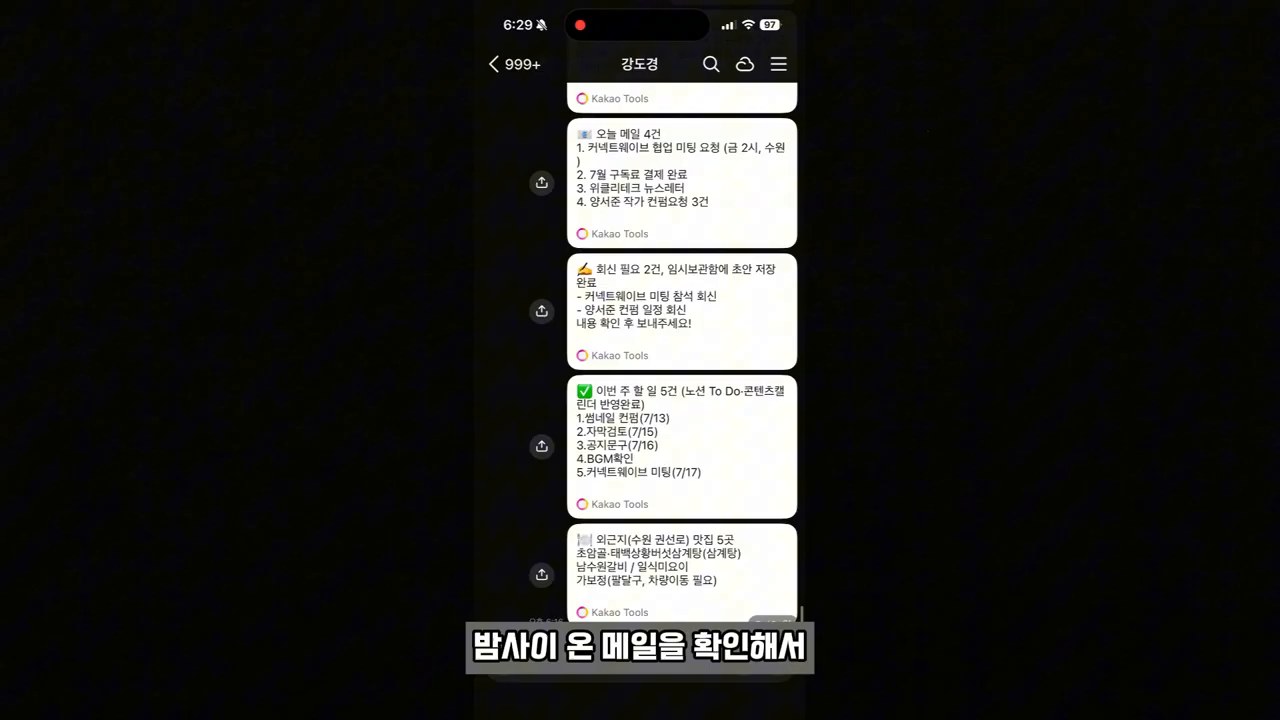
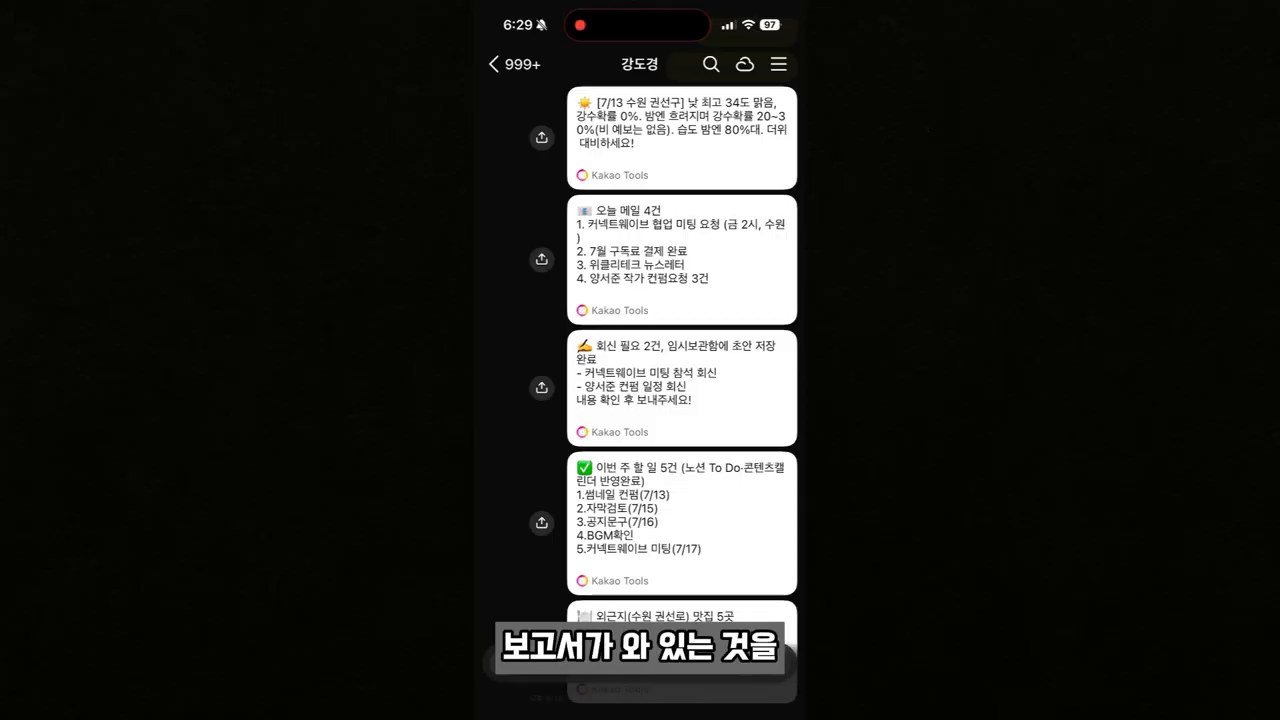
    Example of a Claude AI daily briefing delivered through KakaoTalk
    Example of an AI daily briefing delivered through KakaoTalk · Screenshot from the original video

    The key is not the prompt, but the flow of recurring work

    The most important part of the video is not “one great prompt.” It is the full workflow: reading email in Gmail, drafting replies, organizing tasks in Notion, then connecting weather and KakaoTalk briefings through PlayMCP.

    That difference matters. With one-off questions, a human has to explain the situation again every time. A work flow, on the other hand, can run at the same time each day, by the same standards, in the same output format once it has been designed. This is where the difference appears between people who use AI for work and people who build work systems with AI.

    Step 1: Connect Gmail in the Claude desktop app

    First, open the custom menu in the Claude desktop app and choose Connectors. In the video, after connecting the Gmail connector, the user asks Claude Cowork in collaboration mode: “Tell me about the four most recent emails.”

    Claude Gmail connector setup screen
    Claude Gmail connector setup screen · Screenshot from the original video

    Two useful capabilities become obvious right away.

    • It can summarize recent emails so you can quickly understand what needs attention today.
    • For messages that need replies, it can create draft responses so the user only has to review and send them.

    However, email contains a lot of sensitive information. At first, try connecting test emails or low-importance messages. It is also safer to create a separate work folder that Claude can access and keep important documents out of that folder.

    Step 2: Automatically organize tasks in Notion

    Checking email alone does not make an assistant. The assistant has to pull the work hidden inside those emails and move it into an actual task list. In the video, after connecting the Notion connector, the user asks: “Create this week’s work schedule as a to-do list page in my Notion.”

    Building a Notion work flow in the Claude collaboration screen
    Building a work flow in the Claude collaboration screen · Screenshot from the original video

    The advantage of this step is that the inbox and the task list stay connected. Usually, things get missed when we read email, make a separate note, and then move it again into Notion or a to-do app. If Claude reads and structures the email content, the human only has to decide priority and whether to act.

    You do not need to build a complicated dashboard from the beginning. Simple fields like the ones below are enough.

    • Task name
    • Related email or requester
    • Deadline
    • Priority
    • Status
    • Next action

    Step 3: Add KakaoTalk, weather, and map information with PlayMCP

    If Gmail and Notion organize work information, PlayMCP expands the connection to external tools. In the video, the user adds KakaoTalk’s chat with myself, KakaoMap, and weather tools to the PlayMCP toolbox, then connects them with Claude.

    Selecting weather and KakaoMap tools in PlayMCP
    Selecting weather and KakaoMap tools in PlayMCP · Screenshot from the original video

    With this connection, the briefing becomes much more practical for daily life. For example, you can ask: “Check today’s weather forecast, find five good restaurants near the off-site work location mentioned in Gmail, and send them to me on KakaoTalk.” It becomes not just a work summary, but actual decision-making material for starting the day.

    There is also something to be careful about here. Map, weather, and messenger tools are connected to permissions for external services. You must check which account is logged in, which permissions are granted to each tool, and where any automatic messages will be sent.

    Step 4: Run it every morning with a skill and a scheduled task

    The final exercise in the video is to create a daily briefing skill inside Claude and set it to run every day as a scheduled task. Once created, the skill remembers an order such as “check email → draft replies → update Notion → check weather and off-site information → report through KakaoTalk.”

    Daily briefing result automatically sent through KakaoTalk
    Daily briefing result automatically sent through KakaoTalk · Screenshot from the original video

    When a scheduled task is added, the user no longer has to type the prompt every time. While you are getting ready for work in the morning, AI can prepare the day’s materials first.

    At this point, skipping approval or enabling automatic execution is convenient, but it also increases risk. Start by testing with manual runs, check that no wrong emails are sent and no sensitive information is exposed, and only then raise the level of automation.

    Checklist before you follow along

    Before applying this workflow directly, organize the following four points first.

    1. Decide which work repeats every day. High-frequency tasks such as checking email, organizing schedules, drafting reports, and responding to customers are good candidates.
    2. Separate the accounts and data ranges that AI may access. Instead of opening your entire personal mailbox immediately, define a test scope first.
    3. Choose one channel where you will receive the output. Decide whether you will check it in KakaoTalk, Notion, or email so the flow stays simple.
    4. Run at least three manual tests before enabling automatic execution. Check summary quality, omissions, permissions, and message recipients.

    Who this method fits, and who should wait

    This method works well for people who have a lot of recurring work and move between several tools. If you check email every day, have meetings or off-site work, and already use a task management tool such as Notion, you can see the benefits quickly.

    On the other hand, if concepts such as Claude desktop, Notion, and MCP still feel unfamiliar, it is better not to connect everything at once. Start by connecting only Claude and Gmail and testing email summaries and reply drafts. Then add Notion, and finally add PlayMCP and scheduled tasks. That is the safer order.

    Recommended reading

    Frequently asked questions

    How is Claude Cowork different from regular chat?

    Regular chat is conversation-centered. Cowork, or collaboration mode, is closer to building a workflow that uses specific folders, files, connectors, and tools together. In the video as well, the user designates a work folder through the collaboration button in a new chat, then continues with email and file work.

    Is it safe to connect Gmail and Notion?

    The scope of permissions and your usage habits matter more than the tool itself. Do not automate every email and document from the beginning. Start with a test folder and low-risk work. For automatic sending features in particular, it is safer to keep a manual review step.

    Is PlayMCP required?

    To connect tools outside Claude’s basic connectors, such as KakaoTalk, KakaoMap, and weather, you may need an external tool-connection layer like PlayMCP. If you only want email summaries and Notion organization, you can start without PlayMCP.

    Can I turn on automatic execution every morning right away?

    It is not recommended. First, check the results with manual execution and confirm that sensitive information is not exposed and messages are not sent to the wrong chat room. After that, it is safer to add a scheduled task and automate it.

    Is this article a direct transcript of the original video?

    No. It is based on the practice flow of the original video, but it reduces the promotional latter section and reorganizes the setup order and cautions from the perspective of practical work automation.

    References

    Original Korean article: Claude Cowork one-person AI secretary workflow

    Image source: Captured images used in this article are stills from the original YouTube video. They are used for review, commentary, and educational explanation, and copyright remains with the original rights holders and the channel.

  • Anthropic Mythos Shock: What Korea Must Prepare as AI Becomes a Strategic Asset

    Anthropic Mythos Shock: What Korea Must Prepare as AI Becomes a Strategic Asset

    Anthropic’s “Mythos” issue is not just another story about a new AI model. The core message is colder than that. Frontier AI models are now cloud services and strategic assets at the same time.

    Like advanced semiconductor equipment or high-end GPUs, access to a model itself is becoming a matter of diplomacy and national security. Korea cannot treat this shift as someone else’s regulatory news.

    What Is at the Core of the Mythos Issue?

    A strategy room in Seoul reviewing AI model access rights and security risks
    The Mythos issue signals that AI competition is no longer only about performance. Access rights and control are becoming national strategy questions.

    Anthropic describes Claude Mythos 5 as a model with strong capabilities in cybersecurity and biology research. Through Project Glasswing, the company framed it as a tool for finding and defending critical software vulnerabilities.

    According to Anthropic’s own updates, early partners used Mythos Preview to find more than 10,000 high- or critical-severity vulnerabilities in important software. For defensive security teams, that is a compelling result.

    The problem is that the same capability can also be used offensively. A model that finds vulnerabilities quickly can strengthen defenders. If control fails, it can also strengthen attackers.

    That is why Mythos was limited to vetted partners from the start. When the U.S. government issued a directive suspending foreign national access to Fable 5 and Mythos 5, the story moved from technology news to national strategy.

    Why People Are Saying AI Is Becoming a Strategic Asset

    The U.S. directive showed that access to frontier AI models can be treated as a national security matter. In practical terms, a pattern once associated with semiconductor export controls is now moving toward the model layer itself.

    One important change sits underneath this shift. In the past, the bottleneck was mostly compute, chips, and manufacturing equipment. Going forward, model weights, API access, safeguard settings, and data retention rules may also become objects of control.

    For companies, this makes AI adoption more complicated. A model that was available yesterday may be restricted today. In high-risk fields such as public administration, finance, healthcare, defense, and research, that is not just an inconvenience. It is an operational risk.

    Three Risks Korea Should Watch

    A strategy meeting examining foreign model dependence, the dual-use nature of security AI, and the reality of sovereign AI
    Korea’s AI strategy has to consider foreign model dependence, the dual-use nature of security AI, and the practical limits of sovereign AI at the same time.

    1. Dependence on Foreign Models

    Korean companies and public institutions have adopted global AI models quickly. From a productivity standpoint, that choice is natural. But when core workflows become tightly coupled to a specific overseas model, access restrictions can become workflow disruptions.

    This matters most in areas connected to national functions: public administration, defense, cybersecurity, healthcare, energy, and finance. The point is not that every AI system must be domestic. The point is that systems that cannot stop need alternative routes.

    2. The Dual-Use Nature of Security AI

    A cyber defense operations room reviewing AI vulnerability findings and patch priorities
    Powerful security AI can improve defensive capacity, but without control it can also be redirected toward offensive capability.

    Mythos raises a hard question: if a powerful security AI is released more broadly, does the world become safer or more dangerous?

    Vulnerability-discovery AI can help defenders enormously. Yet if verification, disclosure, and patching cannot keep up, the result may be a faster-growing list of weaknesses. Anthropic has also noted that after AI accelerates discovery, the bottleneck shifts to verification, disclosure, and remediation.

    Korea should not build AI security capability by focusing only on detection models. Coordinated vulnerability disclosure, patch responsibility, supply-chain response, and incident exercises need to be designed together.

    3. The Practical Reality of Sovereign AI

    Sovereign AI should not remain a slogan. It is not simply a matter of building one Korean-language model. It requires public data governance, domestic computing infrastructure, high-risk AI evaluation, sector-specific standards, and procurement rules.

    Korea is already preparing parts of this foundation through the AI Basic Act, the National AI Committee, the AI Safety Institute, and the national AI computing center. The direction is right. The Mythos issue simply demands more speed and sharper prioritization.

    Korea’s Future Strategy: Build Controllable AI Systems, Not Just Models

    A controllable AI infrastructure design connecting computing, data, models, safety evaluation, and procurement
    The key is not merely owning a model. The key is building an AI operating system that can be stopped, switched, and evaluated when necessary.

    Korea’s response should not stop at “we need our own frontier model.” The more important question is this: in which domains should Korea secure control, at what level, and at what cost?

    First, Classify AI Dependence in Critical National Domains

    Public institutions and critical industries should classify the AI services they use by operational importance. A simple writing assistant and a cybersecurity, healthcare, or administrative decision-support system should not be governed by the same standard.

    Critical domains need at least three safeguards: replaceable models, inference paths inside Korea or a trusted jurisdiction, and manual fallback procedures for outages.

    Second, Make Korea’s AI Safety Evaluation More Operational

    AI safety evaluation should not end with paperwork. In high-impact areas such as cybersecurity, biology, financial fraud, disinformation, and privacy leakage, red-team testing and repeated evaluation are essential.

    For frontier models, there must be more than two choices: total prohibition or unlimited release. Restricted partner access, usage logging, high-risk query routing, independent evaluation, and incident reporting should work as one system.

    Third, Treat the National AI Computing Center as Strategic Infrastructure

    The Korean government is moving forward with a national AI computing center of up to 2 trillion won. This infrastructure should not be only a place to rent GPUs. It should become the foundation that connects Korean models, safety evaluation, and public-sector AI pilots.

    Accessibility matters. If only large companies can use the infrastructure, national resilience will not grow very much. Universities, startups, security research groups, and public institutions need realistic access.

    Fourth, Cooperate Internationally but Plan for Access Cutoff Scenarios

    Korea cannot build every AI capability alone. Cooperation with the United States, Europe, Japan, Singapore, and other partners remains necessary. But cooperation is not the same as dependence.

    Contracts should address data location, model access interruption, emergency patching, transition to alternative models, and audit rights. Public procurement should not only ask which model performs best. It should ask which system can keep operating in a crisis.

    What Companies and Individuals Should Check

    Companies should inventory the AI tools they already use. They need to know which workflows depend on which models, where data is stored, and how quickly the organization could switch if a service were restricted.

    Individuals can start with a simpler rule. Using AI well is important. But trusting the answer of one model without question is risky. In the AI era, it is more important to have your own language and judgment criteria before writing better prompts.

    Related Reading

    Conclusion: Korea Needs to Prepare for the Politics of AI Access

    The message from the Mythos issue is clear. Future AI competition will not be only about performance. It will also be about who can access models, who can adjust safeguards, and who can keep services running when access conditions change.

    Korea should continue using global models, but critical domains need controllable alternatives. Sovereign AI is not isolation. It is insurance. That insurance works only when models, data, computing, safety evaluation, and procurement systems move together.

    Original Korean article

    FAQ

    Can ordinary users access Anthropic Mythos?

    No. Anthropic describes Mythos 5 as a restricted-access model with strong capabilities in cybersecurity and biology research. The company also introduced Fable 5 as a safer model for general knowledge work, but access to that model was also suspended after the U.S. government directive.

    Does the Mythos issue immediately affect Korean companies?

    Not every company will be affected immediately. Still, it is a warning for organizations that rely heavily on overseas frontier models for critical workflows. They should review access rights, data location, alternative models, and outage response plans.

    Does sovereign AI mean Korea should stop using overseas AI?

    No. The core of sovereign AI is control and optionality in areas where they matter. Korea can keep using global AI services while building domestic operating capacity and alternatives for public, security, and industrially critical domains.

    What is the Korean government already preparing?

    Korea is preparing several foundations, including the AI Basic Act, the National AI Committee, the AI Safety Institute, and the national AI computing center. The computing center is expected to become a key infrastructure layer for domestic AI research and industrial use.

    What should individuals prepare?

    Individuals should avoid depending on a single model for important judgments. Important claims should be checked against multiple sources, and users should practice explaining AI-generated answers in their own words before accepting them.

    References

  • AI Agent Automation: What Matters More Than the One-Click Illusion

    AI Agent Automation: What Matters More Than the One-Click Illusion

    AI automation stories are getting inflated far too easily these days. Lines like “run a company with 50 AI agents,” “work only one hour a day,” and “leave a comment and I’ll send you the automation recipe. Makes money” keep appearing in our feeds.

    EO Korea’s interview with Gumloop founder Max Brodeur-Urbas puts a firm brake on that trend. The person in the video is the founder of an AI automation platform company that has raised major funding. Yet the point he repeats is surprisingly sober. AI is not a shortcut that lets you skip understanding. It is a tool that helps you execute faster on work you already understand.

    Gumloop founder Max Brodeur-Urbas criticizing exaggerated claims about AI automation in an interview
    Screenshot from EO Korea. Rather than simply summarizing the video, this article analyzes the real conditions for AI agent automation by reading the Gumloop case alongside external sources.

    The Problem With AI Agent Automation Is Not the “Number of Agents”

    Early in the video, Max treats claims such as “AI agents run the whole company” almost as marketing. The target of his criticism is not AI itself. The problem is the way automation is sold as if it can eliminate the need for understanding and trial and error.

    Gumloop’s official website aligns with this view. It puts forward the message that understanding the work should be the only prerequisite for automation. In other words, the point is to make automation possible for people who are not developers. But that person still needs to understand, at least at a basic level, the work they are trying to automate.

    This distinction matters. AI agent automation is not exactly a “do-anything assistant” that takes over whatever you want. It is closer to execution infrastructure that connects multiple tools, data sources, approval steps, and repetitive tasks into one flow.

    The New Automation Market Revealed by the Gumloop Case

    Y Combinator’s company page describes Gumloop as a platform. Uses AI to automate repetitive, complex workflows end to end. Users create automations by connecting modules through drag and drop. The goal is to let teams test and operate workflows faster than they could by writing code.

    Reports from EO, TechCrunch, and BetaKit point in a similar direction. In March 2026, Gumloop raised a $50 million Series B led by Benchmark. Its total funding was described as roughly $70 million. More important than the number itself is the market direction investors are seeing. A market where employees inside companies build AI agents themselves and package repetitive work into an operational form.

    Max Brodeur-Urbas explaining Gumloop's founding background and product direction in an interview

    What makes Gumloop interesting is that it does not only talk about competition over model performance. Its official site highlights concrete work agents such as data analysis, support ticket classification, CRM management, meeting preparation, and call analysis. Instead of abstract AGI, the repetitive work of actual departments comes first.

    Four Reasons One-Click Automation Fails

    AI agent automation usually does not fail for one simple reason such as insufficient technology. When we combine the video with external materials, four conditions become visible.

    1. If You Do Not Understand the Work, You Have No Standard for Automation

    Even if AI produces an output, someone still needs to judge whether that output is correct. Sales lead classification, customer inquiry triage, report writing. Meeting preparation all have different standards from one organization to another. Without business context, automation becomes fast error, not fast execution.

    2. Without Data Connections, Agents Are Empty-Handed

    Enterprise automation does not end with a single chatbot. CRM systems, documents, email, databases, ticket systems, and calendars need to be connected. This is why platforms like Gumloop emphasize connections and execution flows more than the model alone.

    3. Repeated Execution Requires Control and Observability

    A prompt that succeeds once is different from a work automation that runs every day. Repetitive work requires failure alerts, approval steps, logs, and permission management. As the number of AI agents grows, organizations need to be able to see who did what.

    4. Automation Does Not Replace Learning

    Max distinguishes between using AI as a learning tool and using it to skip understanding. AI can explain and assist. But if the user has no idea why a result came out the way it did, automation becomes an expansion of dependency, not an expansion of capability.

    What Non-Developer Automation Really Means

    The non-developer automation Gumloop talks about does not mean “anyone can build anything in any way.” More precisely, it means the person responsible for the work does not need to translate every requirement and hand it off to an engineer.

    Marketers understand campaign lead flows. Salespeople know the annoying parts of CRM updates. HR teams know the recurring candidate communications. Operations teams know where exception handling breaks down. If these people can become the designers of automation, the speed of AI adoption inside a company can clearly increase.

    But there are conditions here as well. The organization needs to decide how much automation authority it will grant. It must define which data can be accessed. Actions require approval before execution, and who is responsible when something fails. Adopting AI agents is not simply buying a tool. It is a redesign of the operating model.

    A Checklist Before Starting AI Workflow Automation

    If you or your organization want to adopt AI agent automation, it is better to start by asking these questions:

    1. Does the repetitive work actually exist?
    2. Can the person responsible explain the success criteria for that work in words?
    3. Can the required data and tools be connected?
    4. Is there a mechanism to stop or review the process when it fails?
    5. Is there a feedback loop for improving automation results?

    Without these five conditions, increasing the number of agents does not mean much. If those conditions are present, however, even one small automation can change how an organization works.

    Max Brodeur-Urbas explaining the importance of execution and people near the end of the interview

    Further Reading From Thinknote on AI Agents

    This perspective also connects with Thinknote’s existing articles on AI agents.

    Conclusion: AI Agents Are More About Operations Than Replacement

    The message from the Gumloop founder interview is simple. The promise that AI will take care of everything for us is attractive, but dangerous. Real value appears when we use AI to execute work we already understand more quickly and reliably.

    That is why the key question for AI agent automation is not “How many agents are you using?” A better question is this:

    Do I understand the work I want to automate well enough? And does that automation have enough verification, permission, and feedback structure to run safely every day?

    When you can answer those questions, AI agents stop being a buzzword and become infrastructure for a new way of working.

    FAQ

    What is AI agent automation?

    AI agent automation is a way of using AI models to connect repetitive work, data processing, cross-tool tasks, notifications, reporting, classification. Similar activities into one execution flow. Compared with a simple chatbot, what matters is its ability to connect with work systems and actually execute tasks.

    What kind of company is Gumloop?

    Gumloop is a platform that lets non-developers create AI-based work automations by connecting modules. Its Y Combinator company page and official site describe the company as focused on using AI to automate repetitive, complex workflows.

    If we have AI agents, do we no longer need to understand the work?

    No. As Max Brodeur-Urbas emphasizes in the video, AI is closer to a tool. Helps people execute work they already understand faster, rather than a replacement for understanding. Humans still need the standards for evaluating and improving the result.

    What should companies look at first when adopting AI automation?

    They should first look at whether repetitive work exists, whether success criteria are clear, whether the data can be connected, whether permissions can be managed. Whether there is a review structure for failures. Tool selection comes after that.

    What is the difference between an AI automation platform and a regular chatbot?

    A regular chatbot focuses on conversation and answers. An AI automation platform focuses on operating workflows. Include data sources, work tools, repeated execution, approval steps, and result records.

    References

    Image source: Captured images used in this article are stills from the original YouTube video. They are used for review, commentary, and educational explanation, and copyright remains with the original rights holders and the channel.

  • AI Agent Evolution: What OpenClaw Shows About the Next Step Beyond Chatbots

    AI Agent Evolution: What OpenClaw Shows About the Next Step Beyond Chatbots

    The Korean article uses OpenClaw as a lens for understanding why AI agents are moving beyond chat. The point is not that one project has solved everything. The point is that AI is becoming a system that can observe, decide, and execute work across tools. That shift makes execution quality, permission design, and safety controls as important as answer quality.

    실행형 AI 에이전트와 OpenClaw 워크플로우를 표현한 기술 이미지
    AI 에이전트가 여러 도구와 작업 흐름을 연결해 실행하는 모습을 표현한 이미지

    Original Korean article: AI agent 변화: OpenClaw가 보여주는 실행형 AI의 다음 단계

    Why AI Agent Evolution Matters Now

    Chatbots trained people to ask questions and receive polished text. Agentic AI changes the question: can the system carry out a task responsibly in the user’s work environment? The source argues that answer quality alone is no longer enough.

    As AI moves into browsers, computers, documents, and workflow tools, the value shifts from conversation to completion. The agent must understand context, select tools, perform steps, check results, and know when to stop or ask for permission.

    OpenClaw as an Observation Lens

    OpenClaw is presented not as the final answer but as a useful observation lens. It shows a direction in which agents are designed around execution environments rather than only model prompts.

    This matters because future AI competition may be decided less by which model writes a better paragraph and more by which operating structure connects models, tools, memory, permissions, gateways, logs, and human review.

    AI Comes Out of the Chat Window

    The first change is that AI leaves the isolated chat window. In practical work, AI is closer to a channel that moves between apps than a separate application. Users want it to read, compare, fill, generate, summarize, and deliver inside existing workflows.

    When AI becomes part of the work channel, interface design changes. A useful agent needs access to browsers, files, APIs, calendars, forms, and internal systems. But every added connection also raises questions about authentication, scope, and auditability.

    From Answering AI to Execution AI

    Execution agents must use browsers and computers, not only language. They may search a page, click a button, fill a form, download a file, or run a workflow. This creates real productivity potential but also real operational risk.

    The source’s central distinction is simple: a chatbot gives a response; an execution agent changes a state. Once AI can change a state, error recovery, rollback, logging, and human approval become essential design features.

    Operating System and Gateway Thinking

    The article emphasizes that the first thing to examine is not only the model. It is the operating structure around the model. A gateway perspective is useful because agents need a route between user requests, tools, external services, and final deliverables.

    This is why agent infrastructure includes queues, tool registries, credentials, sandboxing, notifications, and result delivery. A powerful model without an operating framework becomes difficult to trust in real work.

    Chatbot AI and Execution Agent Compared

    A chatbot is optimized for dialogue, explanation, drafting, and Q&A. An execution agent is optimized for task decomposition, tool use, progress tracking, and completion. The former can be wrong in text; the latter can be wrong in action.

    That difference changes evaluation. We must measure whether the agent completed the requested task, preserved constraints, avoided unauthorized access, produced verifiable outputs, and left a trace that humans can inspect.

    Personal Assistant and Work Automation Boundaries Blur

    The more capable agents become, the more personal assistance and enterprise automation overlap. A personal AI can schedule, summarize, prepare files, and monitor tasks. A work agent can handle reports, forms, customer replies, and operations.

    The boundary blurs because both need context and permissions. If permission boundaries are vague, risk grows. The source warns that convenience cannot be separated from control.

    Why Open Source Agent Ecosystems Are Growing

    Open source matters because agent systems need adaptation. Companies and individuals want to inspect, modify, and connect agents to their own tools. Open ecosystems can accelerate experimentation and reduce dependence on a single vendor.

    But the source also stresses that open source does not automatically mean safe. Public code may reveal design choices, but real safety still depends on deployment practices, isolation, permission design, monitoring, and governance.

    Checklist and Security for Agent Adoption

    Before adopting an OpenClaw-style agent, users should ask what task it will execute, which tools it can touch, what data it can read, who approves sensitive actions, how logs are stored, and how failures are handled.

    Minimum privilege and isolation are the starting point. Agents should receive only the permissions needed for a task, run in controlled environments when possible, and provide review points before irreversible actions. Responsible execution is the essence of the AI agent shift.

    Practical Implications for Readers

    For readers using this article as a working reference, the practical lesson is to move from abstract interest to a concrete audit. Identify where the topic touches your own work, which assumptions are already outdated, what data or tools are missing, and which decision could be tested on a small scale before a larger commitment. Write that test down, assign an owner, and review evidence rather than impressions.

    The Korean source repeatedly treats technology, strategy, and human judgment together. That is why the safest next step is not blind adoption or passive worry. It is disciplined experimentation: define the problem, compare alternatives, verify results, protect sensitive information, and keep the human purpose visible while the tool or trend evolves.

    Related Reading

    Continue with these related Thinknote English articles in the Digital Transformation cluster.

    FAQ

    What is this article about?

    This article explains a digital transformation, platform, market-structure, or technology-adoption topic with Korea-specific context and global implications.

    How should I use this guide?

    Use it to understand market signals and strategic patterns. Combine it with current market data before making business or investment decisions.

    Where can I read the original Korean article?

    The original Korean article is available here: AI Agent Evolution: What OpenClaw Shows About the Next Step Beyond Chatbots.

  • AI Era Skills: What Demis Hassabis Teaches About Learning, STEM, and Agents

    AI Era Skills: What Demis Hassabis Teaches About Learning, STEM, and Agents

    The Korean source uses Demis Hassabis’s interviews and the history of AlphaGo and AlphaFold to think about learning in the AI era. Its main lesson is that students and workers should not stop learning fundamentals. AI makes math, science, experimentation, and problem definition more important because people must know how to use powerful agents wisely.

    AI era skills from Demis Hassabis
    AI era skills from Demis Hassabis.

    Original Korean article: AI 시대 필수 역량, 데미스 하사비스 인터뷰로 정리한 공부의 방향

    AlphaGo Meant More Than a Go Victory

    AlphaGo and AI learning lessons
    AlphaGo and AI learning lessons.

    AlphaGo was not important only because it beat a human Go champion. It showed that AI could discover strategies that surprised experts and changed how people thought about intelligence.

    The source treats AlphaGo as a symbolic moment: machines could now explore complex decision spaces in ways that humans had not fully anticipated.

    Games Were Training Grounds, Not Toys

    AlphaFold and science with AI
    AlphaFold and science with AI.

    Hassabis’s background in games matters because games provide rules, feedback, goals, and environments for learning. They are useful laboratories for AI research.

    This teaches a broader learning principle. Good practice environments give clear feedback and allow repeated experimentation, whether the subject is coding, science, design, or business.

    AlphaFold Showed AI as a Scientific Tool

    STEM foundations in the AI era
    STEM foundations in the AI era.

    AlphaFold demonstrated that AI could contribute to science by predicting protein structures and accelerating biological research. This moved AI from game achievement to scientific infrastructure.

    The implication is that AI-era learning should connect computation with real domains. The most powerful applications may appear when AI meets biology, physics, chemistry, medicine, and engineering.

    Math and Science Still Matter

    AI agents and CEO-like thinking
    AI agents and CEO-like thinking.

    The source rejects the idea that AI makes fundamentals unnecessary. If anything, math and science become more important because they help people understand problems, evaluate outputs, and work with advanced tools.

    People who rely only on AI answers without conceptual grounding may become faster but not wiser. Fundamentals protect judgment.

    Children Should Use AI, Not Only Study About It

    Students should not learn AI only as abstract theory. They should experiment with tools, ask questions, build small projects, and observe where AI helps or fails.

    Hands-on use creates intuition. It teaches prompting, verification, iteration, and the limits of automation.

    Think Like a CEO in the Agent Era

    The source says a future skill is the ability to think like a CEO. This does not mean everyone becomes an executive. It means people must define goals, delegate tasks to agents, evaluate results, allocate resources, and take responsibility.

    As AI agents handle more execution, human value moves toward orchestration: deciding what should be done, in what order, by which tool, and with what standard.

    Essential Skills Checklist

    Key skills include math and science foundations, coding or computational thinking, AI literacy, problem definition, experimentation, communication, ethics, and the ability to learn continuously.

    For workers, the first step is to use AI on a real task, verify the result, and then ask what part of the workflow can be redesigned.

    Conclusion: Study Moves Toward Problem Definition

    The conclusion is that AI-era study is not memorization versus AI. It is learning how to define problems that are worth solving and how to use AI as a partner in solving them.

    Hassabis’s examples show that deep fundamentals and bold tool use belong together. The future favors people who can connect both.

    Practical Implications for Readers

    For readers using this article as a working reference, the practical lesson is to move from abstract interest to a concrete audit. Identify where the topic touches your own work, which assumptions are already outdated, what data or tools are missing, and which decision could be tested on a small scale before a larger commitment. Write that test down, assign an owner, and review evidence rather than impressions.

    The Korean source repeatedly treats technology, strategy, and human judgment together. That is why the safest next step is not blind adoption or passive worry. It is disciplined experimentation: define the problem, compare alternatives, verify results, protect sensitive information, and keep the human purpose visible while the tool or trend evolves.

    Related Reading

    Continue with these related Thinknote English articles in the Digital Transformation cluster.

    FAQ

    What is this article about?

    This article explains a digital transformation, platform, market-structure, or technology-adoption topic with Korea-specific context and global implications.

    How should I use this guide?

    Use it to understand market signals and strategic patterns. Combine it with current market data before making business or investment decisions.

    Where can I read the original Korean article?

    The original Korean article is available here: AI Era Skills: What Demis Hassabis Teaches About Learning, STEM, and Agents.

  • Claude Skills for Small Business: From Chatbot to Workflow Automation

    Claude Skills for Small Business: From Chatbot to Workflow Automation

    This fuller English adaptation follows the Korean source on Claude Skills for small businesses. The key claim is that a Skill is not just a smarter chatbot prompt. It can package repeatable work, connect data, and help small teams automate routines that normally consume the owner’s morning and attention.

    Claude Skills for small business
    Claude Skills for small business.

    Original Korean article: Claude 소상공인 Skill, 챗봇을 넘어 업무 자동화 도구가 되다

    Why Claude Skills for Small Business Matter

    Small businesses often do not have dedicated operations teams. The owner or manager checks sales, messages, invoices, appointments, hiring, inventory, and customer issues personally. A general chatbot can answer questions, but it does not automatically know the business context or the repeated format of work.

    A Claude Skill can bundle instructions, templates, files, and workflow logic so that the AI performs a specific job more consistently. That is why the source article describes the shift from chatbot to workflow automation.

    Business Pulse: Turning the Day Into One Briefing

    Reducing the morning check burden

    Business Pulse represents a daily briefing workflow. Instead of opening multiple apps to check orders, calendar items, reviews, messages, and urgent tasks, the owner receives a summarized snapshot. The value is not only speed; it is attention management. A clear briefing helps the owner decide what must be handled first.

    For a small shop, salon, restaurant, agency, or local service business, this can reduce the feeling of being scattered across tools. The Skill becomes a morning operations packet that organizes signals into actions.

    Invoice Chase: Where Receivables Management Becomes Automated

    Data connection matters more than automatic email

    Invoice Chase shows why connected data matters. Sending a reminder email is easy; knowing which invoice is overdue, who has already replied, what tone is appropriate, and whether the customer is important requires context. A Skill can combine invoice data, customer history, and approved message templates.

    The Korean source highlights that automation should not mean careless pressure. Human review may remain important for sensitive customers, disputes, or large balances. But routine follow-ups can be standardized so that cash flow does not depend on memory.

    Job Post Builder: Hiring Work Becomes a Packet

    small business daily briefing automation
    small business daily briefing automation.

    Improving consistency in hiring documents

    Small businesses hire part-time staff, service workers, assistants, or specialists without a formal HR department. Job Post Builder can turn a role description into a consistent posting with responsibilities, requirements, schedule, compensation details, and evaluation criteria.

    This helps avoid vague hiring posts. It also lets the business reuse successful templates. Over time, the hiring process becomes a packet: job definition, posting, screening questions, interview guide, and follow-up message.

    App Connectors and MCP Create Executable AI

    The article connects Claude Skills with app connectors and MCP because execution requires access to real systems. A Skill becomes more useful when it can read approved documents, calendars, invoices, or CRM data. MCP-style connections can make that access more structured and permissioned.

    The practical lesson is that workflow automation needs both intelligence and connection. Without data, the AI guesses. With uncontrolled data, the AI becomes risky. The correct middle is permissioned access to the minimum information needed for the task.

    Security and Permissions Before Adoption

    invoice and email workflow automation
    invoice and email workflow automation.

    Tasks where human review must remain

    Small businesses should not automate everything blindly. Payments, legal messages, hiring decisions, customer refunds, medical or financial advice, and public posts should keep human review. Credentials should never be pasted into chats. Access should be limited, logged, and revoked when no longer needed.

    Practical Benefits for Small Business Owners

    The benefits are concrete: fewer repetitive checks, faster document creation, more consistent customer communication, better receivables follow-up, and less dependence on the owner’s memory. The deeper benefit is that small businesses can operate with a level of process discipline that previously required larger teams.

    A useful way to start is to choose one daily pain point rather than automate the whole business at once. If the owner spends thirty minutes every morning checking messages and unpaid invoices, that is a good first workflow. If hiring posts are inconsistent, Job Post Builder is a better starting point. Small wins build trust and reveal where data connections are still weak.

    Related Reading

    Continue with these related Thinknote English articles in the Digital Transformation cluster.

    FAQ

    What is this article about?

    This article explains a digital transformation, platform, market-structure, or technology-adoption topic with Korea-specific context and global implications.

    How should I use this guide?

    Use it to understand market signals and strategic patterns. Combine it with current market data before making business or investment decisions.

    Where can I read the original Korean article?

    The original Korean article is available here: Claude Skills for Small Business: From Chatbot to Workflow Automation.

  • How to Create AI Skills: Turning Prompts Into Reusable Work Automation

    How to Create AI Skills: Turning Prompts Into Reusable Work Automation

    This English version is a fuller translation and adaptation of the original Korean article, “AI 스킬 만들기, 파일 3개로 시작하는 Claude·GPT 업무 자동화,” for global readers. The article discusses the importance of creating AI skills, which involves turning prompts into reusable work automation. It highlights the difference between project instructions and skills, and how skills can be used to automate repetitive tasks. The article also provides a step-by-step guide on how to create AI skills using Claude and GPT/Codex, and offers tips on how to review and refine the skills.

    how to create AI skills
    how to create AI skills.

    Original Korean article: AI 스킬 만들기, 파일 3개로 시작하는 Claude·GPT 업무 자동화

    Turning Prompts into Reusable Work Automation

    The process of creating AI skills involves turning prompts into reusable work automation. This means that instead of writing a new prompt every time, you can create a skill that can be reused multiple times. The article uses the analogy of a recipe and a meal kit to explain the difference between project instructions and skills. Just as a recipe provides a set of instructions for cooking a meal, a skill provides a set of instructions for completing a task.

    Difference between Project Instructions and Skills

    Project instructions are specific to a particular project and provide a set of rules for completing a task. Skills, on the other hand, are more general and can be applied to multiple projects. Skills can include not only the instructions for completing a task but also the necessary materials, tools, and standards. This means that skills can be used to automate repetitive tasks and improve efficiency.

    AI skill package structure
    AI skill package structure.

    Why AI Skills are Important Now

    AI skills are important now because they can be used to automate repetitive tasks and improve efficiency. The article highlights the difference between early AI systems, which were limited to answering simple questions, and modern AI systems, which can perform complex tasks and make decisions. The article also discusses the role of prompt engineering in creating AI skills, and how it has changed over time.

    Role of Prompt Engineering

    Prompt engineering involves designing and optimizing prompts to get the best results from an AI system. The article highlights the importance of structuring prompts to get the best results, and how this can be used to create AI skills. The article also provides examples of how prompt engineering can be used to create AI skills, such as creating a skill for generating reports or creating a skill for automating data entry.

    SKILL.md as an execution guide
    SKILL.md as an execution guide.

    Basic Structure of AI Skills

    The basic structure of AI skills involves creating a set of instructions and materials that can be used to complete a task. The article highlights the importance of creating a clear and concise set of instructions, and how this can be used to create AI skills. The article also discusses the role of references and scripts in creating AI skills, and how these can be used to improve efficiency and accuracy.

    SKILL.md: The Execution Manual

    SKILL.md is the execution manual for an AI skill. It provides a set of instructions for completing a task, and can include information such as the materials and tools needed, the steps to follow, and the standards to meet. The article highlights the importance of creating a clear and concise SKILL.md, and how this can be used to create AI skills.

    references and scripts for AI automation
    references and scripts for AI automation.

    References: The Knowledge Base

    References are the knowledge base for an AI skill. They provide additional information and materials that can be used to complete a task, such as documents, templates, and scripts. The article highlights the importance of creating a clear and concise set of references, and how these can be used to improve efficiency and accuracy.

    Scripts: The Automation Tool

    Scripts are the automation tool for an AI skill. They provide a set of instructions that can be used to automate repetitive tasks, such as data entry or report generation. The article highlights the importance of creating clear and concise scripts, and how these can be used to improve efficiency and accuracy.

    Claude and GPT workflow automation
    Claude and GPT workflow automation.

    Creating AI Skills: A Step-by-Step Guide

    Creating AI skills involves a step-by-step process that includes defining the task, creating the SKILL.md, references, and scripts, and testing and refining the skill. The article provides a detailed guide on how to create AI skills using Claude and GPT/Codex, and offers tips on how to review and refine the skills.

    Conclusion: AI Skills are the Assets of the AI Era

    AI skills are the assets of the AI era. They can be used to automate repetitive tasks, improve efficiency, and enhance productivity. The article highlights the importance of creating AI skills, and how these can be used to improve business outcomes. The article also provides a checklist for creating AI skills, and offers tips on how to get started.

    Related Reading

    Continue with these related Thinknote English articles in the Digital Transformation cluster.

    FAQ

    What is this article about?

    This article explains a digital transformation, platform, market-structure, or technology-adoption topic with Korea-specific context and global implications.

    How should I use this guide?

    Use it to understand market signals and strategic patterns. Combine it with current market data before making business or investment decisions.

    Where can I read the original Korean article?

    The original Korean article is available here: How to Create AI Skills: Turning Prompts Into Reusable Work Automation.